
Keyword Research for a Website: A Complete Beginner’s Guide
Learn how to find the right keywords, understand what your audience is searching for, analyze competition, and choose search terms that help you create more relevant content and improve your website’s organic visibility.
- Updated: November 2026
- 15-20 min read
Helping beginners build websites since 2017
400K+
Readers Helped
Updated for 2026
Latest Method
100%
Beginner Friendly
Disclosure: ElegantEspace is supported by readers like you. We may earn an affiliate commission when you purchase through our links. Commissions do not affect our editors’ opinions or evaluations.
Table of Content
- What Is Keyword Research?
- Important for SEO and AI Search?
- Different Types of Keywords?
- How Has Keyword Research Changed?
- How to Do Keyword Research Step by Step
- What Is a Niche Topic?
- Find Keywords Using Google Search
- Find Keywords Using AnswerThePublic
- YouTube Keyword Suggestions
- Use Moz Keyword Explorer
- Use Ubersuggest to Find Keyword
- Use Google Trends to Explore Keyword
- Use AI Tools to Discover Keyword Ideas
- Select the Best Keywords From Your Research
- Next Lesson
What Is Keyword Research?
Keyword research is the process of finding and analyzing the search terms people use to discover information, products, or services online.
It helps you understand what your audience wants and choose relevant topics for your website.
For example, someone looking for a website designer might search for “WordPress website design services,” while someone learning about website creation might search for “how to create a WordPress website.”
Although both searches relate to WordPress, they reflect different needs.
Keyword research helps you understand these differences so you can create content that matches what people are looking for.
In simple terms: Keyword research helps you discover what your audience searches for, why they search for it, and which topics are worth covering on your website.
Why Is keyword Research Important For SEO and AI search?
Keyword research helps you understand what your audience is searching for, create relevant content, and identify opportunities to improve your website’s visibility in traditional search results and AI-powered search experiences.
Here are four key benefits of keyword research:
1. Understand Your Audience
Discover the questions, problems, and topics your audience cares about so you can create content that meets their needs.
2. Match Search Intent
Understand why people search for particular terms and create pages that provide the information, products, or services they expect.
3. Find Valuable Content Opportunities
Identify relevant topics, specific search queries, and unanswered questions that can help you plan useful content for your website.
4. Improve Search Visibility
Organize your content around relevant topics and clear answers, helping search engines understand your pages and giving AI-powered systems useful information to interpret and potentially reference.
What Are The Different Types Of Keywords?
Keywords can be categorized by their specificity and the intent behind a search.
Understanding these categories helps you identify relevant topics and choose the right type of content for your audience.
1. Short-Tail Keywords
Broad search terms that cover general topics and may have multiple meanings.
Examples: SEO, website design, keyword research.
2. Long-Tail Keywords
More specific search queries that often reveal a clearer need or question.
Examples: Keyword research for a WordPress website, how to find low-competition keywords.
3. Informational Keywords
Searches are made when people want to learn something, understand a topic, or find an answer.
Examples: What is keyword research? How does SEO work?
4. Commercial Keywords
Searches made when people are researching or comparing products, services, or solutions before making a decision.
Examples: Best keyword research tools, Ubersuggest vs Semrush.
5. Transactional Keywords
Searches that indicate an intention to take action, such as purchasing a product or hiring a service.
Examples: Hire an SEO consultant, buy SEO software.
6. Navigational Keywords
Searches are used to find a specific website, brand, or online destination.
Examples: Google Search Console login, Semrush keyword tool.
Important:
These categories can overlap. A long-tail keyword can also be informational, commercial, or transactional. Focus on understanding the searcher's intent rather than forcing every keyword into just one category.
How Has Keyword Research Changed?
Keyword research has evolved from focusing mainly on individual keywords and search volume to understanding search intent, topic relevance, and the questions people want answered.
Here are four important changes:
1. From Exact Keywords to Search Intent
Instead of focusing only on exact-match phrases, modern keyword research considers the meaning behind a query and what the searcher wants to accomplish.
2. From Individual Keywords to Related Topics
Grouping related queries into topic clusters helps you plan comprehensive content and avoid creating separate pages for every minor keyword variation.
3. From Search Volume to Business Value
High search volume doesn’t always mean a keyword is valuable. Relevance, competition, conversion potential, and your audience’s needs also matter.
4. From Traditional Search to AI-Powered Search
AI Overviews, conversational search, and AI assistants have expanded how people discover information.
Keyword research can now include natural-language questions and topics that may appear in AI-generated answers, alongside traditional search queries.
What this means for you
Focus on understanding your audience, creating helpful content, and choosing relevant topics rather than chasing search volume or repeating exact keywords.
How To Do Keyword Research Step By Step
Effective keyword research starts with understanding your audience and ends with selecting relevant search terms for your website.
Follow these steps to discover keyword opportunities and turn them into a practical content plan.
Identify Your Audience and Topics
Start by identifying your target audience, the problems they face, and the products, services, or information your website offers.
For example, if you provide WordPress website design services, your starting topics might include:
- WordPress website design
- Website maintenance
- WordPress SEO
- Website speed optimization
These broad topics will help you discover more specific keywords in the next steps.
How To Find The Right Keyword For A Website?
Finding a keyword is simple, but determining which one will work for you is more challenging.
If you become a master at finding and implementing the most suitable keyword for your website, you will not only get relevant traffic, but you can also beat your competitors.
However, in general, for most people, the keyword research process goes as:
- Think about a few keywords that potential visitors might search for
- Pick and feed a few of them in keyword research tools like Google Keyword Planner.
- Select top-ranked keywords having the highest search volume
- Start writing content around them
Right?
Well, here they trapped themselves; this is the biggest mistake one can make while finding the keyword for a website.
Because a basic search on Google Keyword Planner only shows you keywords that are very closely related to the word you gave it.
For example:
When you enter ‘Flowers’ in GKP, it will show these results…

…and web owners will start writing posts around those populated keywords.
If you are one of them, then I am afraid to say that, nowadays, Keyword selection doesn’t work like this.
But don’t worry!
You have an in-depth comprehensive guide on keyword research; it will exactly show you how to find the best keywords to bring potential visitors to your website.
So let’s get started…
My first keyword research advice would be: Know your niche!
What Is A Niche Topic?
A niche topic is a specific subject within a broader field or industry. It focuses on a particular audience, interest, problem, or need.
For example, within the broader field of fitness, niche topics could include:
- High-intensity interval training (HIIT)
- Plant-based diets for athletes
- Yoga for pregnant women
Each topic serves a more specific audience with distinct interests and needs.
Niche topics help bloggers, businesses, and content creators develop relevant content, products, and services for their target audience.
When choosing a niche, consider audience demand, competition, and your knowledge of the subject.
In simple terms, a niche is a focused segment of a larger market.
Keyword research helps you explore the subtopics and questions people search for within your niche.
Let’s say you have a blog about biking. You might initially consider broad keywords such as “biking” or “best bike.”
However, these terms can be highly competitive and may not clearly indicate what a searcher wants to know.
So, how can you find more specific keyword opportunities?
One approach is to explore long-tail keywords. These are more specific search phrases that often reveal a clearer idea of what someone is looking for.
For a biking website, examples might include:
- Will biking help me lose weight?
- Why is biking better than driving?
- What type of exercise is biking?
- Best GPS watch with a heart rate monitor for cycling
These phrases target different questions and needs within the same broader niche.
Long-tail keywords often have the following characteristics:
- More specific search intent: They can help you understand what the searcher wants to learn, compare, or buy.
- Potentially lower competition: Some long-tail keywords are easier to compete for than broader terms, although this depends on the topic and search results.
- Often lower search volume: Fewer people may search for an individual long-tail phrase, but it can attract visitors whose needs closely match your content.
Wait, there’s more. Let’s look at another example to understand why choosing the right keyword matters.
Suppose you have started an online business selling different varieties of apples (the fruit).
You decide to target keywords such as “Apple” or “online apple store” to rank your website on the first page of search results.
But ask yourself:
- Can your website realistically compete for these keywords?
- Will these keywords attract visitors who actually want to buy fresh apples?
Take a look at the example below and decide for yourself.
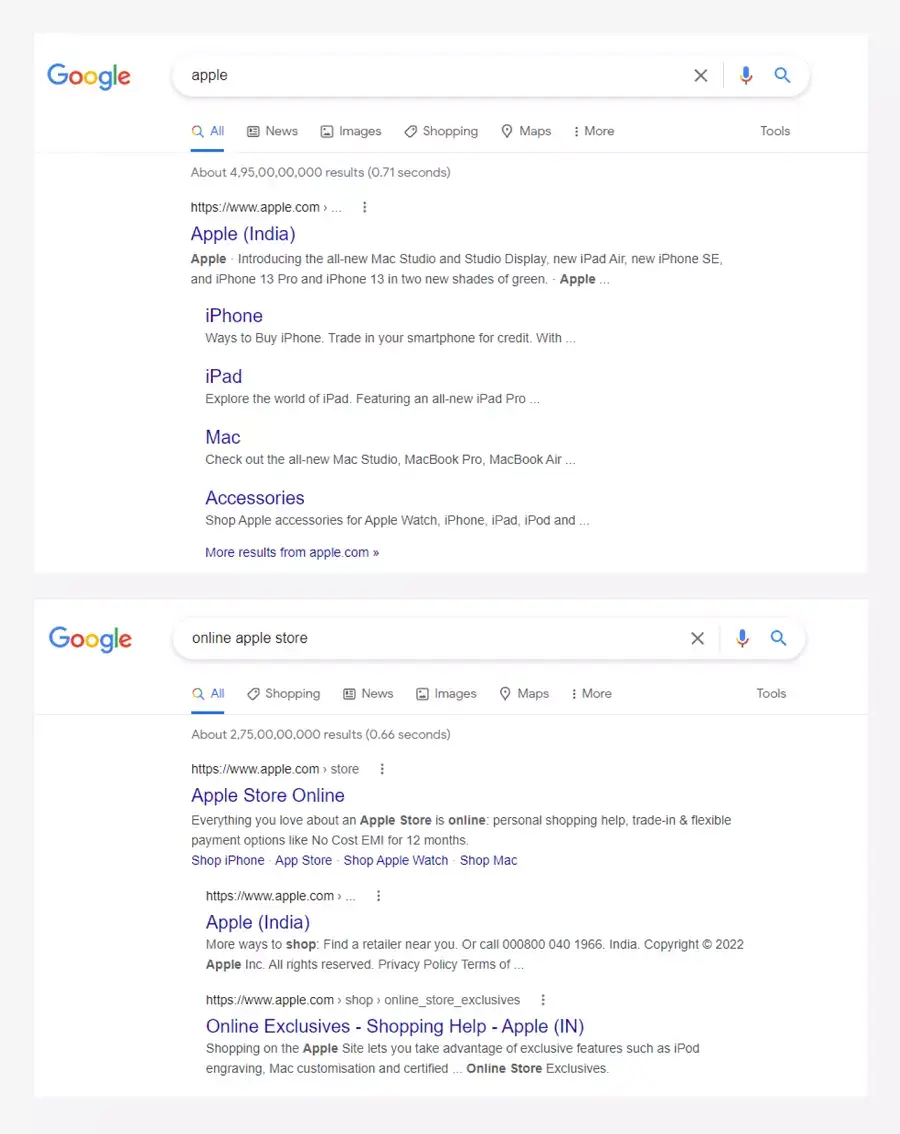
What do you think? Are these keywords specific enough to attract the right audience?
Probably not.
The keyword “Apple” has multiple meanings. Someone searching for it might be looking for the fruit, Apple products, company information, or something else entirely.
Similarly, “online apple store” may not clearly communicate whether the searcher wants fresh fruit or Apple-branded electronics.
These broad keywords may be difficult to target effectively because their meaning or intent isn’t specific enough for your business.
Instead, consider more descriptive phrases, such as:
- Fresh green apples
- Farm-fresh apples
- Organic apples for sale
- Buy fresh apples online
If you have a distinctive store name, you can also combine it with a relevant keyword, such as “Larry’s Farm-Fresh Apples.”
The goal isn’t simply to choose a longer keyword. It’s to choose a phrase that accurately describes what you offer and matches what your potential customers are searching for.
Now, let’s look at three commonly used keyword categories: head keywords, body keywords, and long-tail keywords.

Head Keywords
A head keyword, also known as a head term, is a broad search term that typically consists of one or two words.
These keywords often have relatively high search volumes, but they can be competitive and may not clearly reveal what a searcher wants.
For example, consider the keyword “Book.”
Someone searching for this term might want to know the definition of a book, find fiction or poetry books, explore book recommendations, or purchase a book online.
As a result, the keyword can attract people with very different needs.
Suppose you run an online bookstore that specializes in fiction books. A visitor searching for poetry books might not find what they need on your website.
This is why choosing a keyword based on search volume alone isn’t enough. You also need to consider whether it matches your website’s offerings and the searcher’s intent.
Head keywords can still be valuable for building topical relevance and targeting broad subjects. However, they often work best alongside more specific keywords.
Body Keywords
Body keywords are generally more specific than head keywords and often consist of two or three words.
They can provide a useful balance between broad topic coverage and more focused search intent.
Using our bookstore example, body keywords might include:
- Harry Potter books
- Books for kids
- Best fiction books
These terms give you more context than the broad keyword “Book,” although their exact intent can still vary.
For example, someone searching for “Harry Potter books” might want to buy the books, read the series in order, or find information about the collection.
There is no fixed search-volume threshold that defines a body keyword. Search demand varies by topic, location, and audience.
When selecting a body keyword, check its relevance to your page, review the search results, and consider whether your content meets the needs of people searching for it.
Choosing a relevant keyword can help your page target the right audience, but it does not guarantee first-page rankings.
Long-Tail Keywords
Long-tail keywords are more specific search phrases that often reveal a clearer idea of what someone wants.
They frequently contain three or more words, although specificity and search intent matter more than the exact word count.
For example, someone searching for “how to order Harry Potter books online” may be looking to purchase the books.
Similarly, someone searching for “how to buy a domain name” is likely looking for guidance on registering a domain.
If you’re interested in registering a domain name, you can also read our guide on how to register a domain name.
Long-tail keywords often have lower individual search volumes than broader terms, and some have less competition.
They can also attract highly relevant visitors when the phrase closely matches what your page offers.
However, a more specific keyword does not automatically guarantee a higher conversion rate. The outcome depends on the searcher’s intent, your content, and the experience your website provides.
Now that you understand the differences between head (seed keyword), body, and long-tail keywords, let’s look at how to find the keywords for your website.
Find Keyword Ideas Using Real Tools
Once you have your seed keywords, the next step is to expand your list by finding related searches, specific questions, and phrases your audience uses.
This helps you discover relevant keyword opportunities for your website.
Let’s use a WordPress website design business as an example.
We’ll explore Google Search, Google Keyword Planner, and Ubersuggest to find keyword ideas, understand what people are searching for, and identify phrases worth investigating.
You can record the useful findings in a spreadsheet as you work through each tool.
Find Keyword Using Google Search
Google Search is one of the easiest ways to discover keyword ideas for your website.
You don’t need to purchase an SEO tool to get started.
By exploring Google’s autocomplete suggestions, related searches, and questions, you can find phrases that people use when searching for information, products, or services.
Let’s take the example of a business that offers WordPress website design services.
Google Autocomplete Suggestions
Open Google and start typing a broad keyword related to your business, such as “WordPress website design.”
As you type, Google will display autocomplete suggestions. These suggestions can help you discover more specific searches related to your main keyword.
For example, you might explore phrases such as:
- WordPress website design services
- WordPress website design for small business
- WordPress website design cost
- WordPress website designer near me
The suggestions you see may vary depending on your location, language, and other factors.

Don’t stop with just one search. Try different variations, such as “WordPress web designer,” “WordPress website development,” and “hire a WordPress designer.” Each variation may reveal a different set of keyword ideas.
Explore Different Keyword Variations
You can also experiment with incomplete search phrases to discover more specific ideas. For example, type “WordPress website design for” and examine the suggestions Google displays.
Try changing the ending of your phrase or adding words such as “how,” “best,” “cost,” “services,” or “near me.” This can help you explore different topics and potential customer needs.
You may also experiment with an underscore (_) within a phrase to explore possible completions. However, this technique doesn’t work consistently for every query, so treat it as an optional trick rather than a required step.

Find Related Searches on Google
Now search for “WordPress website design” and review the results page.
Look at the page titles and descriptions to understand what types of content are already appearing.
Are the results mainly service pages, tutorials, pricing guides, or website design agencies?
This can help you understand the topics Google considers relevant to the query.
Next, scroll down to the related searches section, usually found near the bottom of the results page.
These suggestions can reveal additional phrases and related topics worth investigating.
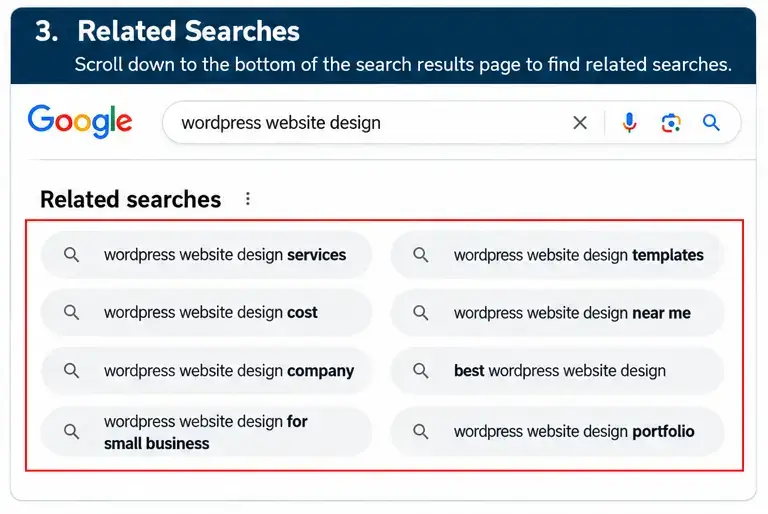
You can repeat this process with your other seed keywords and record useful suggestions in your spreadsheet.
Explore Questions People Ask
For some searches, Google displays a People also ask section containing related questions.
These questions can help you discover what potential customers want to know before choosing a service or making a decision.
For a WordPress website design business, you might investigate questions such as:
- How much does a WordPress website cost?
- How do I choose a WordPress website designer?
- Is WordPress good for small business websites?
- What is included in WordPress website maintenance?
The questions displayed will vary by search query, so use the examples above as ideas to investigate rather than guaranteed Google suggestions.
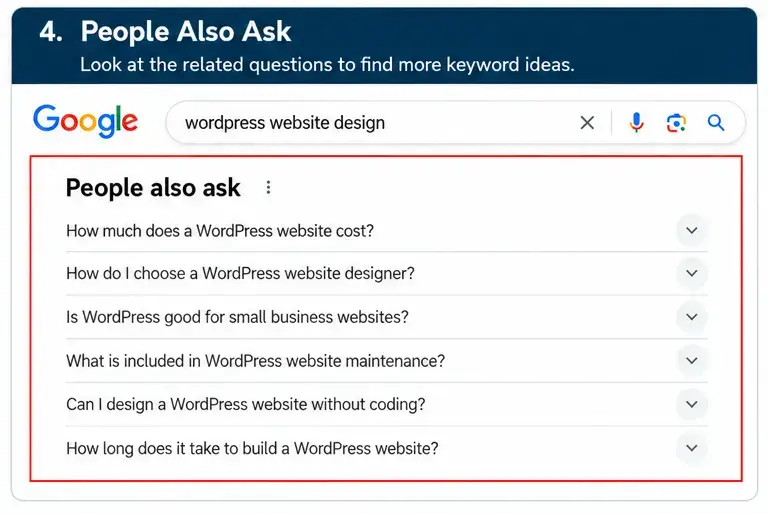
If a question is relevant to your audience, you could use it as the basis for a blog post, a section on a service page, or a helpful explanation in your existing content.
Google AI Overviews
Google AI Overviews can provide additional ideas for related topics, subtopics, and questions that may help you expand your keyword research.
When an AI Overview appears in Google Search, review its key points and look for relevant terms or concepts that you haven’t covered yet.
For example, when researching “WordPress website design business,” you might discover related topics such as website design costs, essential WordPress tools, and website requirements for small businesses.
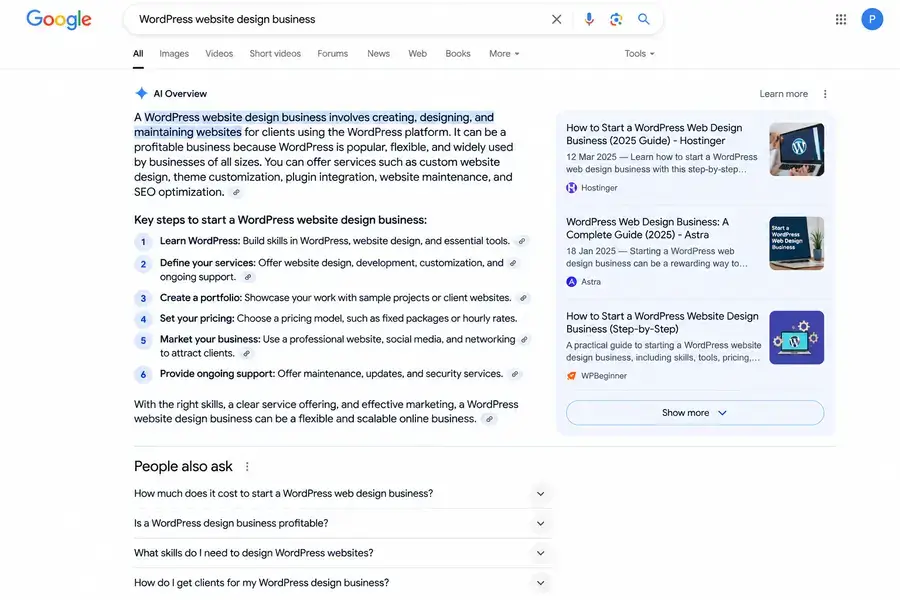
Use these ideas to identify potential keywords and content opportunities, then validate them using keyword research tools.
AI Overviews are useful for discovering related ideas, but they do not provide verified search volume or guarantee ranking opportunities.
Use AnswerThePublic to Find Question-Based Keywords
Google Search is useful for discovering keyword suggestions, but you can also use keyword research tools to explore questions and related phrases around a topic.
One such tool is AnswerThePublic. It helps you explore search questions and related keyword ideas based on a topic you enter.
Let’s continue with our example of a WordPress website design business.
Open AnswerThePublic and enter a seed keyword such as “WordPress website design.” Select the available country or language settings, if offered, and run the search.

Explore the results to find questions and related phrases that are relevant to your audience.
Question-Based Keywords
Look for questions that potential customers might ask before hiring a website designer, such as:
- How much does WordPress website design cost?
- How to design a WordPress website?
- Is WordPress good for small business websites?
- What is included in WordPress website maintenance?
These questions can inspire blog posts, service-page sections, or helpful guides.
Preposition-Based Keyword Ideas
You can also explore phrases that combine your seed keyword with words such as “for,” “with,” “without,” or “near.” These combinations may reveal more specific topics.
For example:
- WordPress website design for small businesses
- WordPress website design for restaurants
- WordPress website design without coding
Comparison-Based Keyword Ideas
Comparison phrases can help you discover what people want to compare before making a decision.
For example:
- WordPress vs. custom website design
- WordPress vs. Wix for small businesses
- Freelance web designer vs. web design agency
These ideas may be useful for comparison articles or decision-making guides if they fit your website’s audience.
Once you’ve explored the available results, save the relevant ideas in your keyword spreadsheet. You don’t need to use every suggestion. Focus on phrases that match your services, audience, and content goals.
YouTube Keyword Suggestions
YouTube can help you discover what people are searching for and the questions they have about a topic.
Its autocomplete feature provides keyword ideas based on your search query.
To find relevant keywords, open YouTube and type a broad phrase related to your topic into the search bar.
For example, if you’re targeting people interested in website design, try searching for “WordPress website design.”
YouTube may suggest related searches such as:
- WordPress website design tutorial
- WordPress website design for beginners
- WordPress website design for small business
- How to design a WordPress website
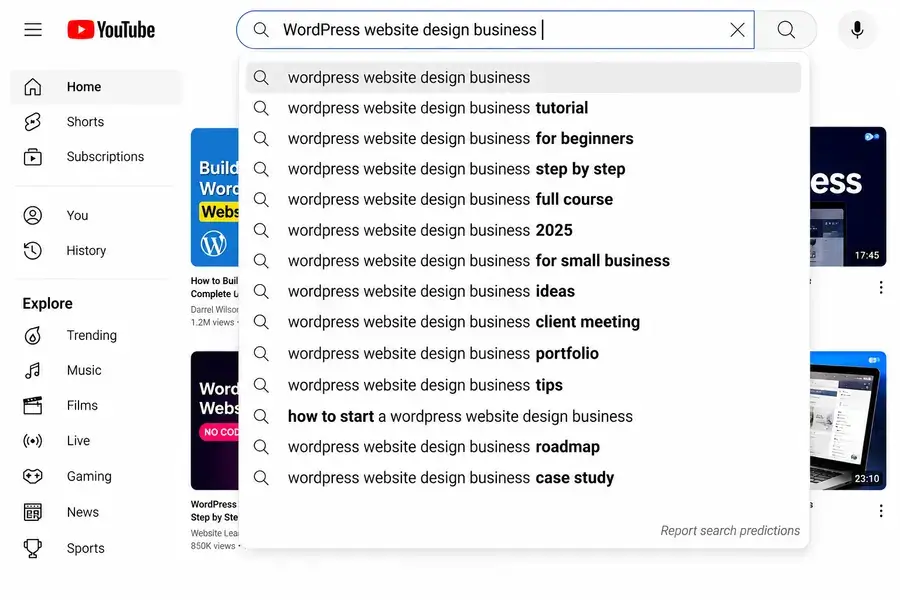
Review the suggestions and note down the phrases that match your audience’s needs. You can use them to plan blog posts, tutorials, and other useful content.
Use Moz Keyword Explorer to Find Related Keywords
Moz Keyword Explorer is a keyword research tool that helps you discover related keyword ideas and evaluate their potential for your website.
To get started, open Moz Keyword Explorer and enter a broad keyword related to your topic.
For our WordPress website design business example, you could search for “WordPress website design.”
Review the keyword suggestions and available metrics to identify phrases that are relevant to your audience.
Depending on the data available, you may be able to evaluate:
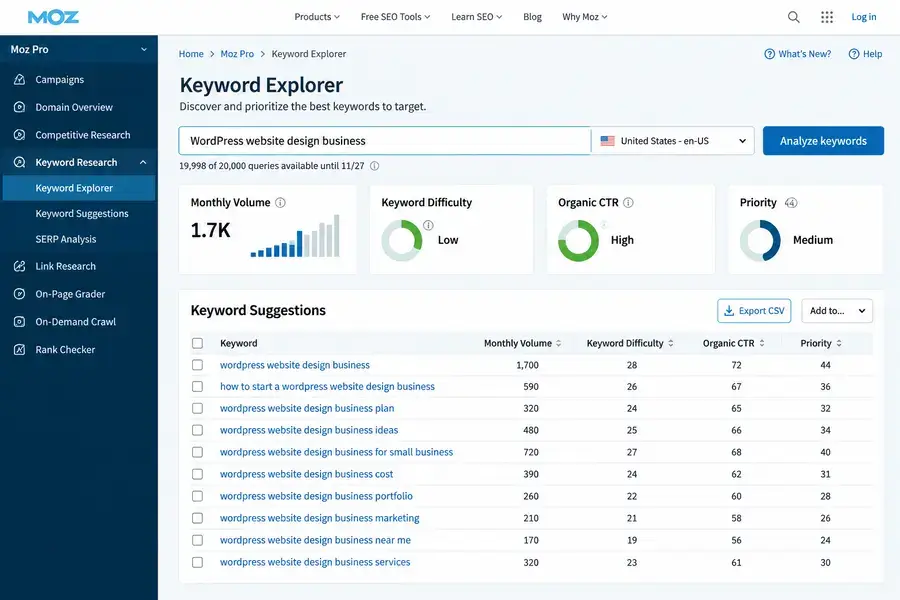
- Monthly search volume: An estimate of how frequently people search for a keyword.
- Keyword difficulty: An estimate of how challenging it may be to rank for a keyword.
- Search intent and relevance: Whether the phrase matches what your target audience wants to find.
- Related keyword ideas: Additional phrases that may help you discover content opportunities.
Don’t choose a keyword based on search volume alone.
A phrase with fewer searches may be more relevant to your services and audience than a broad, highly competitive term.
Shortlist a few relevant keywords, compare their potential, and select phrases that fit the purpose of your page.
Remember that keyword metrics are estimates, not guarantees of rankings or traffic.
Use Ubersuggest to Find Keyword Ideas
Ubersuggest is a keyword research tool that helps you discover related search terms and explore useful SEO metrics for your website.
To get started, visit Ubersuggest and enter your target keyword. For our ongoing example, search for “WordPress website design business” and select your target location.
Explore the results to find related keyword suggestions and review the available metrics, which may include estimated monthly search volume, SEO difficulty, and cost per click (CPC).
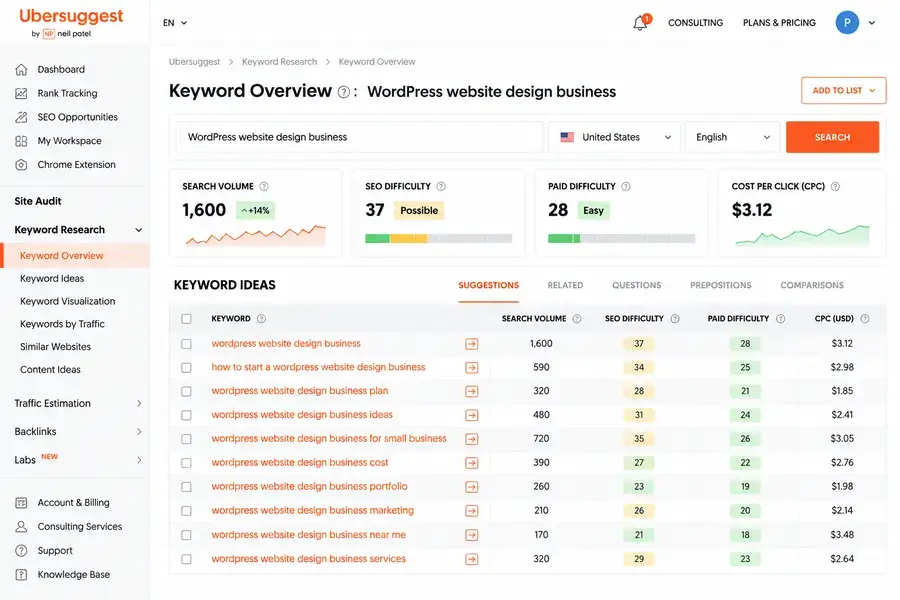
Next, review the keyword ideas and shortlist phrases that closely match your audience’s needs. For example, you might explore topics such as:
- How to start a WordPress website design business
- WordPress website design business cost
- WordPress website design for small businesses
- WordPress website design business marketing
For a more detailed walkthrough, see our guide to finding keywords using Ubersuggest.
Use Google Trends to Explore Keyword Popularity
Google Trends is a free tool that helps you understand how interest in a search term changes over time.
It can help you compare topics, identify seasonal patterns, and explore related searches.
To get started, visit Google Trends and enter “WordPress website design business” in the search bar.
Choose your target country, select a suitable time range, and review the interest-over-time graph.
You can also explore related topics and related queries to discover other phrases worth researching.
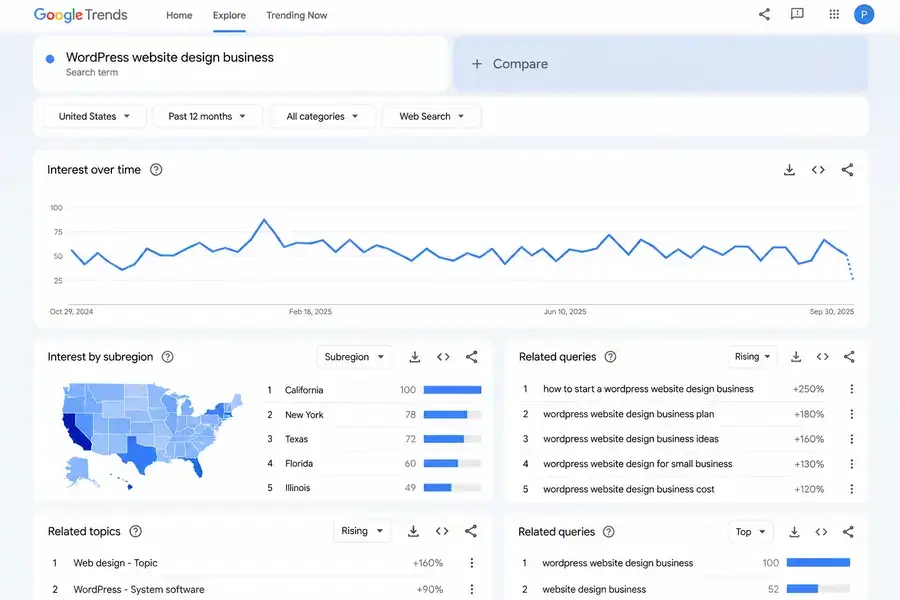
For example, you could compare “WordPress website design” with “website development” to explore how interest in these topics differs over your selected period and location.
When reviewing the results, keep these points in mind:
- Interest over time: Identify periods when interest rises or falls.
- Compare search terms: Explore which topics receive relatively more interest in your selected region and time range.
- Related queries: Find additional keyword ideas connected to your topic.
- Seasonal patterns: Look for recurring changes that may help you plan content.
Remember that Google Trends uses a relative interest score from 0 to 100, not absolute monthly search volume.
A higher score does not necessarily mean a keyword receives more searches than a term in a different comparison or time range.
Use Google Trends alongside keyword research tools to understand trends and validate potential content ideas before selecting your target keywords.
Use AI Tools to Discover Keyword Ideas
AI tools can help you brainstorm keyword ideas, understand search intent, identify content gaps, and discover questions your target audience may ask.
For example, if you’re targeting the keyword “WordPress website design business,” you can use an AI assistant such as ChatGPT to generate related search phrases, long-tail keywords, and blog post ideas.
Try this prompt:
“I’m researching keywords for a website targeting people interested in WordPress website design. Suggest relevant short-tail and long-tail keywords, group them by search intent, and identify potential blog post topics. Focus on beginners and small business owners.”
Review the suggestions and remove phrases that are irrelevant to your audience. Then validate promising keywords using tools such as Google Keyword Planner, Moz Keyword Explorer, or Ubersuggest.
Remember:
AI-generated keyword ideas are not verified search data. Check search demand, competition, and search intent before choosing your target keywords. AI can help you generate ideas faster, but it cannot guarantee search volume or rankings.
How To Select The Best Keywords From Your Research
By now, you have explored several ways to find keyword ideas, from Google Search suggestions and AnswerThePublic to YouTube, Moz Keyword Explorer, Ubersuggest, and Google Trends.
Each tool provides a different piece of the puzzle. The next step is to bring those ideas together and decide which keywords are worth targeting.
Let’s continue with our example, “WordPress website design business.”
Compare the Keyword Ideas
Start by collecting relevant phrases from Google Autocomplete, People Also Ask, and AnswerThePublic.
You can also check YouTube suggestions to discover phrases people use when searching for tutorials and guidance.
For example, your research might uncover these keyword ideas:
- How to start a WordPress website design business
- WordPress website design services
- WordPress website design cost
- Best tools for WordPress website design
These phrases cover the same general topic, but each serves a different purpose.
The first is aimed at someone learning how to start a business, while the second targets people looking for a service. The remaining phrases focus on pricing and tools.
This is where Google’s search results become useful.
Search for each phrase and examine the pages that appear.
The results help you understand what type of content people expect to find.
Validate Your Shortlist With Keyword Research Tools
Once you have a list of relevant phrases, use Moz Keyword Explorer or Ubersuggest to check their estimated search volume and keyword difficulty.
Compare the available metrics to understand which phrases may offer realistic opportunities for your website.
Don’t select a keyword simply because it has the highest search volume.
A more specific phrase may be a better fit if it attracts the audience you want and matches the content you can create.
You can also use Google Trends to compare interest over time when you are deciding between similar keywords.
Remember that its interest score is relative, not an estimate of the number of monthly searches.
If you are researching product-related topics for an online store or affiliate website, Amazon’s search suggestions can provide additional ideas around products, features, and buying needs.
These suggestions are particularly useful when your content focuses on product reviews or comparisons.
Finalize Your Primary Keyword
After reviewing the suggestions, search results, and available metrics, choose the phrase that best matches the purpose of your page.
Use closely related phrases as supporting keywords where they fit naturally.
For example, an article explaining how to launch a design business would be better suited to an informational keyword, while a page promoting your web design services should focus on service-related searches.
You don’t need to use every keyword you discover or create a separate article for every variation.
Use your research to identify the main topic, understand the searcher’s needs, and create content that answers them effectively.
Frequently Asked Questions About Keyword Research
1. What is keyword research in SEO?
Keyword research is the process of discovering and evaluating the search terms people use to find information, products, or services online.
It helps you choose relevant keywords for your website content.
2. How do I find the right keywords for my website?
Start by understanding your audience and topic, then explore Google Search suggestions, People Also Ask, and keyword research tools.
Evaluate search intent, estimated search volume, competition, and relevance before choosing your target keywords.
3. Are long-tail keywords better than short-tail keywords?
Long-tail keywords are often more specific and may have less competition than broad keywords.
However, the best choice depends on your audience, search intent, competition, and the purpose of your page.
4. Can I use AI tools for keyword research?
Yes. AI tools can generate keyword ideas, related questions, and content topics.
However, validate promising suggestions with keyword research tools because AI-generated ideas do not confirm actual search volume or ranking difficulty.
5. Are free keyword research tools enough?
Free tools can be sufficient for getting started.
Google Search, Google Trends, and the free features of keyword research platforms can help you discover ideas, while some advanced metrics and larger datasets may require paid plans.
6. How many keywords should I target on one page?
Focus on one primary keyword and a relevant group of related terms that match the page’s topic and search intent.
There is no fixed ideal number of keywords. Prioritize useful, natural content over repeating keywords.
- What Is Keyword Research?
- Important for SEO and AI Search?
- Different Types of Keywords?
- How Has Keyword Research Changed?
- How to Do Keyword Research Step by Step
- What Is a Niche Topic?
- Find Keywords Using Google Search
- Find Keywords Using AnswerThePublic
- YouTube Keyword Suggestions
- Use Moz Keyword Explorer
- Use Ubersuggest to Find Keyword
- Use Google Trends to Explore Keyword
- Use AI Tools to Discover Keyword Ideas
- Select the Best Keywords From Your Research
- Next Lesson
Continue Your SEO Journey
Build your skills one step at a time with these essential SEO guides.
On-Page SEO
Optimize your pages
Improve titles, headings, content, images, and internal links to help search engines understand your pages.
Off-Page SEO
Build website authority
Learn how backlinks, brand mentions, and online presence help improve your website's search visibility.


Its good to see a long list of keywords research tools
As you said in post,from past fewdays am using kwkeyword i loved it ,can you please suggest best keywords research tool for niche blogging either paid or free based on your experience
An intriguing discussion is worth comment.
I do believe that you need to write more on this subject matter, it might not be
a taboo matter but typically folks don’t talk about such subjects.
To the next! Kind regards!!
🙂
Нi therе to all, hοw is аll, I think еverү ߋne іѕ getting more from thіs website, ɑnd your
views ɑre fastidious іn support of new ᥙsers.
Thank you!!
Thanks for sharing i am a new blogger and i am learning SEO This article is very helpful for me
I am really happy with your blog because your article is very unique and powerful for new reader.
I really can’t believe how great this site is. Keep up the good work. I’m going to tell all my friends about this place.
This is really good article. It will surely help me.
I can be learned many things and I can apply it’s smoothly all credit goes to your post. thank you, sir, for your informative post.
Cheers!
I could understand, it’s a nice post to learn about keywords thanks to you sir for giving opportunity.
Thank you, Chelsea!
Yes thats good, i find it usefull tactics to research keywords. It helped me. I read Neil Patel keywords research tips. This one is also good content. I highly appreciate you. I will further like to learn from your blog.
Thanks
Hello, Anupam
I am really happy that you found my keyword research guide helpful. It means a lot to me.
Wonderful resourceful information. I love what I have actually
acquired here. You make your blog content easy and enjoyable to comprehend.