
- October 2026
What Is VPS Hosting? Benefits, Pros, Cons & More
Learn what VPS hosting is, how it works, its benefits and drawbacks, typical costs, and whether a virtual private server is right for your website.
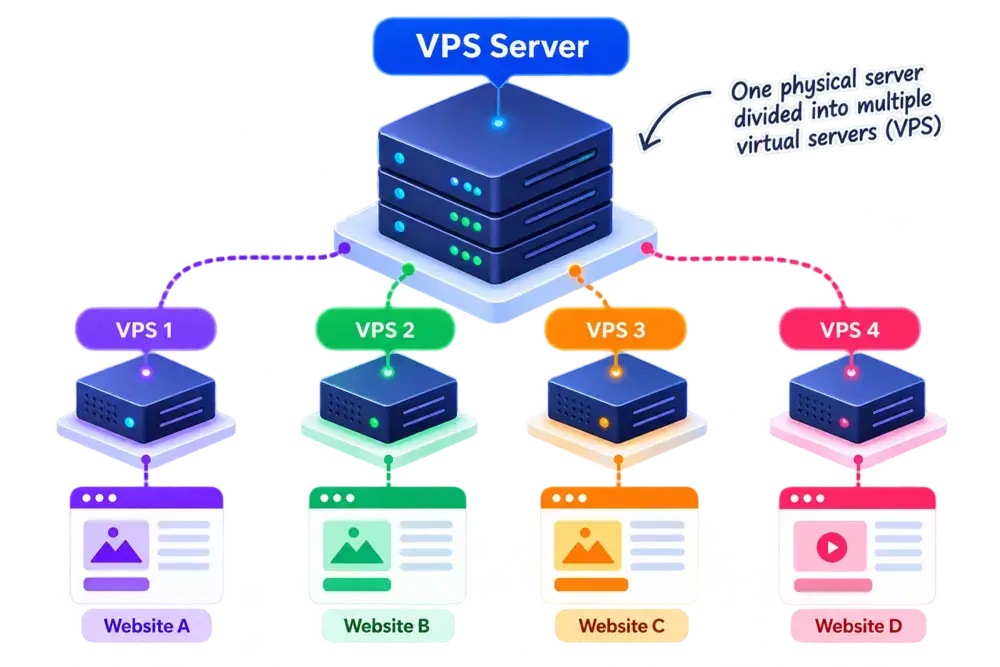
VPS Hosting at a Glance
A quick overview of what VPS hosting offers, who it’s for, and what to expect.
- Editor's Summary
More Control
Server-Level Flexibility
Best For
- Growing Websites
- Web Applications
- E-commerce Stores
- Developers & Agencies
What You Should Know
VPS hosting uses virtualization to create an isolated virtual server on a physical machine. You get a defined allocation of resources and more control over your hosting environment than with shared hosting.
It can provide a good balance of performance, flexibility, and cost for websites that have outgrown basic shared hosting.
Allocated Resources
Get defined CPU, RAM, and storage resources based on your VPS plan.
More Control
Configure your operating system, software, and server environment.
Isolated Environment
VPS operates in its own virtual environment, separate from other VPS.
Easy to Scale
Upgrade your resources as your website or application grows.
Disclosure: ElegantEspace is supported by readers like yourself. We may earn an affiliate commission when you purchase through our links. Commissions do not affect our editors’ opinions or evaluations.
What Is VPS Hosting?
VPS (Virtual Private Server) hosting is a type of web hosting that uses virtualization to create multiple isolated virtual servers on a single physical server. Each VPS operates as its own hosting environment, with its own operating system, allocated resources, and configuration.
Unlike shared hosting, where multiple websites typically share the same hosting environment, a VPS gives you more control, isolation, and flexibility over how your server environment is configured.
A VPS can be a practical middle ground between shared and dedicated hosting. You get more resources and control than a typical shared hosting plan without having to rent an entire physical server.
How VPS Hosting Works
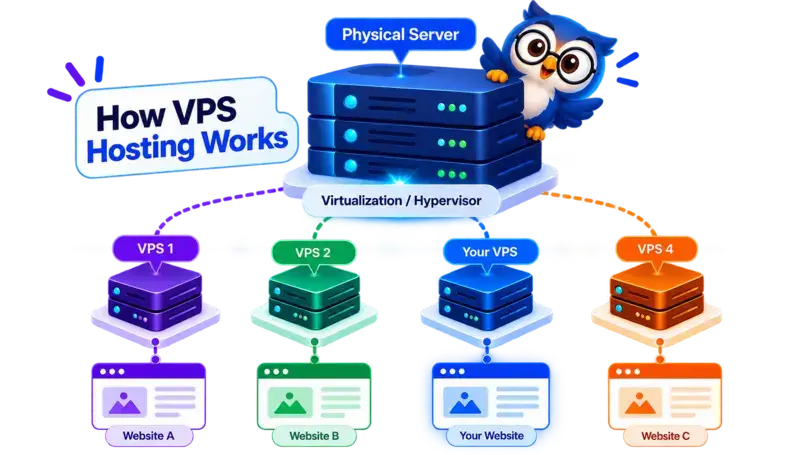
VPS hosting works by using virtualization technology to divide a physical server into multiple isolated virtual servers. Each VPS operates as an independent hosting environment with its own operating system, software, settings, and allocated resources.
The physical server is still shared between VPS instances, but virtualization provides much greater isolation and control than typical shared hosting.
Here's How It Works:
1. You Choose a VPS Hosting Plan
You choose a VPS plan based on the resources and features your website or application needs, such as CPU, RAM, storage, bandwidth, operating system, and management level.
2. A Virtual Server Is Created
The hosting provider uses virtualization technology to create your virtual private server (VPS) on a physical server.
Your VPS operates as its own virtual environment, separate from other VPS instances running on the same physical machine.
3. The VPS Gets Its Own Operating Environment
Your VPS can run its own operating system and server software.
Depending on the provider and plan, you may be able to choose an operating system such as Linux or Windows and install the software your website or application requires.
4. Resources Are Allocated to Your VPS
Your VPS plan provides a specified amount of resources such as CPU, RAM, storage, and bandwidth.
The exact resource model varies by provider. Some plans offer guaranteed or dedicated allocations, while others may use different resource-sharing or bursting arrangements.
5. Your Website or Application Runs on the VPS
Once your VPS is configured, you can install and run your website, WordPress, web applications, databases, or other supported software.
When someone visits your website, their request is processed by your VPS environment rather than a shared hosting account.
6. You Manage the VPS Environment
This is one of the biggest differences from shared hosting.
Depending on whether you choose managed or unmanaged VPS hosting, you may be responsible for tasks such as software installation, server configuration, security updates, backups, and performance management.
With a managed VPS, the hosting provider handles more of these tasks for you.
VPS Hosting In One Simple Flow
Physical Server
↓
Virtualization / Hypervisor
↓
Multiple Isolated VPS Environments
↓
Your VPS
↓
Operating System + Server Software
↓
Your Website or Application
↓
Visitors
In simple terms: A VPS uses virtualization to turn one physical server into multiple isolated virtual servers. You get your own virtual environment with more control and flexibility than shared hosting, while the physical hardware is still shared.
What Are the Benefits of VPS Hosting?
VPS hosting gives you more control, isolation, and flexibility than traditional shared hosting without the cost of renting an entire physical server.
It can be a practical choice for growing websites, applications, online stores, and users who need more control over their hosting environment.
1. More Control Over Your Server
One of the biggest advantages of VPS hosting is the additional control it provides.
Depending on your VPS plan and operating system, you may be able to:
- Install your own software
- Configure server settings
- Choose an operating system
- Manage applications and services
- Configure security settings
- Customize the server environment
The exact level of access depends on whether the VPS is managed or unmanaged and what access the provider allows.
2. Greater Resource Allocation
VPS plans typically provide a defined allocation of resources such as CPU, RAM, storage, and bandwidth.
Unlike traditional shared hosting, where many websites operate within the same hosting environment, your VPS has its own virtual environment and resource allocation.
This can make VPS hosting more suitable for websites and applications that have outgrown the limits of basic shared hosting.
Note: Resource guarantees vary between providers. Always check the specifications and resource policies of the VPS plan you’re considering.
3. Better Isolation
A VPS operates in an isolated virtual environment created through virtualization.
Other VPS customers may use the same physical server, but their virtual environments are separated from yours.
This isolation can provide greater control and reduce the direct impact that activity in another hosting account can have on your environment compared with traditional shared hosting.
However, VPS isolation doesn’t mean the physical hardware is dedicated exclusively to you.
4. Greater Customization
VPS hosting gives you more freedom to configure the environment around your website or application.
Depending on your setup, you can choose and configure:
- Operating system
- Web server software
- PHP or other runtime versions
- Databases
- Security tools
- Development frameworks
- Server-level applications
This makes VPS particularly useful for developers, agencies, businesses, and applications with specific technical requirements.
5. Scalable Hosting
As your website or application grows, you may need additional CPU, RAM, storage, or bandwidth.
Many VPS providers allow you to upgrade your plan or increase resources without moving immediately to an entirely different hosting environment.
This gives growing websites a path to scale beyond basic shared hosting.
The exact upgrade process and available resource options depend on the provider.
6. Suitable for Growing Websites and Applications
VPS hosting can be a good fit when your website needs more than a basic shared hosting environment can comfortably provide.
It’s commonly used for:
- Growing business websites
- E-commerce stores
- High-resource WordPress websites
- Web applications
- SaaS projects
- Development environments
- Client websites managed by agencies
You also get more control over the server environment, which can be important when your application has requirements that standard shared hosting cannot accommodate.
Quick takeaway: VPS hosting offers a balance of control, resource allocation, isolation, and scalability. It’s a natural step up from shared hosting when your website or application needs more flexibility, but it also requires more technical responsibility.
More Control Also Means More Responsibility.
With an unmanaged VPS, you’re generally responsible for much of the server administration, including configuration, updates, security, and backups.
With a managed VPS, the hosting provider handles more of these tasks, although exactly what’s covered varies by provider.
Pros and Cons of VPS Hosting
- More Server Control
- Allocated Resources
- Better Isolation
- Greater Customization
- Scalable Hosting
Why These Features Stand Out
- More Server Control: Depending on the VPS and management level, you can configure the operating system, install software, manage services, and customize the server environment.
- Allocated Resources: VPS plans generally specify resources such as CPU, RAM, storage, and bandwidth. The exact allocation and whether resources are guaranteed depend on the provider and plan.
- Better Isolation: Your VPS runs in an isolated virtual environment rather than operating directly within the same hosting environment as other customers.
- Greater Customization: You have more freedom to configure the server software and environment around your website or application.
- Scalable Hosting: Many providers allow you to increase resources as your requirements grow, although the available upgrade options vary.
- Higher Cost
- More Technical Knowledge
- Server Management May Be Required
- Resource Limits Still Apply
- More Responsibility for Security
Potential Drawbacks Explained
- Higher Cost: VPS hosting generally costs more than entry-level shared hosting because you’re paying for a more capable and configurable hosting environment.
- More Technical Knowledge: Managing a VPS can require familiarity with operating systems, server configuration, networking, security, and command-line tools, particularly with unmanaged plans.
- Server Management May Be Required: With an unmanaged VPS, you’re responsible for much of the server administration. Managed VPS plans shift more of that responsibility to the provider.
- Resource Limits Still Apply: A VPS isn’t an unlimited server. Your plan still has defined CPU, RAM, storage, bandwidth, or other resource limits.
- More Responsibility for Security: Greater control means greater responsibility. With an unmanaged VPS, you may need to handle security updates, firewall configuration, software updates, backups, and other maintenance yourself.
How Much Does VPS Hosting Cost?
VPS hosting typically costs more than shared hosting because you get a more isolated and configurable server environment with a larger allocation of resources.
Entry-level VPS plans can be relatively affordable, while higher-resource and managed VPS plans can cost considerably more. The final price depends on factors such as CPU, RAM, storage, bandwidth, management, operating system, and additional services.
The advertised price can also be an introductory rate, so always check the regular or renewal price before purchasing.
What Determines the Cost of VPS Hosting?
Several factors can affect the price of a VPS plan:
- CPU and RAM: More processing power and memory generally increase the cost.
- Storage: Larger storage capacity and faster NVMe or SSD storage can cost more.
- Bandwidth: Plans with higher data-transfer allowances may have higher prices.
- Managed vs. unmanaged: Managed VPS plans usually cost more because the provider handles more server administration.
- Operating system: Some operating systems or software licenses may involve additional costs.
- Control panel: cPanel, Plesk, or other commercial control panels may be charged separately by some providers.
- Backups: Automated backups and longer backup retention may cost extra.
- Server location: Pricing can vary depending on the available data-center location and infrastructure.
- Billing period: Paying annually or for a longer term can reduce the effective monthly price with some providers.
- Additional IP addresses: Extra IPv4 addresses or other networking features may incur additional charges.
Managed vs. Unmanaged VPS: How Does It Affect Price?
| Metric | Managed VPS | Unmanaged VPS |
|---|---|---|
| Price | Usually higher | Usually lower |
| Server management | More provider assistance | Mostly your responsibility |
| Technical knowledge | Lower | Higher |
| Software updates | More provider involvement | Usually your responsibility |
| Security management | More provider support | More user responsibility |
| Best for | Businesses & less technical users | Developers & experienced users |
A cheaper unmanaged VPS isn’t necessarily the better value if you don’t have the skills or time to maintain the server yourself.
What Should You Look for in a VPS Plan?
Don’t compare VPS plans by price alone. Before purchasing, check:
- CPU & RAM: Make sure the resources match your website or application’s requirements.
- Storage: Check both capacity and whether the plan uses SSD or NVMe storage.
- Bandwidth: Look at the included transfer allowance and any overage policies.
- Resource guarantees: Check whether CPU, RAM, and other resources are guaranteed, allocated, shared, or burstable.
- Management: Confirm exactly what the provider manages if you’re buying a managed VPS.
- Backups: Check whether backups are included, how often they’re created, and how long they’re retained.
- Server access: Look for SSH or other administrative access if you need to manage the server yourself.
- Data-center locations: Choose a location appropriate for your visitors and application requirements.
- Upgrade options: Make sure you can increase resources as your website grows.
- Support: Check what technical assistance is included with the plan.
Unmanaged VPS can offer a lower entry price but requires more technical responsibility.
Managed VPS costs more but can be worth considering if you want the provider to handle more of the server administration.
Managed vs Unmanaged VPS Hosting
VPS hosting comes in two main management options: managed and unmanaged. The main difference is how much responsibility you have for configuring, maintaining, and securing your server.
With managed VPS hosting, the provider handles specified server administration tasks. With unmanaged VPS hosting, you take responsibility for most of the server’s setup and maintenance.
| Feature | Managed VPS | Unmanaged VPS |
|---|---|---|
| Server Management | Provider handles agreed tasks | You manage the server |
| Technical Knowledge | Less required | More required |
| Security Updates | Provider assistance varies by plan | Usually your responsibility |
| Software Configuration | Support depends on the provider | Greater hands-on responsibility |
| Cost | Usually higher | Usually lower |
| Best For | Businesses and users who prefer expert assistance | Developers and experienced server administrators |
Which VPS Management Option Should You Choose?
Choose managed VPS hosting if you want VPS resources and greater control without handling every aspect of server administration yourself. It’s particularly suitable for businesses without an in-house server administrator.
Choose unmanaged VPS hosting if you’re comfortable configuring servers, installing software, managing security updates, and troubleshooting technical issues. It can also be a more economical option if you have the necessary skills.

Quick Tip: Managed VPS does not necessarily mean the provider handles everything. Check exactly which services are included, particularly backups, security updates, control panel management, and technical support.
Recommended VPS Hosting Providers
Looking for a shared hosting plan? These are some providers worth considering based on features, pricing, performance, support, and overall suitability.

Affordable VPS Hosting
- Affordable Self Managed VPS plans
- KVM Virtualization
- NVMe SSD Storage
- Full Root Access
- Multiple Resource Configurations
- Built-in VPS Management Tools
From $6.49/mo
Renews at regular pricing.

Fully managed VPS Hosting
- Fully Managed VPS hosting
- cPanel/WHM
- NVMe Storage
- Automated Backups
- Free Website & Server Migrations
- 24/7 Technical Support
From $53.87/mo
Renews at regular pricing.
Who Should Use VPS Hosting?
VPS hosting is a good choice when your website has outgrown basic shared hosting and you need more resources, control, or flexibility without moving to an entire physical server.
It can work particularly well for websites, online stores, applications, and businesses with higher resource requirements or more specific server needs.
VPS Hosting Is a Good Fit For:
- Growing Websites: A practical upgrade for websites that need more resources and control than a typical shared hosting plan provides.
- Business Websites: Suitable for businesses that need a more configurable hosting environment, especially when their website has growing traffic or resource requirements.
- E-commerce Stores: VPS hosting can provide the additional resources and server control that larger online stores may need for their applications, databases, and traffic.
- High-Traffic Websites: Websites with consistently higher traffic or resource consumption may benefit from the greater resource allocation available with VPS hosting.
- Web Applications: VPS hosting is useful for custom applications, SaaS platforms, APIs, and other software that requires specific server configurations.
- Developers & Agencies: Developers and agencies can use VPS hosting when they need root access, custom software, specific runtime versions, or greater control over the server environment.
- Resource-Intensive WordPress Websites: WordPress websites running WooCommerce, large databases, complex plugins, or other resource-intensive features may benefit from moving beyond shared hosting.
When VPS Hosting May Not Be the Right Choice
VPS hosting isn’t ideal for every website. You may want to consider shared hosting instead if you:
- Are launching a small or new website
- Have relatively low resource requirements
- Don’t need server-level customization
- Don’t need root or administrative access
- Prefer the hosting provider to handle most server management
- Want the simplest and lowest-cost hosting option
On the other hand, a VPS may still not be enough if you require an entire physical server, very high and consistent resource capacity, or specialized enterprise infrastructure. In those cases, a dedicated server or other higher-capacity hosting solutions may be more appropriate.
Quick Tip: You don’t need to move to VPS hosting simply because your traffic increases. Look at actual CPU, RAM, storage, bandwidth, application requirements, and server resource usage before upgrading.
VPS Hosting Compared to Other Hosting Types
VPS hosting is one of several ways to host a website. Compared with shared hosting, it typically offers more control and a defined allocation of resources. Cloud hosting can offer greater flexibility and scalability, while dedicated hosting gives you an entire physical server.
The main differences come down to how resources are allocated, how much control you need, how easily you can scale, and how much you’re willing to spend.
| Feature | Shared Hosting | VPS Hosting | Cloud Hosting | Dedicated Hosting |
|---|---|---|---|---|
Cost |
$2–$10/mo |
$5–$40+/mo |
$5–$50+/mo |
$70–$200+/mo |
Resources |
Shared |
Allocated |
Distributed |
Dedicated |
Performance |
Good For Smaller Sites |
Higher |
Highly Scalable |
Very High |
Server Control |
Limited |
High |
High |
Very High |
Scalability |
Moderate |
High |
Very High |
High |
Technical Knowledge |
Low |
Moderate–High |
Moderate–High |
High |
Best For |
Beginners & Small Websites |
Growing Websites |
Scaling & Variable Traffic |
High-Resource Websites |
VPS Hosting vs Shared Hosting
VPS hosting provides an isolated virtual server environment with allocated resources and greater server-level control than typical shared hosting. Shared hosting, on the other hand, is designed for simplicity and affordability, making it suitable for smaller websites with basic hosting needs.
| Feature | VPS Hosting | Shared Hosting |
|---|---|---|
| Cost | Higher | Lower |
| Resources | Allocated virtual server resources | Shared hosting resources |
| Performance | More control over resource allocation | Suitable for modest workloads |
| Server Control | Greater customization and access | Limited |
| Isolation | Separate virtual environment | Shared hosting environment |
| Scalability | Resource upgrades often available | Depends on the hosting plan |
| Technical Knowledge | Moderate to high, depending on management | Usually beginner-friendly |
| Best For | Growing websites, online stores, and web applications | Blogs, portfolios, and small websites |
Choose VPS hosting if your website needs greater control, more configurable resources, custom software, or an isolated server environment. It’s particularly useful when your current hosting plan no longer meets your website’s requirements.
Choose shared hosting if your website has modest resource needs and you prefer a simpler, lower-cost hosting solution without managing server configurations.
VPS Hosting vs Cloud Hosting
VPS hosting provides an isolated virtual server with allocated resources on a physical machine, while cloud hosting uses cloud infrastructure that may distribute workloads across multiple interconnected servers.
Both can offer scalability, control, and strong performance. The main differences are how the infrastructure is designed, how resources can be scaled, and how each hosting environment handles changing workloads.
| Feature | VPS Hosting | Cloud Hosting |
|---|---|---|
| Cost | Often predictable monthly pricing | Fixed or usage-based pricing, depending on the provider |
| Infrastructure | Virtual server hosted on a physical machine | Cloud infrastructure that may use multiple interconnected servers |
| Resources | Allocated resources based on your plan | Resources depend on the cloud service and configuration |
| Performance | Depends on allocated resources and server capacity | Depends on the underlying infrastructure and configuration |
| Scalability | Usually requires upgrading the VPS plan | Often supports flexible resource scaling |
| Reliability | Depends on the provider's infrastructure and redundancy | Can offer high availability through redundant infrastructure |
| Server Control | High, depending on management and access | Varies by platform and service |
| Technical Knowledge | Moderate to high, depending on management | Moderate to high, depending on configuration |
| Best For | Websites and applications needing a configurable virtual server | Applications needing flexible scaling or cloud infrastructure features |
Choose VPS hosting if you want a virtual server with defined resources, greater configuration control, and a relatively predictable hosting setup. It can suit growing websites, online stores, and applications with consistent resource requirements.
Choose cloud hosting if you need flexible scaling, cloud-based infrastructure, or high availability through appropriately configured redundant systems. It can be useful for applications with changing workloads or more demanding infrastructure requirements.
VPS Hosting vs Dedicated Hosting
VPS hosting gives you an isolated virtual server running on shared physical hardware, while dedicated hosting provides an entire physical server for your exclusive use.
Both offer more control than typical shared hosting, but they differ in hardware access, resource capacity, cost, and management requirements.
| Feature | VPS Hosting | Dedicated Hosting |
|---|---|---|
| Cost | Generally more affordable | Generally more expensive |
| Infrastructure | Virtual server on shared physical hardware | Entire physical server |
| Resources | Allocated virtual server resources | Physical server resources available to your workloads |
| Performance | Depends on allocated resources and underlying hardware | Depends on server specifications and workload |
| Server Control | High, depending on plan and management | Extensive control over server configuration |
| Isolation | Isolated virtual environment | Separate physical server |
| Scalability | Often upgraded by changing the VPS plan | May require hardware upgrades or server migration |
| Technical Knowledge | Moderate to high, depending on management | Often high for self-managed plans |
| Management | Managed or self-managed | Managed or self-managed |
| Best For | Growing websites, online stores, and web applications | Resource-intensive applications and workloads needing dedicated hardware |
Choose VPS hosting if you need more control, allocated resources, and an isolated server environment without paying for an entire physical machine. It can be suitable for growing businesses, websites, and applications with moderate to substantial resource needs.
Choose dedicated hosting if your workload requires an entire physical server, substantial hardware capacity, specialized configurations, or greater control over the underlying machine.
Is VPS Hosting Right For Your Website?
VPS hosting is a good choice if your website needs more resources, greater server control, or a more customizable hosting environment than typical shared hosting provides.
It offers a balance between flexibility and cost, making it suitable for growing websites, online stores, web applications, and businesses with specific server requirements.
However, VPS hosting usually costs more than shared hosting and may require technical knowledge, especially if you choose an unmanaged plan. If you need flexible scaling across cloud infrastructure or an entire physical server, cloud or dedicated hosting may be more appropriate.
For most website owners, the best approach is to evaluate your resource requirements, technical experience, and budget before choosing a VPS plan. Upgrade when your website needs the additional resources and control, rather than paying for capacity you don’t yet use.
Frequently Asked Questions About VPS Hosting
1. What Is VPS Hosting and How Does It Work?
VPS (Virtual Private Server) hosting is a type of web hosting that uses virtualization to divide a physical server into multiple isolated virtual servers. Each VPS operates as its own environment with an allocated amount of resources, such as CPU, RAM, and storage.
Unlike shared hosting, VPS hosting gives you greater control over your server configuration, software, and hosting environment.
2. Is VPS Hosting Better Than Shared Hosting?
VPS hosting offers greater server control, an isolated virtual environment, and more configurable resources than typical shared hosting. However, it generally costs more and may require additional technical knowledge.
Shared hosting is suitable for smaller websites with modest resource requirements, while VPS hosting can be useful when a website needs more resources or server-level customization. The right option depends on your website’s needs.
3. How Much Does VPS Hosting Cost?
VPS hosting costs vary depending on the provider, CPU, RAM, storage, bandwidth, and level of server management. Self-managed entry-level plans are generally cheaper than fully managed VPS plans.
When comparing prices, check the regular renewal rate, backup costs, control panel licenses, included support, and whether the advertised price requires a long-term commitment.
4. Is VPS Hosting Good for WordPress?
Yes, VPS hosting can be a good choice for WordPress websites that need more resources, greater server control, or custom configurations. It can be particularly useful for growing business websites, resource-intensive WordPress installations, and WooCommerce stores.
However, a VPS is not automatically faster than shared hosting. Performance also depends on server resources, caching, website optimization, and server configuration.
5. What Is the Difference Between Managed and Unmanaged VPS Hosting?
Managed VPS hosting includes server administration from the hosting provider, with services such as updates, monitoring, security maintenance, and technical support depending on the plan.
Unmanaged VPS hosting gives you greater responsibility for configuring and maintaining the server, including software installation, updates, security, and backups.
Choose managed VPS if you prefer less server maintenance. Consider unmanaged VPS if you have the technical skills and want greater hands-on control.
6. Is VPS Hosting Secure?
VPS hosting provides an isolated virtual environment, but it is not automatically secure. Security depends on the server configuration, operating system updates, firewall rules, access controls, backups, and the hosting provider’s infrastructure.
To improve security, use strong passwords or SSH keys, keep software updated, configure a firewall, enable appropriate security monitoring, and maintain regular backups. Check which security services your hosting plan includes.
7. Do I Need Technical Knowledge to Use VPS Hosting?
It depends on whether you choose managed or unmanaged VPS hosting.
Unmanaged VPS hosting generally requires knowledge of server administration, operating systems, software installation, security updates, and troubleshooting. Managed VPS hosting reduces much of this work because the provider handles specified server-management tasks.
If you’re new to server administration, review the provider’s management services and support coverage before purchasing a plan.
8. When Should I Upgrade From Shared Hosting to VPS Hosting?
Consider upgrading when your current hosting plan consistently struggles to meet your website’s needs. Signs may include recurring resource-limit warnings, high CPU or memory usage, slowdowns under load, or the need for server configurations your current plan doesn’t support.
Before upgrading, investigate caching, database performance, plugins, and other potential causes of slowdowns. Increased traffic alone does not necessarily mean you need VPS hosting.
9. Can I Host Multiple Websites on One VPS?
Yes. A VPS can host multiple websites, provided it has sufficient resources and the required software and configurations are in place.
You may need to configure separate domains, web server settings, databases, SSL certificates, and application environments. The number of websites you can run depends on their resource requirements and your VPS plan.
10. What Is the Difference Between VPS Hosting and Cloud Hosting?
VPS hosting provides an isolated virtual server with allocated resources on physical hardware. Cloud hosting uses cloud infrastructure and may offer features such as flexible resource scaling, distributed infrastructure, and high availability.
The distinction varies by provider because some VPS services also run on cloud infrastructure. Compare the actual architecture, scaling options, redundancy, pricing model, and management features before choosing between them.

