
- October 2026
What Is Managed Hosting? Benefits, Pros, Cons & More
Learn what managed hosting is, how it works, its benefits and costs, and how to choose the right managed hosting service for your website.
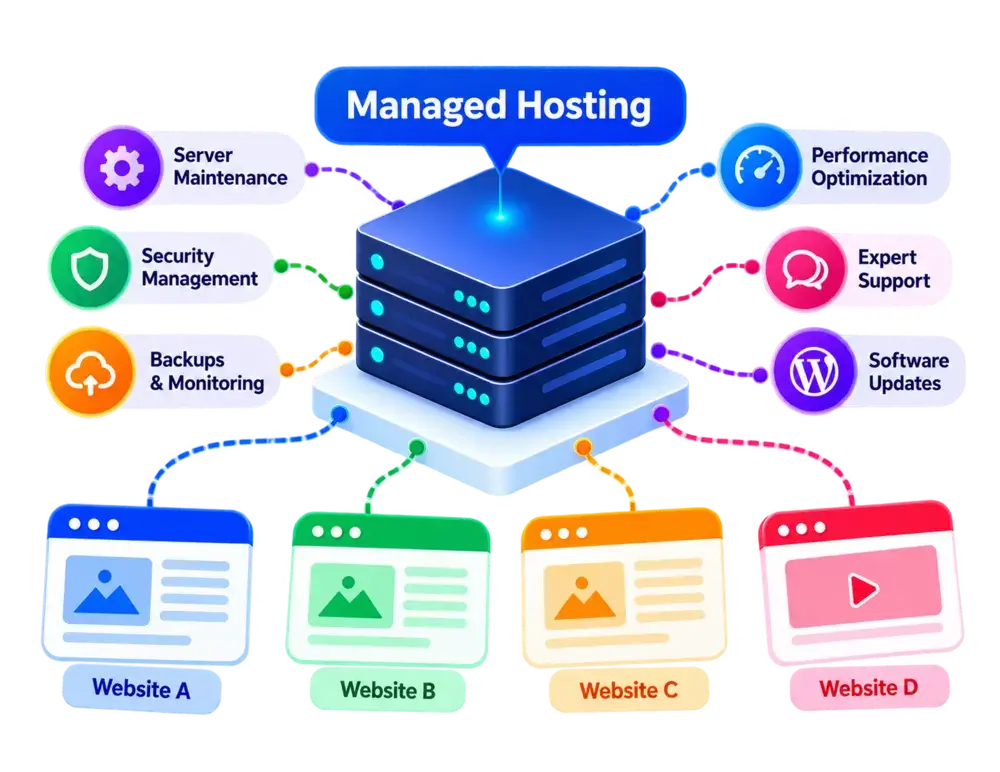
Managed Hosting at a Glance
A quick overview of what managed hosting offers, how it works, and who it’s designed for.
- Editor's Summary
Less Server Management
Provider-Managed Tasks
Best For
- Growing Websites
- Web Applications
- E-commerce Stores
- Website Owners With Limited Technical Experience
What You Should Know
Managed hosting lets your hosting provider handle certain technical tasks, such as server maintenance, software updates, monitoring, and security management. The services included depend on the hosting type, provider, and plan. Managed hosting can run on shared, VPS, cloud, or dedicated infrastructure
Server Maintenance
Providers handle routine server maintenance and updates, depending on your plan.
Simplified Management
Spend less time managing infrastructure and more time growing your website.
Technical Support
Get assistance with server issues, troubleshooting, and hosting-related tasks.
Security Management
Security updates, monitoring, and protection tools may be included.
Disclosure: ElegantEspace is supported by readers like yourself. We may earn an affiliate commission when you purchase through our links. Commissions do not affect our editors’ opinions or evaluations.
What Is Managed Hosting?
Managed hosting is a web hosting service in which the hosting provider takes care of certain technical tasks, such as server maintenance, software updates, security monitoring, and backups. This reduces the amount of server administration you need to handle yourself.
Unlike unmanaged hosting, where you are responsible for more of the server’s setup and maintenance, managed hosting includes support and management services according to your chosen plan.
Managed hosting is available across different hosting environments, including shared hosting, VPS hosting, cloud hosting, and dedicated hosting. The level of management varies by provider. Some plans cover basic server maintenance, while others include performance optimization, automated backups, security monitoring, and advanced technical support.
Managed hosting can be a practical choice for businesses, website owners, and developers who want to spend less time maintaining hosting infrastructure. However, it usually costs more than comparable unmanaged services, and you should check exactly which tasks the provider handles before choosing a plan.
Important Distinction
Managed hosting describes who manages the technical side of your hosting, not the type of server infrastructure you use. It can be offered with shared hosting, VPS hosting, cloud hosting, or dedicated hosting.
Managed WordPress hosting is a specialized service designed for WordPress websites. General managed hosting, however, can support many types of websites and applications.
How Does Managed Hosting Work?
Managed hosting works by allowing a hosting provider to handle specific technical tasks involved in running and maintaining your website or application. Instead of managing every server-related task yourself, you rely on the provider for services included in your hosting plan.
The exact process depends on the hosting infrastructure, management level, and services offered by the provider.
Here's How It Works:
1. You Choose a Managed Hosting Plan
You select a plan based on your website’s requirements, budget, expected traffic, and preferred hosting environment. Options may include managed shared, VPS, cloud, dedicated, or WordPress hosting.
2. Your Hosting Environment Is Set Up
The provider prepares your hosting environment, configures the necessary software, and allocates the resources included in your plan. Some services also include website migration and application installation.
3. Your Website Runs on the Server
Your website files, databases, and applications run on the hosting infrastructure. The underlying environment may use shared server resources, a virtual private server, cloud infrastructure, or a dedicated physical server.
4. The Provider Handles Technical Tasks
Depending on your plan, the provider may manage server updates, security patches, monitoring, performance configuration, and routine maintenance. You should check which tasks are included because managed hosting services vary.
5. Visitors Access Your Website
When someone enters your domain name, their browser sends a request to your hosting environment. The server processes the request and delivers the relevant website content to the visitor. The provider maintains the managed infrastructure according to the services included in your plan.
6. Support and Maintenance Continue
The provider continues performing the agreed management tasks and offers technical support according to your plan. You remain responsible for tasks outside the service scope, which may include website content, application settings, plugin updates, user accounts, or other site-level maintenance.
Important: Managed hosting does not mean the provider handles everything automatically. Before choosing a plan, review its management scope, backup policy, security coverage, support availability, and your own responsibilities.
What Are the Benefits of Managed Hosting?
Managed hosting helps reduce the technical workload involved in running a website or application. By letting the hosting provider handle certain maintenance and server administration tasks, you can spend more time on your business, content, and customers.
The available benefits depend on the hosting infrastructure, provider, and management services included in your plan.
1. Less Server Administration
One of the main benefits of managed hosting is that your provider handles certain technical tasks on your behalf.
Depending on your plan, these tasks may include server configuration, routine maintenance, software updates, and system monitoring.
This can save time for website owners who prefer not to manage server infrastructure themselves.
2. Professional Technical Support
Managed hosting plans may include technical assistance with server issues, configuration problems, and hosting-related troubleshooting.
Support availability and expertise vary by provider, but access to experienced technicians can be particularly useful when you encounter infrastructure problems.
Before choosing a plan, check its support hours, response commitments, and the types of issues the team will handle.
3. Simplified Security Management
Managed hosting providers may handle important security tasks, such as operating system updates, security patching, server monitoring, and firewall configuration.
These services can help reduce the work involved in maintaining a secure hosting environment.
However, managed hosting does not automatically protect every part of your website. You may still need to manage application security, user permissions, passwords, plugins, and other site-level risks.
4. Routine Software Updates
Keeping server software up to date helps maintain compatibility, address known vulnerabilities, and support reliable operation.
Depending on the plan, your provider may manage operating system updates, server software patches, and other infrastructure maintenance.
Check which updates are included and whether major upgrades require your approval or additional fees.
5. Backup and Recovery Options
Many managed hosting plans offer automated backups or additional backup services, helping you recover website data after certain failures or accidental changes.
Available features may include scheduled backups, backup retention, restoration tools, and recovery assistance.
Backup frequency and coverage vary, so confirm what gets backed up, how long copies are retained, and whether restoring your website costs extra.
6. Server Monitoring
Some managed hosting services monitor server health, resource usage, and infrastructure performance.
Monitoring can help identify certain technical problems and alert the provider when intervention may be needed.
The level of monitoring varies by plan. Check whether it covers server availability, resource utilization, application performance, or specific security events.
7. Performance Optimization
Managed hosting plans may include server configuration and performance improvements suited to the hosting environment.
Depending on the service, these may involve caching configuration, database tuning, web server optimization, or resource monitoring.
These measures can help improve performance, but managed hosting does not guarantee faster loading times. Results depend on server resources, website code, traffic, and configuration.
8. Time to Focus on Your Business
When your provider handles routine server administration, you can spend less time dealing with infrastructure maintenance.
This can be particularly valuable for small businesses, online stores, publishers, and website owners without a dedicated technical team.
You can focus more on creating content, serving customers, improving your products, and growing your online presence.
9. Flexible Hosting Options
Managed hosting is available across different infrastructure types, including shared hosting, VPS hosting, cloud hosting, and dedicated servers.
This allows you to choose a hosting environment based on your website’s resource requirements and technical needs while outsourcing some administrative tasks.
As your requirements change, you may be able to upgrade to a different plan or infrastructure type. The available options and migration process depend on your provider.
10. Support for Growing Websites
As your website grows, its resource requirements and maintenance needs may increase.
Managed hosting can help by providing ongoing technical assistance and infrastructure management while you focus on expanding your website or business.
However, management services do not automatically increase server capacity. You may still need to upgrade your plan or move to a more powerful hosting environment as traffic and resource demands grow.
Pros and Cons of Managed Hosting
- Less Server Administration
- Professional Technical Support
- Simplified Security Management
- Routine Software Updates
- Backup and Recovery Options
- Server Monitoring and Maintenance
Why These Features Stand Out
Managed hosting reduces the technical workload by letting your provider handle server maintenance, updates, monitoring, and other administrative tasks. Depending on the plan, you may also receive security services, backups, and technical support, leaving you more time to focus on your website or business.
- Higher Hosting Costs
- Less Administrative Control
- Provider-Dependent Management
- Service Limitations May Apply
- Some Tasks Remain Your Responsibility
- Provider Lock-In Is Possible
Potential Drawbacks Explained
Managed hosting typically costs more than comparable unmanaged services. Your control may be limited by the provider’s policies, and included services vary by plan. You may still need to manage website content, application updates, user accounts, and other tasks outside the provider’s management scope.
How Much Does Managed Hosting Cost?
Managed hosting costs vary depending on the hosting infrastructure, provider, server resources, and level of management included in the plan. Managed shared hosting may be relatively affordable, while managed VPS, cloud, and dedicated hosting typically cost more as resource requirements and service levels increase.
The price also depends on what the provider manages for you. Services such as server monitoring, security updates, automated backups, performance optimization, and advanced technical support may be included in the plan or charged separately.
Keep in mind that managed hosting is a service model, not a single hosting type. To compare prices fairly, look at both the underlying hosting resources and the management services you receive.
What Determines the Cost of Managed Hosting?
Several factors can affect the price of a managed hosting plan:
- Hosting infrastructure: Managed shared hosting, VPS hosting, cloud hosting, and dedicated hosting have different resource and pricing structures.
- Server resources: CPU, RAM, storage capacity, and bandwidth affect the cost, particularly for resource-intensive websites and applications.
- Level of management: Plans that include extensive server administration, monitoring, maintenance, and troubleshooting may cost more.
- Security services: Firewalls, malware scanning, security patching, and advanced protection may be included or charged separately.
- Backup and recovery: Automated backups, longer retention periods, and recovery assistance can affect the overall price.
- Technical support: The availability of specialist support, priority assistance, and server administration services may influence plan costs.
- Performance features: Caching, database optimization, content delivery networks (CDNs), and performance monitoring may be included or offered as extras.
- Website or application type: Managed WordPress hosting may include WordPress-specific tools, while managed server hosting may focus on infrastructure and server administration.
- Billing period and renewal rates: Introductory discounts and long-term commitments can reduce the advertised monthly rate, but renewal prices may be higher.
- Additional services: Website migration, premium software licenses, extra storage, and advanced support may increase the total cost.
What Should You Look For in a Managed Hosting Plan?
A low starting price doesn’t necessarily mean a managed hosting plan offers the best value. Compare the included management services, server resources, support coverage, and additional charges before choosing a provider.
Before buying, check whether the plan includes:
- Server maintenance: Confirm which updates, patches, and routine maintenance tasks the provider handles.
- Security management: Check the included security tools, monitoring, and protection services.
- Automated backups: Review backup frequency, retention periods, and restoration options.
- Technical support: Check support availability, response commitments, and whether server-level troubleshooting is included.
- Sufficient resources: Make sure the CPU, RAM, storage, and bandwidth meet your website’s requirements.
- Performance optimization: Check whether caching, server tuning, or other optimization services are included.
- Management scope: Understand which tasks the provider handles and which remain your responsibility.
- Upgrade options: Check whether you can move to a more powerful plan or different hosting infrastructure as your needs grow.
- Transparent pricing: Review renewal rates, setup fees, software licenses, and charges for additional services.
Quick tip: Compare managed hosting plans based on their total cost and the work they save you, not just the advertised monthly price. A more expensive plan may offer better value if it includes the maintenance, backups, security, and technical support you would otherwise need to manage yourself.
Recommended Managed Hosting Providers
Looking for a shared hosting plan? These are some providers worth considering based on features, pricing, performance, support, and overall suitability.

Managed Hosting
- Web Hosting and WordPress Options
- Managed Hosting Options
- WordPress Hosting Solutions
- Performance Optimization Features
- Free SSL on Eligible Plans
- Website Migration Options
- Security and Backup Features
- Technical Support
From $23.20/mo
Renews at regular pricing.

Managed WordPress
- WordPress-Focused Hosting
- Managed WordPress Hosting
- Google Cloud Infrastructure
- Daily Automatic Backups
- Cloudflare CDN and Edge Caching
- Staging Environments
- Performance Monitoring Tools
- 24/7 Technical Support
From $30.00/mo
Renews at regular pricing.
Who Should Use Managed Hosting?
Managed hosting is a suitable choice for website owners who want professional technical support and server maintenance without handling every technical task themselves.
It can be useful for businesses, growing websites, online stores, and WordPress users who want to spend less time managing hosting infrastructure.
Managed Hosting Is a Good Fit For:
- Small Businesses: Keep business websites running while spending less time on server administration and maintenance.
- Growing Websites: Get hosting resources and management services that match your website’s changing needs.
- E-commerce Stores: Access support for server maintenance, security, backups, and performance, depending on the hosting plan.
- WordPress Website Owners: Simplify WordPress hosting with services designed for updates, backups, security, and performance.
- Agencies and Freelancers: Reduce routine server management when maintaining websites for multiple clients.
- Users With Limited Technical Experience: Get help with hosting-related tasks without needing advanced server administration skills.
When Managed Hosting May Not Be the Right Choice
Managed hosting may not be necessary for every website. You may prefer another hosting type if you need:
- The Lowest Possible Hosting Cost: Shared hosting may be more affordable for personal blogs, portfolios, and small websites with limited resource requirements.
- Full Server Control: Unmanaged VPS or dedicated hosting may be more suitable if you want to configure server software, system settings, and security tools yourself.
- Hands-On Server Management: If you have the technical skills to manage updates, backups, security, and troubleshooting, you may not need to pay for additional management services.
- Minimal Hosting Requirements: A simple website with low traffic may run comfortably on a basic shared hosting plan without advanced management features.
- Custom Server Configurations: If your application requires specific software, system-level access, or custom configurations, check whether the managed hosting provider supports them.
- Flexible Choice of Technical Services: If you prefer to choose and configure your own monitoring, backup, security, and maintenance tools, an unmanaged plan may offer more flexibility.
Managed Hosting Compared to Other Hosting Types
Managed hosting differs from other hosting types mainly in how much server administration and technical maintenance the hosting provider handles.
It can run on shared, VPS, cloud, or dedicated infrastructure, so the right comparison depends on both the hosting environment and the management services included.
1. Managed Hosting vs. Shared Hosting
Shared hosting places multiple websites on the same server, while managed hosting describes a service in which the provider handles specified technical tasks. Shared hosting can also include management services.
Choose shared hosting for a budget-friendly website with modest resource needs. Consider managed hosting if you want additional technical assistance and maintenance.
2. Managed Hosting vs. VPS Hosting
VPS hosting provides a virtual server with allocated resources and greater control than typical shared hosting. Managed VPS hosting adds provider assistance with server administration, maintenance, and other included services.
Choose unmanaged VPS hosting if you want more hands-on control and can manage the server yourself. Choose managed VPS hosting if you want VPS resources with less administrative work.
3. Managed Hosting vs. Cloud Hosting
Cloud hosting uses cloud-based infrastructure to deliver hosting resources. Managed cloud hosting adds services such as server maintenance, monitoring, and technical support, depending on the plan.
Choose cloud hosting based on your infrastructure and resource requirements. Consider managed cloud hosting if you also want the provider to handle more of the technical administration.
4. Managed Hosting vs. Dedicated Hosting
Dedicated hosting gives one customer access to an entire physical server. Managed dedicated hosting includes provider assistance with server administration and maintenance, while unmanaged options leave more of that work to the customer.
Choose dedicated hosting when your workload requires dedicated physical resources or specific server configurations. Consider managed dedicated hosting if you also need help maintaining the server.
| Feature | Managed Hosting | Unmanaged Hosting |
|---|---|---|
| Server maintenance | Provider handles specified tasks | Customer handles most server administration |
| Technical support | Depends on the plan | Often more limited to infrastructure or basic support |
| Server control | May be restricted by the service | Typically offers more administrative control |
| Technical expertise | Less server expertise may be needed | Requires server administration skills |
| Cost | Usually higher for comparable infrastructure | Often lower, but management takes your time |
| Best suited for | Users who want less server administration | Users who prefer hands-on control |
Remember: Managed hosting is not a separate infrastructure type. Before choosing a plan, compare the underlying hosting environment, included management services, resource limits, support scope, and total cost.
Is Managed Hosting Right For Your Website?
Managed hosting can be a suitable choice if you want to spend less time handling server maintenance and more time growing your website or business. It can work well for small businesses, growing websites, online stores, agencies, and WordPress users who value technical support and simplified hosting management.
However, managed hosting usually costs more than unmanaged alternatives, and the services included vary by provider and plan. Some providers handle server updates, monitoring, backups, and security tasks, while others leave certain responsibilities to you.
If you run a small website on a tight budget, shared hosting may be sufficient and more affordable. If you want greater server control and have the technical skills to manage it, unmanaged VPS hosting may be a better fit. For WordPress websites, managed WordPress hosting is another option to consider.
For most website owners, the right choice depends on your budget, technical experience, website requirements, and preferred level of support. Compare the management services included in each plan before you buy, so you know exactly what the provider will handle and what remains your responsibility.
Frequently Asked Questions About Managed Hosting
1. What is managed hosting?
Managed hosting is a hosting service in which the provider handles certain technical tasks, such as server maintenance, software updates, monitoring, and backups. The exact services depend on the provider and plan.
2. How does managed hosting work?
The provider supplies the hosting environment and manages specified server-related tasks. You manage your website’s content and application, while the provider handles the technical responsibilities covered by your plan.
3. What are the benefits of managed hosting?
Key benefits include reduced server administration, access to technical support, simplified maintenance, and potential security, backup, and performance improvements, depending on the services included.
4. What are the disadvantages of managed hosting?
Managed hosting generally costs more than comparable unmanaged hosting. It may also limit server-level control, and some technical tasks may remain your responsibility.
5. How much does managed hosting cost?
Managed hosting costs vary by provider, infrastructure, resources, and management level. Managed shared hosting may be relatively affordable, while managed VPS, cloud, and dedicated hosting typically cost more. Check introductory and renewal prices before purchasing.
6. What is the difference between managed and unmanaged hosting?
With managed hosting, the provider handles specified technical tasks. With unmanaged hosting, you generally take responsibility for most server administration, including configuration, updates, security, and troubleshooting.
7. Is managed hosting suitable for beginners?
Yes. Managed hosting can help beginners who want technical assistance without learning server administration. However, you should still understand basic website management and check which services the provider includes.
8. Is managed hosting good for WordPress?
Yes. Managed WordPress hosting can simplify tasks such as WordPress-specific maintenance, backups, security, and performance optimization. Features vary by provider, so check whether plugin updates, staging, and malware removal are included.
9. Is managed hosting more secure?
Managed hosting may provide additional security measures, such as server monitoring, security updates, and backup services. However, security depends on the provider’s practices, the plan, and how you manage your website, passwords, plugins, and applications.
10. Can I upgrade my managed hosting plan as my website grows?
Many providers allow you to upgrade your hosting resources or move to a different plan. Available options and migration requirements vary, so check the provider’s upgrade policies before signing up.
11. What is the difference between managed hosting and managed WordPress hosting?
Managed hosting can support different applications and infrastructure types, including VPS, cloud, and dedicated servers. Managed WordPress hosting is specifically designed for WordPress websites and may include WordPress-focused tools, maintenance, and performance features.
12. Who should use managed hosting?
Managed hosting can suit small businesses, growing websites, online stores, agencies, and website owners who prefer professional technical support. Users who need full server control or want to minimize costs may prefer unmanaged hosting.

