
- October 2026
What Is WordPress Hosting? Benefits, Pros, Cons & More
Learn what WordPress hosting is, how it works, its types, benefits, costs, and how to choose the right hosting for your WordPress website.
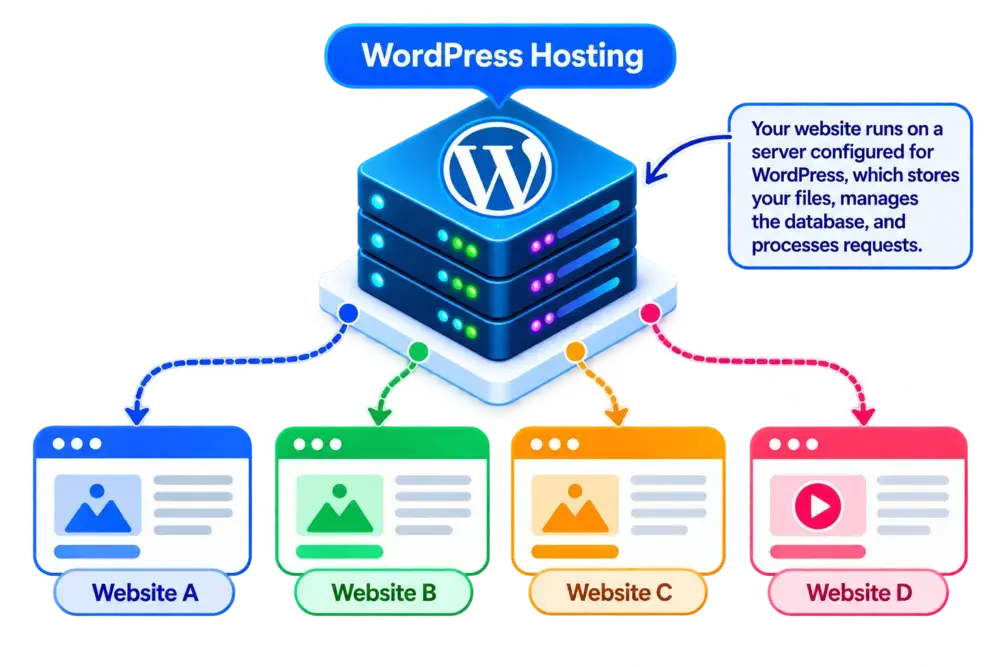
WordPress Hosting at a Glance
A quick overview of what WordPress hosting offers, how it works, and who it’s designed for.
- Editor's Summary
Only For WordPress Sites
WordPress-Optimized Hosting
Best For
- Growing Websites
- Web Applications
- E-commerce Stores
- Businesses with Variable Traffic
What You Should Know
WordPress hosting provides a hosting environment suitable for running WordPress websites. Some plans include WordPress-specific caching, security tools, automatic updates, backups, and expert support, while others mainly simplify installation. These features are not guaranteed with every plan.
WordPress Performance
Caching and server configurations designed for WordPress, depending on the plan.
Management Options
Managed plans may handle updates, backups, and maintenance tasks.
Simplified Setup
WordPress may come pre-installed or be available through a quick installer.
Security Features
SSL, backups, and security tools may be included, depending on the provider.
Disclosure: ElegantEspace is supported by readers like yourself. We may earn an affiliate commission when you purchase through our links. Commissions do not affect our editors’ opinions or evaluations.
What Is WordPress Hosting?
WordPress hosting is a web hosting service configured to run websites built with WordPress. It provides the server resources and software needed to store your website files, manage your database, and deliver your pages to visitors.
Some WordPress hosting plans also include features designed specifically for WordPress, such as one-click installation, automatic updates, WordPress caching, security tools, backups, and specialized support. The features available depend on the hosting provider and plan.
Unlike regular web hosting, which may support many different website platforms, WordPress hosting is tailored to the needs of WordPress websites. However, WordPress hosting does not automatically mean your website will be faster, more secure, or fully managed. Those benefits depend on the provider’s infrastructure, configuration, and included services.
Important Distinction
WordPress hosting is hosting configured or optimized to run WordPress websites. It can use shared, VPS, cloud, or dedicated server infrastructure. Managed WordPress hosting includes additional services, such as updates, backups, security, and performance management, depending on the provider and plan.
How Does WordPress Hosting Work?
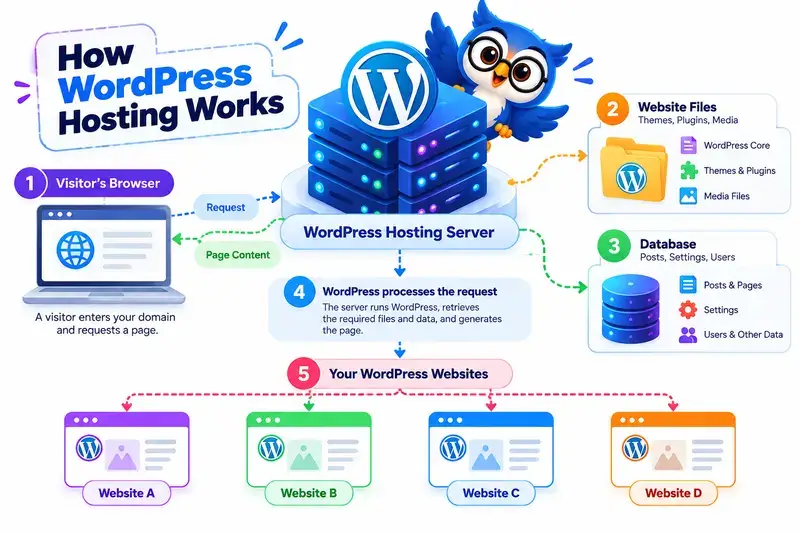
WordPress hosting works by providing the server resources and software needed to run a WordPress website. It stores your website files, manages your database, and processes requests whenever someone visits your site.
Depending on the hosting provider and plan, the environment may also include WordPress-specific tools for installation, updates, caching, security, backups, and website management.
Here's How It Works:
1. You Choose a WordPress Hosting Plan
You select a hosting plan based on your website’s needs, such as expected traffic, storage, performance requirements, budget, and the level of technical support you need.
2. Your WordPress Environment Is Set Up
The hosting provider supplies the server environment required to run WordPress.
You can usually install WordPress through a hosting control panel or use a plan that comes with WordPress pre-installed.
3. Your Website Files and Database Are Stored
WordPress uses files containing its core software, themes, plugins, and media, along with a database that stores content, settings, user information, and other website data.
Both work together to generate your website’s pages.
4. WordPress Processes Requests
When a visitor opens a page, the hosting server runs the necessary WordPress code, retrieves relevant information from the database, and generates the page.
Caching can reduce repeated processing and help pages load faster when configured appropriately.
5. Visitors Access Your Website
The server sends the generated page and its associated resources to the visitor’s browser.
The browser then displays your website, allowing visitors to read articles, browse products, submit forms, or interact with other features.
6. Your Hosting Plan Provides Resources and Tools
Your hosting plan determines the available computing resources and management features.
Depending on the provider, you may receive tools for backups, security, updates, performance optimization, and resource upgrades.
Managed WordPress hosting may handle more of these technical tasks for you, while other plans leave more responsibility in your hands.
What Are the Benefits of WordPress Hosting?
WordPress hosting provides a hosting environment designed to run WordPress websites. Depending on the provider and plan, it may include simplified installation, WordPress-specific performance features, security tools, backups, and management options.
These features can make it easier to launch, maintain, and grow a WordPress website without handling every technical task yourself.
1. Easy WordPress Installation
Many WordPress hosting plans include one-click installation or come with WordPress pre-installed. This simplifies the process of getting your website online.
Instead of manually configuring the software, you can often install WordPress through your hosting control panel and begin customizing your website.
This is particularly useful for beginners, bloggers, small businesses, and anyone creating their first WordPress website.
2. WordPress-Specific Performance Features
Some WordPress hosting plans include performance features designed to help WordPress websites load efficiently.
Depending on the provider, these may include:
- Server-level or plugin-based caching
- PHP version management
- Content delivery network (CDN) integration
- Database optimization tools
- Performance monitoring
- WordPress-specific server configurations
These features can help improve loading times when configured appropriately. However, actual performance also depends on your theme, plugins, images, website traffic, and server resources.
3. Simplified Website Management
WordPress hosting can make routine website management easier by providing tools for common tasks.
Depending on the plan, you may be able to manage WordPress installations, domains, databases, staging environments, backups, and software settings through a hosting dashboard.
Some providers also offer automatic WordPress updates and maintenance tools, reducing the amount of manual work required to keep your website running.
4. Security Features
WordPress hosting providers may include security tools to help protect your website against common threats.
Available features can include:
- Free SSL certificates for encrypted connections
- Malware scanning or detection
- Web application firewall (WAF) protection
- Automated backups
- Login protection and access controls
- Security monitoring
The exact protection varies by provider and plan. Hosting security features complement, rather than replace, good password practices, timely updates, and secure plugin selection.
5. Backup and Recovery Options
Website backups help you recover your content and configuration if something goes wrong.
Some WordPress hosting plans include automatic backups of website files and databases. Depending on the provider, you may also be able to create manual backups and restore an earlier version of your website.
These options can be useful before updating WordPress, changing themes, installing plugins, or making significant website modifications.
Important: Backup frequency, retention periods, restoration options, and additional charges vary by plan. Check these details before choosing a provider.
6. Managed Maintenance Options
Managed WordPress hosting can reduce the technical work involved in running a website.
Depending on the service, the hosting provider may handle tasks such as:
- WordPress core updates
- Automated backups
- Security monitoring
- Server and caching optimization
- Staging and website migration
- WordPress-specific technical support
This can be helpful for business owners, content publishers, and website operators who prefer to focus on their websites rather than server administration.
Not every WordPress hosting plan is fully managed. Some providers offer only basic WordPress tools, while others handle a wider range of maintenance tasks.
7. Support for WordPress Websites
Some hosting providers offer support teams with experience in WordPress-related hosting issues.
Depending on the provider and plan, support may help with WordPress installation, hosting configuration, database connectivity, SSL setup, backups, and server-side performance problems.
Specialized support can be valuable when troubleshooting technical issues, particularly if you have limited experience managing websites.
However, support for custom themes, third-party plugins, and website development issues may be limited or charged separately.
8. Hosting Options for Different Website Sizes
WordPress websites vary widely in their resource requirements. A personal blog may need relatively little server capacity, while a busy online store or membership platform may require more resources.
WordPress can run on several types of hosting infrastructure, including:
- Shared WordPress hosting: A budget-friendly option for many beginners and smaller websites.
- VPS WordPress hosting: Provides a virtual server environment with allocated resources and potentially greater control.
- Cloud WordPress hosting: Uses cloud infrastructure, with scaling and redundancy capabilities depending on the platform.
- Dedicated WordPress hosting: Provides an entire physical server for workloads that require dedicated hardware.
- Managed WordPress hosting: Adds services that handle more technical maintenance, depending on the provider.
This variety lets you choose a hosting environment based on your budget, traffic, technical skills, and management preferences.
9. Room to Grow With Your Website
As your WordPress website develops, you may need more storage, processing power, or support for additional visitors and features.
Many hosting providers offer upgrade paths that let you move to a higher-tier plan or a different hosting environment as your requirements change.
For example, you might start with shared WordPress hosting for a new blog and later move to VPS or cloud hosting as traffic and resource requirements increase.
Upgrading does not always happen automatically. You may need to change plans, migrate your website, adjust its configuration, or pay for additional resources.
Good to Know
Not all WordPress hosting plans include the same features. Automatic backups, advanced security, performance optimization, and managed maintenance may be available only with certain plans. Before choosing a provider, check which features are included, what costs extra, and how much website maintenance you will need to handle yourself.
Pros and Cons of WordPress Hosting
- Easy WordPress Setup
- WordPress-Specific Tools
- Simplified Website Management
- Security and Backup Options
- Managed Hosting Available
- Flexible Upgrade Options
Why These Features Stand Out
WordPress hosting can simplify website creation through easy installation, WordPress-specific tools, and hosting features designed for the platform.
Depending on the plan, you may also benefit from automated backups, security tools, performance optimization, and managed maintenance.
These features can help you spend less time on technical tasks and more time developing your website.
- Features Vary by Plan
- Managed Plans Can Cost More
- Plugin and Theme Conflicts
- Resource Limits Still Apply
- Maintenance May Still Be Needed
- Upgrades or Migration May Be Required
Potential Drawbacks Explained
WordPress hosting does not eliminate every website management task.
Features such as automatic backups, advanced security, and managed updates may require higher-tier plans.
You may also encounter plugin compatibility issues, resource limits, or additional costs as your website grows.
Before choosing a plan, check its included features, renewal pricing, resource limits, and migration options.
How Much Does WordPress Hosting Cost?
WordPress hosting costs vary depending on the hosting type, provider, server resources, and features included in your plan. Basic shared WordPress hosting is often affordable for beginners, while VPS, cloud, and managed WordPress hosting plans can cost more depending on their resources and services.
Your total cost may also include domain registration, premium themes, plugins, email hosting, backups, and other website tools. Some of these expenses are optional, while others may be necessary for your website.
Keep in mind that introductory discounts can make the first payment much lower than the renewal price. Always check the regular renewal rate and the features included before choosing a plan.
What Determines the Cost of WordPress Hosting?
Several factors can affect the price of a WordPress hosting plan:
- Hosting type: Shared hosting is generally budget-friendly, while VPS, cloud, and dedicated hosting can cost more depending on their resources. Managed WordPress hosting may also carry a premium for additional services.
- Hosting provider: Different providers offer different infrastructure, features, support, and pricing structures.
- Server resources: CPU, RAM, storage, and bandwidth limits can affect the plan’s price and capacity.
- Website traffic: Websites with more visitors or resource-intensive features may require higher-tier hosting plans.
- Management features: Automatic updates, managed maintenance, staging tools, and WordPress-specific support may increase the cost.
- Performance features: Advanced caching, CDN services, and performance optimization tools may be included or charged separately.
- Security and backups: SSL certificates, malware scanning, automated backups, and backup restoration options vary by provider and plan.
- Domain and email: Domain registration, professional email accounts, and renewals may be separate expenses.
- Themes and plugins: Premium WordPress themes and plugins may involve one-time purchases or recurring subscription fees.
- Billing period and discounts: Promotional prices, renewal rates, and longer billing commitments can affect your overall spending.
What Should You Look For in a WordPress Hosting Plan?
A low starting price does not necessarily mean a WordPress hosting plan offers the best value. Compare the included features, resource limits, renewal prices, and management options before making a decision.
Before buying, check whether the plan includes:
- Free SSL: Helps encrypt data exchanged between your website and its visitors.
- WordPress installation: Look for a one-click installer or pre-installed WordPress to simplify setup.
- Sufficient resources: Check storage, CPU, RAM where specified, bandwidth, and other limits to ensure they suit your website.
- Backups: Review backup frequency, retention periods, restoration options, and any additional charges.
- Security features: Look for appropriate security tools, malware protection, access controls, and software update options.
- Performance features: Check for caching, CDN integration, supported PHP versions, and other relevant optimization features.
- WordPress-specific support: Confirm whether the provider helps with WordPress-related issues or only server and hosting problems.
- Management options: If you prefer less technical work, check whether automatic updates, backups, and maintenance are included or require a managed plan.
- Transparent pricing: Compare introductory prices with renewal rates and check for extra charges for backups, email, migrations, or additional resources.
- Upgrade and migration options: Make sure you can move to a more suitable plan as your website grows without unnecessary complications.
Quick Tip: If you’re launching your first blog or small business website, basic shared WordPress hosting may be enough. Consider managed WordPress, VPS, or cloud hosting when your maintenance needs, traffic, performance requirements, or desired level of control justify the additional cost.
Recommended WordPress Hosting Providers
Looking for WordPress hosting? These providers are worth considering based on WordPress features, pricing, performance, security, support, and ease of website management.

WordPress Hosting
- WordPress-Optimized Hosting
- LiteSpeed on Supported Plans
- Free SSL Certificate
- Turbo Performance Options
- WordPress Installation Tools
- Website Migration Options
- 24/7 Technical Support
From $4.49/mo
Renews at regular pricing.

WordPress Hosting
- WordPress-Ready Hosting
- Free SSL Certificate
- WordPress Installation Tools
- Performance Optimization Options
- Website Migration Assistance
- Security Features
- 24/7 Customer Support
From $5.09/mo
Renews at regular pricing.
Who Should Use WordPress Hosting?
WordPress hosting is a suitable choice for anyone building a website with WordPress. Depending on the provider and plan, it can simplify website setup, provide WordPress-specific performance tools, and reduce the technical work involved in managing a website.
The right plan depends on your website’s purpose, expected traffic, budget, technical experience, and how much maintenance you want to handle yourself.
WordPress Hosting Is a Good Fit For:
- Bloggers and Content Creators: WordPress hosting can simplify publishing articles, managing media, and maintaining a content-focused website.
- Small and Medium-Sized Businesses: Business owners can use WordPress to build company websites, service pages, contact forms, and landing pages without developing everything from scratch.
- E-commerce Stores: Businesses running WooCommerce can use WordPress hosting to operate online stores. Stores with larger catalogs, higher traffic, or demanding functionality may need more resources.
- Portfolio and Personal Websites: Freelancers, designers, photographers, and professionals can use WordPress to showcase their work, publish content, and build an online presence.
- Affiliate Marketers and Publishers: WordPress offers tools for publishing product reviews, comparison articles, tutorials, and other content. Hosting features such as caching and backups can help support ongoing site management.
- Membership and Subscription Websites: Websites offering paid content, online communities, courses, or member-only resources can run on WordPress, provided the hosting plan supports their technical requirements.
- Beginners Building Their First Website: Plans with easy WordPress installation, user-friendly dashboards, and helpful support can make getting started less complicated.
- Developers and Website Managers: WordPress hosting plans with staging environments, developer tools, configurable resources, or advanced management features can help users maintain multiple websites and more complex projects.
When WordPress Hosting May Not Be the Right Choice
WordPress hosting isn’t necessary for every website. You may prefer another solution if you need:
- A website without WordPress: If you’re using a different content management system or website platform, choose hosting compatible with that technology.
- A simple, no-maintenance website builder: A hosted website builder may be more convenient if you don’t want to manage WordPress, plugins, or updates.
- Highly customized server infrastructure: Developers with specialized software requirements may prefer a configurable VPS, cloud server, or dedicated server.
- A fully managed experience: Basic WordPress hosting may still require you to manage updates, backups, security, and troubleshooting. Consider managed WordPress hosting if you want the provider to handle more of these tasks.
- The lowest possible hosting cost: If you’re building a very small website, a basic shared hosting plan that supports WordPress may offer everything you need without paying extra for specialized features.

Quick Takeaway: WordPress hosting can support websites of many sizes, but choosing a WordPress-specific plan doesn’t automatically guarantee better performance or security. Compare the provider’s actual features, resource limits, support, and management services before deciding.
WordPress Hosting Compared to Other Hosting Types
WordPress hosting is designed to run websites built with WordPress. Unlike general-purpose hosting, it may include WordPress-specific features such as easy installation, caching, security tools, backups, and simplified website management.
WordPress hosting can run on shared, VPS, cloud, or dedicated server infrastructure. The main differences come down to the resources available, performance requirements, level of control, management features, scalability, and budget. Your best option depends on your website’s needs and how much technical maintenance you want to handle yourself.
| Feature | Shared WordPress Hosting | Managed WordPress Hosting | VPS WordPress Hosting | Cloud WordPress Hosting |
|---|---|---|---|---|
Cost |
Usually lower |
Varies, often higher |
Moderate to high |
Varies by resources |
Resources |
Shared server resources |
Depends on underlying infrastructure |
Allocated virtual resources |
Depends on cloud configuration |
Performance |
Suitable for smaller sites |
Depends on plan and optimization |
More configurable resources |
Flexible, depending on platform |
Maintenance |
More user responsibility |
Provider handles more tasks |
Depends on management level |
Depends on management level |
Scalability |
Plan-dependent |
Plan-dependent |
Resources can often be upgraded |
Scaling options depend on provider |
Technical Knowledge |
Low |
Low to moderate |
Moderate to high if unmanaged |
Varies by service |
Best For |
Beginners and small websites |
Users wanting less maintenance |
Growing or resource-intensive websites |
Websites needing flexible resources |
Is WordPress Hosting Right For Your Website?
WordPress hosting is a good choice if you’re building a website with WordPress and want a hosting environment suited to the platform.
It can work well for blogs, business websites, online stores, portfolios, and content publishing websites, with features that simplify installation, performance optimization, security, and website management.
However, the features and level of management vary by provider and plan.
Basic WordPress hosting may require you to handle updates, backups, and maintenance yourself, while managed WordPress hosting can take care of more technical tasks for you.
If you’re starting a small blog or business website, shared WordPress hosting may be sufficient and affordable. If you want less maintenance, consider managed WordPress hosting.
For websites with greater resource demands, VPS or cloud WordPress hosting may offer more flexibility and control. Dedicated hosting is worth considering when your website requires an entire physical server.
For most website owners, the best approach is to compare your website’s requirements, expected traffic, technical experience, and budget before choosing a plan.
Start with hosting that meets your current needs, and upgrade as your website grows rather than paying for resources and features you don’t yet need.
Frequently Asked Questions About WordPress Hosting
1. What is WordPress hosting?
WordPress hosting is a web hosting service configured to run websites built with WordPress. It provides the server resources and software needed to store website files, manage the database, and deliver pages to visitors.
Depending on the plan, it may also include WordPress installation tools, caching, backups, security features, and specialized support.
2. What is the difference between WordPress hosting and web hosting?
Web hosting is a general service that makes websites accessible online. WordPress hosting is designed or configured to run WordPress websites and may include platform-specific tools and features.
You can run WordPress on many standard web hosting plans, so specialized WordPress hosting is not always necessary. Compare the included features, management options, and technical requirements before choosing.
3. How much does WordPress hosting cost?
WordPress hosting costs depend on the provider, hosting type, server resources, and included features. Basic shared hosting is generally more affordable, while managed WordPress, VPS, cloud, and dedicated hosting can cost more depending on the service.
Remember to compare introductory prices with renewal rates and check whether backups, email, domain registration, and premium features cost extra.
4. Which WordPress hosting is best for beginners?
Shared WordPress hosting is often a practical starting point for beginners because it is generally affordable and requires less server administration. Look for easy WordPress installation, an intuitive control panel, SSL, backups, and accessible customer support.
If you prefer the hosting provider to handle more technical maintenance, consider a managed WordPress hosting plan.
5. What is managed WordPress hosting?
Managed WordPress hosting is a service in which the provider handles more of the technical work involved in running a WordPress website. Depending on the plan, this may include software updates, backups, security monitoring, caching, and performance optimization.
It can suit business owners, bloggers, and website managers who want to spend less time maintaining their hosting environment.
6. What is the difference between shared hosting and WordPress hosting?
Shared hosting describes how server resources are shared among multiple websites. WordPress hosting describes a hosting environment intended or configured for WordPress.
These categories can overlap. A shared hosting plan can support WordPress, and a WordPress hosting plan may use shared, VPS, cloud, or dedicated infrastructure.
7. Can I host a WordPress website on regular web hosting?
Yes. You can host a WordPress website on regular web hosting if the server meets WordPress’s technical requirements and supports the software needed to run it.
Many general-purpose hosting plans support WordPress installation. Before purchasing, check the provider’s supported PHP and database versions, HTTPS support, and installation options.
8. Is WordPress hosting secure?
WordPress hosting can provide security features such as SSL certificates, backups, malware scanning, firewalls, and software update tools. However, the available protection varies by provider and plan.
You should also keep WordPress, themes, and plugins updated, use strong passwords, restrict unnecessary access, and maintain reliable backups. No hosting plan can guarantee complete protection against every threat.
9. Does WordPress hosting improve website speed?
WordPress hosting may improve website performance when it provides suitable server resources, optimized configurations, effective caching, or CDN integration.
However, hosting is only one factor. Your theme, plugins, image sizes, database, website code, and traffic also influence loading speed. A WordPress-specific plan does not automatically make every website faster.
10. Can I change my WordPress hosting provider later?
Yes. You can migrate your WordPress website to another compatible hosting provider. The process typically involves transferring your website files and database, configuring the new hosting environment, testing the website, and updating DNS settings when you’re ready.
Some providers offer migration tools or assistance. Before moving, create a complete backup and check whether the new provider supports your website’s plugins, themes, and technical requirements.

