
Helping beginners build websites since 2017
400K+
Readers Helped
Updated for 2026
Latest Method
100%
Beginner Friendly
Disclosure: ElegantEspace is supported by readers like you. We may earn an affiliate commission when you purchase through our links. Commissions do not affect our editors’ opinions or evaluations.
Table of Content
What Are Search Engines?
Search engines are online tools that help users find information across the web.
They discover web pages, organize their content in searchable indexes, and display relevant results when someone enters a query.
Popular search engines include:
- Google: The world's most widely used search engine.
- Bing: Microsoft's search engine, integrated with Copilot.
- Yahoo: A search platform powered largely by Bing's search technology.
- DuckDuckGo: A search engine focused on user privacy.
Modern search engines also use artificial intelligence (AI) to better understand search queries, summarize information, and generate relevant answers.
In simple terms: Search engines connect users with relevant information from across the internet, whether through traditional results or AI-generated responses.
How Do Search Engines Work?
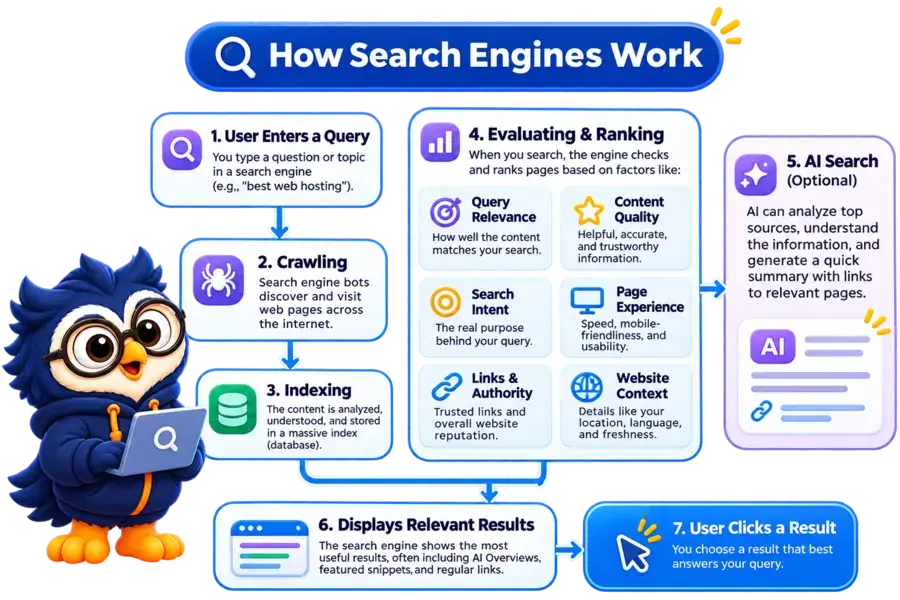
Search engines use a series of processes to discover web pages, understand their content, and display the most relevant results when someone searches for information.
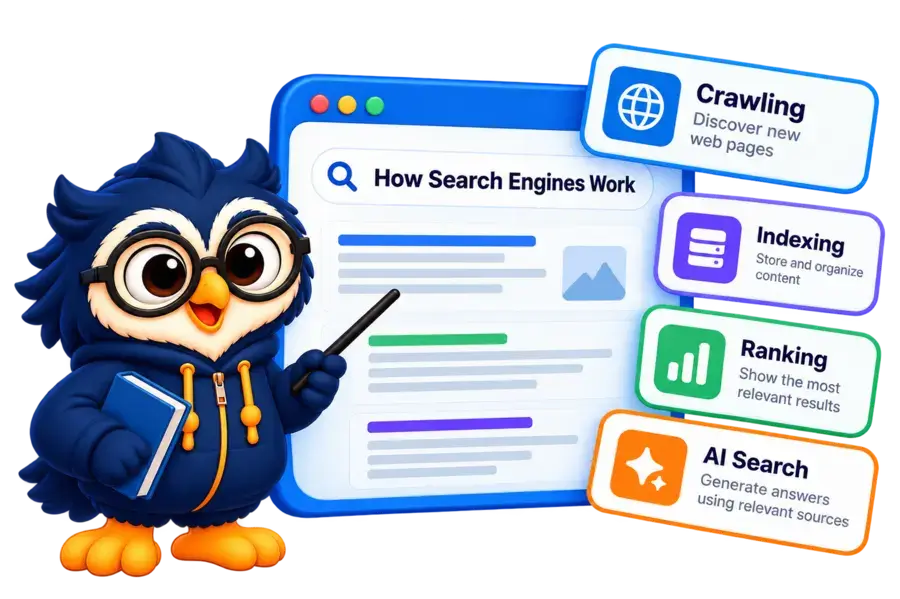
Although different search engines use different technologies, the traditional search process generally involves three main stages: crawling, indexing, and ranking.
Let’s understand each stage in detail.
Crawling: Discovering Web Pages
Crawling is the process through which search engines discover new and updated pages across the internet.
They use automated programs called crawlers, bots, or spiders to visit websites and collect information.
For example, Google’s crawler, Googlebot, discovers web pages by following links, checking XML sitemaps, and revisiting previously discovered URLs.
During crawling, search engines can discover different types of content, including:
- Text, headings, and other page content
- Images and videos
- Internal and external links
- Page titles and metadata
Crawlers also revisit websites to identify newly published pages and changes to existing content.
However, discovering a URL doesn’t guarantee that it will be crawled.
Your website should have a clear structure, accessible pages, and proper internal linking to help search engines discover important content.
Rendering
After discovering a page, search engines may need to render it to understand how its content appears, particularly when the page relies on JavaScript.
Rendering helps search engines process the page’s visible content and understand its structure.
Indexing: Organizing Information
After crawling a page, search engines process and analyze its content to understand what the page is about.
They may then store the processed information in a massive database called a search index.
During indexing, search engines can analyze:
- Page content and headings
- Title tags and meta information
- Images and other media
- Internal and external links
- Canonical URLs and other technical signals
When someone enters a search query, the search engine doesn’t search the entire internet from scratch. It retrieves potentially relevant information from its index.
Important: Not every crawled page gets indexed. Search engines may exclude pages because of duplicate content, technical issues, low-value content, or other reasons.
Ranking: Displaying Relevant Results
When someone enters a search query, search engines identify relevant pages from their index and use ranking systems to determine which results should appear first.
They consider numerous signals, including:
- Relevance: How closely the content matches the search query.
- Content quality: Whether the page provides helpful and reliable information.
- Page experience: Whether the website offers a good user experience.
- Links: How pages are connected and referenced across the web.
- Context: The user's location, language, and search intent.
The search engine then displays results in an order designed to help users find the information they need.
Ranking is not a fixed process. Results can change depending on the query, competition, context, and search engine updates.
How AI Fits Into This Process
Artificial intelligence is increasingly involved in how search engines understand queries and present information.
Google’s AI Overviews and AI Mode, for example, can use information from relevant web sources to generate summarized answers and provide supporting links.
This means search visibility is no longer limited to traditional blue links.
Your content may also be surfaced as a source within AI-powered search experiences.
However, the fundamentals remain important: your pages need to be accessible, useful, relevant, and eligible to appear in search features.
How Do Search Engines Understand Content?
Search engines don’t simply match exact keywords. They use advanced algorithms and language-processing technologies to understand what a page is about and how well it answers a user’s query.
Here are some key ways they interpret content:
Keywords and Search Intent
Search engines analyze the words and phrases used on a page to understand its topic.
They also consider search intent, or what the user actually wants to find.
For example, someone searching for “best web hosting” is likely looking for recommendations or comparisons, not just a definition of web hosting.
Natural Language Processing
Natural Language Processing (NLP) helps search engines interpret human language, including phrases, questions, and relationships between words.
This allows them to understand the meaning behind a search query rather than relying only on exact keyword matches.
Context and Semantic Understanding
Search engines analyze related terms, topics, and concepts to understand the broader meaning of content.
For example, a page about WordPress hosting may naturally include terms such as server performance, SSL certificates, website speed, and uptime.
Links and Website Relationships
Search engines also analyze links between pages to discover content and understand how information is connected.
Internal links help establish relationships between pages on your website, while external links can provide additional context and signals about a page.
What Is Search Engine Crawling?
Crawling is the process through which search engines discover new and updated web pages across the internet.
They use automated programs called crawlers, bots, or spiders to visit websites and collect information about their content.
For example, Google uses a web crawler called Googlebot to discover pages across the web.
It follows links, checks submitted sitemaps, and revisits previously discovered URLs to identify new or updated content.
How Do Search Engine Crawlers Discover Pages?
Search engine crawlers use several methods to discover web pages:
1. Following Links
Crawlers follow links from one page to another to discover additional URLs.
For example, when Googlebot visits your homepage, it may follow links to your blog posts, service pages, and other sections of your website.
2. XML Sitemaps
An XML sitemap provides search engines with a list of important URLs on your website. It helps crawlers discover pages they might not easily find through internal links.
3. Revisiting Existing Pages
Search engines periodically revisit known URLs to check for changes, such as newly added content, updated information, modified links, or deleted pages.
What Happens During Crawling?
When a crawler visits a web page, it retrieves the page and processes its accessible content.
Depending on the page, search engines may also render JavaScript to understand content that isn’t immediately available in the initial HTML.
Crawlers can discover different types of website content, including:
- Text, headings, and other page content
- Images and videos
- Internal and external links
- Page titles and metadata
However, crawling doesn’t guarantee indexing or ranking. Search engines decide which discovered pages should be processed further and potentially included in their search index.
Why Is Crawling Important for SEO?
If search engines cannot discover or access your important pages, those pages may not appear in search results.
That’s why maintaining a crawlable website with proper internal linking, clear navigation, and an XML sitemap is essential.
In the next section, we’ll look at how you can help search engines discover and crawl your website more effectively.
How to Help Search Engines Crawl Your Website
You cannot control exactly when or how often search engines crawl your website, but you can make it easier for their crawlers to discover and access your important pages.
Here are some practical ways to improve your website’s crawlability.
Use Google Search Console
Google Search Console is a free tool that helps you monitor how Google discovers and crawls your website.
Its URL Inspection Tool allows you to check an individual page’s indexing status, identify certain crawling issues, and request indexing when a page is ready.
You can also use the Page Indexing report to understand which pages are indexed and why some pages may not be indexed.
Use the Site Search Operator

You can use Google’s site: search operator to get an approximate idea of which pages from your website appear in Google’s search index.
For example, enter:
site:yourdomain.com
Google will display pages from your domain that it has included in its search results.
You can also check a specific URL or section of your website:
site:yourdomain.com/blog/
Create and Submit an XML Sitemap
An XML sitemap is a file that lists important URLs on your website. It helps search engines discover pages that they might not find easily through internal links.
If you’re using WordPress, SEO plugins such as Yoast SEO and Rank Math can automatically generate XML sitemaps.
For example, a sitemap URL may look like this:
https://yourdomain.com/sitemap_index.xml
Once generated, submit your sitemap through Google Search Console under the Sitemaps section.
This helps Google discover your important URLs, although submitting a sitemap does not guarantee that every page will be crawled or indexed.
Maintain Good Site Navigation
Search engine crawlers discover many pages by following links from one URL to another. Your website should have a logical navigation structure that makes important pages easy to find.
For example, if you publish a new article about keyword research, link to it from relevant SEO guides, category pages, and other related articles.
Avoid leaving important pages without internal links.
These are often called orphan pages, and they can be harder for search engines and visitors to discover.
A well-organized website should have:
- Clear navigation menus.
- Relevant internal links between related pages.
- Logical categories and subcategories.
- Descriptive URLs.
- No unnecessary navigation barriers.
Good site navigation improves content discoverability and helps visitors move through your website more easily.
Check Your Robots.txt File
The robots.txt file provides instructions to crawlers about which parts of your website they are allowed or disallowed to crawl.
For example, you can use it to prevent crawlers from accessing certain sections that don’t need to be crawled.
A robots.txt file is generally available at:
https://yourdomain.com/robots.txt
However, remember that robots.txt is a crawling directive, not a reliable way to prevent a URL from appearing in search results. A blocked URL may still be indexed if other signals point to it.
Important: Don’t accidentally block important pages, CSS files, JavaScript resources, or other content that search engines need to understand your website.
Importance of Good Site Navigation
A well-organized website makes it easier for visitors to find information and helps search engines discover and understand your pages.
Search engine crawlers follow links to move from one page to another.
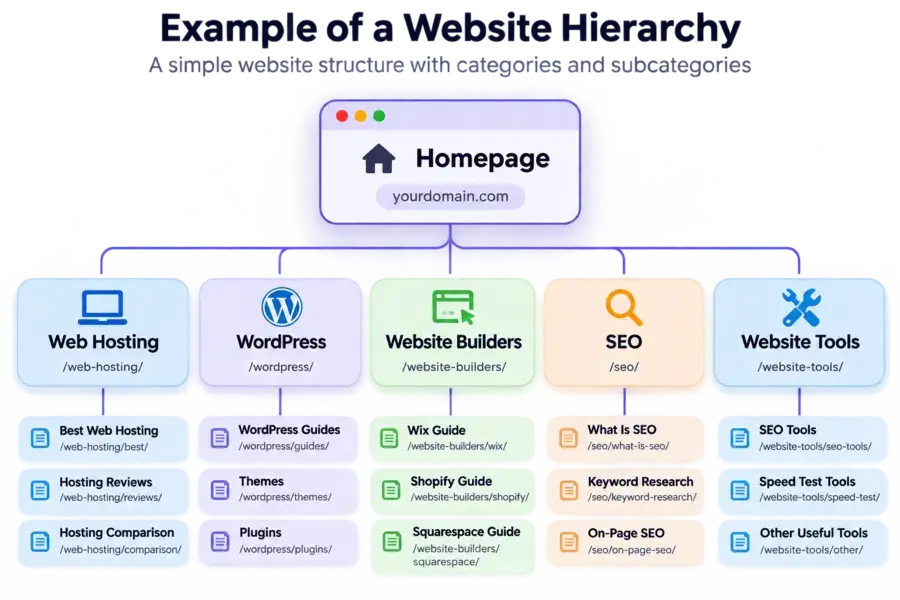
If important pages are poorly connected or difficult to access, crawlers may take longer to discover them.
That’s why your website should have clear navigation, logical categories, and relevant internal links.
What Is Information Architecture?
Information architecture (IA) is the practice of organizing and structuring website content so visitors can easily find the information they need.
Think of it as the blueprint of your website.
It determines how pages are grouped, how categories are arranged, and how users move between different sections.
For example, a website about SEO might use the following structure:
SEO
What Is SEO?
How Search Engines Work
Keyword Research
On-Page SEO
Off-Page SEO
Technical SEO
This structure helps visitors understand how topics are connected and makes related content easier to discover.
How To Create a Good Website Structure
Follow these practices when organizing your website:
- Use clear categories: Group related pages under meaningful categories.
- Create logical navigation: Make important pages accessible through menus and relevant links.
- Use internal linking: Connect related articles to help visitors explore additional information.
- Avoid orphan pages: Ensure important pages have relevant internal links pointing to them.
- Keep navigation simple: Don't make visitors click through unnecessary pages to find useful information.
Defining a Good URL Structure
A URL (Uniform Resource Locator) is the web address used to access a particular page.
A well-structured URL gives visitors and search engines a clear indication of what a page is about.
Examples of good URL structures:
https://www.example.com/coffee
https://www.example.com/products/shirt
These URLs are short, descriptive, and easy to understand.
Examples of poor URL structures:
https://www.example.com/455de/sh45/
https://www.example.com/rtgdfd/5879/
These URLs contain random characters and provide little information about the destination page.
Best Practices For Creating SEO-Friendly URLs
- Keep URLs short and descriptive.
- Include your primary topic or keyword naturally.
- Use hyphens to separate words.
- Avoid unnecessary numbers, symbols, and parameters.
- Use lowercase letters consistently.
- Maintain a logical URL hierarchy where appropriate.
Important: A descriptive URL helps users understand a page, but changing URLs unnecessarily can create problems.
If you change an existing URL, implement a relevant 301 redirect to preserve access to the old address and help search engines process the change.
Robots.txt: How to Control Search Engine Crawling
The robots.txt file is a text file that website owners use to provide crawling instructions to search engine bots.
It tells crawlers which parts of a website they are allowed or disallowed to access.
For example, you may want search engines to crawl your blog posts and product pages but avoid crawling certain administrative or internal sections.
A robots.txt file is usually located in your website’s root directory:
https://yourdomain.com/robots.txt
How Does Robots.txt Work?
The file uses specific directives to communicate crawling rules to search engine bots.
Here is a simple example:
User-agent: *
Disallow: /wp-admin/
Allow: /wp-admin/admin-ajax.php
Sitemap: https://yourdomain.com/sitemap_index.xml
Let’s understand what each directive means:
- User-agent: Specifies which crawler the rule applies to. The asterisk (*) applies to all crawlers that follow the standard.
- Disallow: Tells crawlers not to access a specified URL path.
- Allow: Permits access to a specific path, even when a broader disallow rule applies.
- Sitemap: Provides the location of your XML sitemap.
Important Things to Know About Robots.txt
- File name is case-sensitive: The file should be named robots.txt and placed in your website's root directory.
- No robots.txt file: If a crawler doesn't find the file, it generally assumes there are no robots.txt restrictions.
- Crawlers may follow the instructions: Well-behaved search engine crawlers generally respect the rules specified in the file.
- It doesn't guarantee deindexing: A URL blocked by robots.txt may still appear in search results if Google discovers it through other sources.
- Different crawlers may behave differently: Not every bot follows robots.txt instructions.
Should You Block Pages Using Robots.txt?
You can use robots.txt to manage crawler access to certain sections of your website. However, don’t block important pages that you want search engines to discover and understand.
For example, accidentally blocking your entire website with this rule can prevent search engines from crawling its pages:
User-agent: *
Disallow: /
Important: If you want to prevent a page from appearing in Google search results, use an appropriate noindex directive instead. Google needs to crawl the page to see that instruction, so don’t block the page in robots.txt at the same time.
For WordPress websites, check your SEO plugin and robots.txt configuration carefully before making changes.
How Do Search Engines Rank Web Pages?
Once search engines have crawled and indexed web pages, the next step is ranking. Ranking is the process of determining the order in which pages appear in search results when someone enters a query.
Search engines aim to show users the most relevant, helpful, and reliable information for their searches.
In the early days of search, keyword matching played a major role in determining which pages appeared in results. Today, search engines use sophisticated algorithms, machine learning systems, and numerous signals to understand content and evaluate its relevance.
For example, if someone searches for “best web hosting for beginners,” Google identifies relevant pages from its index and evaluates which ones are most likely to satisfy that search.
Several factors can influence how pages perform in search results.
Content Relevance and Search Intent
Relevance is one of the most important aspects of search ranking. Search engines try to understand what users are looking for and identify pages that best match their queries.
For example, when someone searches for “how to start an online store,” they are probably looking for a step-by-step guide rather than a list of online shopping websites.
Modern search engines also understand related words, phrases, and concepts.
For example, they can recognize that “how to change a light bulb” and “how to replace a light bulb” express similar intentions.

This means ranking is no longer just about matching exact keywords. Your content should address the actual purpose behind a search.
Backlinks and Website Authority
Backlinks are links from other websites pointing to your website.
They can help search engines discover pages and understand how websites reference one another.
Relevant, naturally earned links from reputable websites can contribute to your site’s credibility and search visibility.
However, more backlinks don’t automatically mean higher rankings.
The relevance and quality of links matter more than simply collecting large numbers of them.
For example, a relevant link from a respected website in your industry may be more valuable than dozens of unrelated links from low-quality websites.
Avoid buying links or participating in link schemes intended to manipulate search rankings.
Content Quality and Helpfulness
Publishing useful content is essential for attracting visitors and performing well in search results.
Search engines aim to prioritize content that provides relevant, reliable, and satisfying information.
Consider this example:
Suppose someone searches for “benefits of yoga” and opens two articles.
- Article A: Contains extensive information but is poorly organized, difficult to understand, and lacks practical explanations.
- Article B: Explains the topic clearly, uses relevant examples, includes helpful images, and organizes information with descriptive headings.
Even if Article A has more backlinks, Article B may provide a better experience for readers.
The lesson is simple: don’t create content just to include keywords or increase word count. Focus on answering questions, explaining concepts, and providing information that genuinely helps your audience.
Content Freshness
Freshness refers to how recently information has been published or updated. It can influence rankings when a search query requires current information.
For example, someone searching for “latest WordPress guide” expects up-to-date information.
In this case, newer and accurate information is particularly important.
However, freshness doesn’t matter equally for every topic.
If someone searches for “how many continents are there,” an accurate article published several years ago may still provide the right answer.
Update your content when information becomes outdated, not simply to change its publication date.
Page Experience and Core Web Vitals
Page experience refers to how visitors interact with and experience your website.
A slow, confusing, or difficult-to-use website can frustrate visitors.
That’s why Google considers several page experience signals when evaluating search results.
Core Web Vitals measure important aspects of user experience:
- Largest Contentful Paint (LCP): Measures loading performance.
- Interaction to Next Paint (INP): Measures responsiveness to user interactions.
- Cumulative Layout Shift (CLS): Measures visual stability.
Google recommends the following Core Web Vitals targets:
| Metric | Good Score |
|---|---|
| LCP | 2.5 seconds or less |
| INP | 200 milliseconds or less |
| CLS | 0.1 or less |
You can measure these metrics using Google’s PageSpeed Insights.
Remember, good Core Web Vitals support a better user experience, but passing every metric does not guarantee higher rankings.
Mobile-Friendly Website

A large share of web searches happen on mobile devices, making mobile usability essential.
Google primarily uses the mobile version of website content for indexing and ranking. This approach is known as mobile-first indexing.
If your website works properly on desktop but displays poorly on smartphones, you may create problems for both visitors and search engines.
Make sure your website:
- Uses a responsive design.
- Displays text clearly without unnecessary zooming.
- Has buttons and links that are easy to tap.
- Loads important content properly on mobile devices.
- Avoids intrusive elements that interfere with browsing.
You can use Google Search Console and PageSpeed Insights to identify potential mobile usability and performance issues.
How Do People Interact With Search Engines?
The way people interact with search engines has evolved significantly over the years. Earlier, users mainly entered short keywords to find information.
Today, they use detailed questions, voice searches, and conversational queries to get more specific answers.
However, the basic search journey still follows a few important steps:
- Identify a need: Someone looks for information, a product, a service, or a solution to a problem.
- Form a search query: They express what they need using keywords, phrases, or complete questions.
- Enter the query: They type or speak their search into Google, Bing, or another search platform.
- Explore the results: The search engine displays relevant web pages, images, videos, featured snippets, or AI-generated answers.
- Find the information: Users visit relevant pages, explore the available answers, or refine their search if they haven't found what they need.
Informational Queries
People use informational queries when they want to learn something or find answers to specific questions.
Examples include:
- What is SEO?
- How do search engines work?
- How to start an online business?
- What are the benefits of yoga?
- How can I improve my website speed?
Navigational Queries
Navigational queries are used when someone wants to find a particular website, brand, or online destination.
Examples include:
- Google Search Console
- Hostinger login
- WordPress dashboard
- Facebook login
Transactional Queries
Transactional queries indicate that someone intends to purchase a product, subscribe to a service, or complete an action.
Examples include:
- Buy a domain name
- Purchase WordPress hosting
- Buy a website theme
- Subscribe to an SEO tool
Commercial Investigation Queries
Sometimes people research different products or services before making a purchase decision.
Examples include:
- Best web hosting for beginners
- Hostinger vs Bluehost
- Best WordPress SEO plugins
- Kinsta review
How AI Is Changing Search Behaviour
AI-powered search is making it easier for people to ask detailed questions and explore topics through conversations.
Instead of entering several separate searches, users can ask follow-up questions and request comparisons, explanations, or recommendations within the same search experience.
For example, someone researching web hosting might ask:
- Which hosting provider is best for beginners?
- What features should I compare?
- Which option offers better performance on a budget?
AI-powered search experiences can help organize information and provide summarized answers with links to relevant sources.
The takeaway: Understand what your audience is searching for and create content that addresses their actual needs. Whether someone wants information, is comparing products, or is ready to purchase, your website should provide a relevant and useful experience.
How Do Search Engines Personalize Search Results?
Have you ever noticed that two people searching for the same keyword can sometimes see different results?
That’s because search engines may consider several contextual factors to provide results that are more relevant to individual users.
Search personalization helps search engines understand what someone might be looking for based on the context of their search.
Factors That Can Influence Search Results
Here are some factors that may influence the results users see:
Location
Location plays an important role in searches where nearby businesses or local information are relevant.
For example, if someone searches for “SEO company,” Google may display SEO agencies near their location.
Language
Search engines consider the language of a query and other language-related context to provide results users can understand.
For example, someone searching in Hindi may see Hindi-language pages alongside other relevant results.
Search Context
Search engines interpret the meaning and context of a query to understand what the user wants.
For example, someone searching for “Apple price” may be looking for an iPhone, while someone searching for “Apple benefits” is probably interested in the fruit.
Previous Search Activity
Search activity and other available personalization signals may influence certain search experiences. However, not every search result is personalized, and search history is not a universal ranking factor.
How Search Personalization Affects SEO
Personalization means search results are not always identical for everyone.
The same keyword can produce different results depending on the query, location, language, and other contextual factors.
For website owners, this means you should focus on creating content for your intended audience rather than relying only on checking rankings from your own browser.
For example, if you run a local web design agency in Patna, creating useful pages that clearly explain your services and the locations you serve can help search engines understand your local relevance.
The takeaway: Focus on understanding your audience, their location, language, and search intent. Create relevant content that addresses their needs instead of trying to optimize for one fixed search result position.
How AI Is Changing Search Engines and the Future of Search
Artificial intelligence is changing how search engines understand queries, process information, and present search results.
Earlier, users mainly received a list of links and had to visit different websites to find answers.
Today, AI-powered search features can understand more complex questions, summarize information, and help users explore a topic through follow-up questions.
Search engines are gradually moving from simply matching keywords to understanding the meaning and context behind a search.
Let’s look at some of the major ways AI is transforming search.
AI-Powered Search Summaries
One of the biggest changes is the introduction of AI-generated summaries in search results.
For example, Google’s AI Overviews can generate an AI-powered summary for certain searches by bringing together relevant information from multiple sources.
Users can get an initial explanation directly on the search results page, along with links to websites where they can explore the information further.
Consider someone searching for:
“How can I improve my WordPress website speed?”
Instead of relying only on traditional blue links, an AI-powered search feature may provide a summary covering image optimization, caching, hosting performance, and other relevant techniques.
This changes how users discover information because they can understand the basics without immediately opening several websites.
Understanding Conversational and Complex Queries
Traditional search often encouraged users to enter short keywords, such as “best WordPress hosting” or “website speed optimization.”
AI-powered search systems can understand longer, more conversational questions.
For example:
- "Which hosting provider is suitable for a beginner starting a WordPress blog?"
- "How can I move my website to another hosting provider without losing data?"
- "What should I consider before choosing hosting for an eCommerce website?"
These queries contain more context than a few keywords. AI systems can interpret the user’s intent and provide responses that address multiple aspects of the question.
This makes search more conversational and helps users find information using natural language.
Follow-Up Questions and Conversational Search
AI is also making search more interactive. Instead of starting a completely new search every time, users can ask follow-up questions to explore a topic in greater detail.
For example:
Initial search: What is web hosting?
Follow-up question: Which type of hosting is best for beginners?
Next question: Is shared hosting suitable for a small business website?
An AI-powered search experience can use the context of the earlier questions to understand what the user wants to know next.
This creates a more continuous search experience rather than treating every query as an isolated request.
Better Understanding of Search Intent and Context
AI helps search systems understand the meaning behind a query rather than relying only on exact keyword matches.
For example, someone searching for “best hosting for an online store” may be looking for a hosting service that offers reliable performance, security, scalability, and eCommerce support.
An AI-powered system can interpret these requirements and identify information that addresses the user’s actual needs, even when the content does not use exactly the same words as the search query.
This makes content relevance, clear explanations, and satisfying search intent increasingly important.
Multimodal Search: Searching Beyond Text
Search is no longer limited to typing words into a search box. AI is helping search systems understand different types of input, including images, voice, and text.
For example, users can:
- Search using an image to find visually similar products or information.
- Ask questions through voice instead of typing.
- Use text and images together to provide more context.
- Explore information about objects, places, and products using visual search tools.
Google Lens and other visual search technologies demonstrate how AI can help users discover information through images.
For website owners, this makes useful images, descriptive image filenames, relevant alt text, and properly structured visual content important parts of website optimization.
AI Search and the Importance of Reliable Sources
AI-generated answers need information from sources that can help support their responses.
Search systems may use relevant web pages to provide context, identify supporting information, and link users to useful sources.
For example, when someone asks an AI search system to compare different web hosting providers, it may use information from product pages, reviews, documentation, and other relevant websites.
This creates another opportunity for publishers and website owners to get discovered through links and citations in AI-powered search experiences.
However, appearing in an AI-generated answer is not guaranteed.
AI systems select sources based on their own processes, and being indexed in a traditional search engine does not guarantee that a page will be cited.
What Does This Mean for SEO?
AI is changing how search results are presented, but it does not make traditional SEO irrelevant.
Search engines still need to discover, crawl, understand, and evaluate web pages.
Google also explains that its AI search features build on existing Search systems, so established SEO practices remain relevant.
For website owners, the focus should be on:
- Publishing original, accurate, and genuinely helpful content.
- Answering specific questions clearly and completely.
- Organizing content with descriptive headings and logical sections.
- Building relevant internal links between related pages.
- Providing useful examples, data, and first-hand experience where appropriate.
- Keeping important content accessible to search engine crawlers.
- Using relevant images, videos, and structured data correctly.
AI-generated answers need information from sources that can help support their responses.
Search systems may use relevant web pages to provide context, identify supporting information, and link users to useful sources.
For example, when someone asks an AI search system to compare different web hosting providers, it may use information from product pages, reviews, documentation, and other relevant websites.
This creates another opportunity for publishers and website owners to get discovered through links and citations in AI-powered search experiences.
However, appearing in an AI-generated answer is not guaranteed.
AI systems select sources based on their own processes, and being indexed in a traditional search engine does not guarantee that a page will be cited.
How To Optimize Your Website For Traditional and AI Search
Search engines are evolving, but the fundamentals of SEO remain important.
Whether someone discovers your website through Google search results, Bing, Google AI Overviews, or another AI-powered search experience, your content needs to be accessible, relevant, useful, and trustworthy.
There is no separate trick or guaranteed method for ranking in AI-generated answers.
Instead, focus on building a technically sound website and publishing content that genuinely helps your audience.
Here are the essential practices you should follow.
Create Helpful, People-First Content
Content is one of the most important parts of your SEO strategy. Your website should provide useful information that answers visitors’ questions and helps them solve problems.
Avoid publishing articles simply to target keywords or increase the number of pages on your website.
For example, if you are writing about web hosting, do not just explain what hosting is.
Help readers understand the different hosting types, compare providers, evaluate pricing, and choose a suitable service.
Follow these practices:
- Understand what your target audience wants to know.
- Answer the main question early in the article.
- Provide detailed explanations where the topic requires them.
- Include practical examples, screenshots, and relevant data.
- Avoid unnecessary repetition and generic statements.
- Add original insights and experience wherever possible.
Your content should be written for people first, with SEO helping search engines discover and understand it.
Understand Search Intent and Target Relevant Keywords
Before creating a page, understand why someone is searching for a particular term.
For example, someone searching for “what is web hosting” wants an explanation, while someone searching for “best web hosting for beginners” is likely comparing services before making a purchase.
These searches have different intentions, so they require different types of content.
You can categorize search intent into four main types:
| Search Intent | Example Query | Suitable Content |
|---|---|---|
| Informational | What is web hosting? | Educational guide |
| Navigational | Hostinger login | Login or brand page |
| Commercial | Hostinger vs Bluehost | Comparison article |
| Transactional | Buy web hosting | Product or pricing page |
Use keyword research tools such as Google Keyword Planner, Semrush, or Ahrefs to discover relevant search terms and understand what your audience is looking for.
Also, consider related questions and long-tail keywords. These can help you cover specific topics that users may explore through traditional or conversational search.
Organize Your Content With Clear Headings
A well-structured article is easier to read, navigate, and understand.
Use a logical heading hierarchy:
- H1: Main article title.
- H2: Major sections.
- H3: Subsections within an H2.
- H4: Smaller sections when additional hierarchy is needed.
Use descriptive headings that accurately explain what each section covers. Avoid adding headings just to include keywords.
Build a Strong Internal Linking Structure
Internal links connect different pages on your website and help visitors discover related information.
They also help search engines find pages and understand how your content is connected.
For example, if you publish an article about keyword research, you can link to related guides covering:
- What Is SEO?
- How Search Engines Work
- On-Page SEO
- Technical SEO
- Best Keyword Research Tools
Use descriptive anchor text so readers understand what they will find after clicking a link.
Avoid leaving important pages without internal links from other relevant pages. Also, make sure your website has a logical category structure.
Improve Website Speed and Page Experience
Website performance affects how visitors experience your content. Slow-loading pages, unstable layouts, and delayed interactions can frustrate users.
Use Google PageSpeed Insights to test your website and identify performance issues.
Pay particular attention to Google’s Core Web Vitals.
To improve performance:
- Compress and optimize images.
- Use an efficient caching solution.
- Choose reliable web hosting.
- Minimize unnecessary scripts and plugins.
- Use a content delivery network when appropriate.
- Optimize your website for mobile devices.
Make Your Website Mobile-Friendl
Many people access websites through smartphones, so your website should work properly on different screen sizes.
Google primarily uses the mobile version of website content for indexing and ranking through mobile-first indexing.
Check that:
- Text is readable without zooming.
- Navigation menus work properly.
- Buttons and links are easy to tap.
- Images fit smaller screens.
- Important content is available on mobile.
- Pages do not have unnecessary horizontal scrolling.
Use Structured Data Correctly
Structured data is a standardized format that helps search engines understand information on a webpage.
For example, you can use relevant schema types to describe:
- Articles and blog posts.
- Products.
- Organizations.
- Breadcrumb navigation.
- Events.
- Local businesses.
For a product review page, appropriate structured data may help search engines understand details such as the product name, review information, and other eligible attributes.
However, structured data does not guarantee rich results or AI citations.
It should accurately represent the visible content on your page and follow the relevant search engine guidelines.
Optimize Images and Other Media
Images, videos, and other media can make your content more useful and engaging.
They can also help search engines understand and discover visual information.
Follow these image optimization practices:
- Use descriptive image filenames.
- Add meaningful alt text where appropriate.
- Compress images without unnecessarily reducing quality.
- Use modern image formats such as WebP or AVIF when supported.
- Add captions when they provide useful context.
- Make sure important visual information is also explained in text.
For example, instead of uploading an image named IMG_1234.jpg, use a descriptive filename such as wordpress-hosting-comparison.webp.
Keep Your Content Accurate and Updated
Outdated information can reduce the usefulness of an article, especially when discussing products, software, pricing, and technology.
Review your important pages regularly and update information when necessary.
For example, if you publish a web hosting comparison, check whether:
- Hosting plans and prices have changed.
- New features have been introduced.
- Old features have been discontinued.
- Performance information is still accurate.
- Screenshots reflect the current interface.
Do not update content merely to change its publication date. Make meaningful improvements that benefit readers.
Final SEO Checklist for Traditional and AI Search
Before publishing an article or updating an existing page, use this checklist:
Website Preparation
Following these practices can help search engines discover and understand your website while giving visitors a better experience.
Continue Your SEO Journey
Build your skills one step at a time with these essential SEO guides.
Keyword Research
Start here
Discover what your audience searches for and find relevant topics worth targeting.
On-Page SEO
Optimize your pages
Improve titles, headings, content, images, and internal links to help search engines understand your pages.


Very informative..
Great…!! that’s great advice good work, I read and also saw your every post, nice artical very usefull your post Thank you so much for sharing this and the information provide.
Glad to hear that…!!
I’m really enjoying the design and layout of your site.
It’s a very easy on the eyes which makes it much more pleasant for
me to come here and visit more often. Did you hire out a developer to create your theme?
Superb work!