
- October 2026
What Is Shared Hosting? Benefits, Pros, Cons & More
Learn what shared hosting is, how it works, its benefits and drawbacks, typical costs, and whether it’s the right choice for your website.
Shared Hosting at a Glance
A quick overview of what shared hosting offers, who it’s for, and what to expect.
- Editor's Summary
Beginner Friendly
Easy to set up and manage
Best For
- Portfolio Websites
- Bloggers & Content Websites
- Small Business
- Beginners
What You Should Know
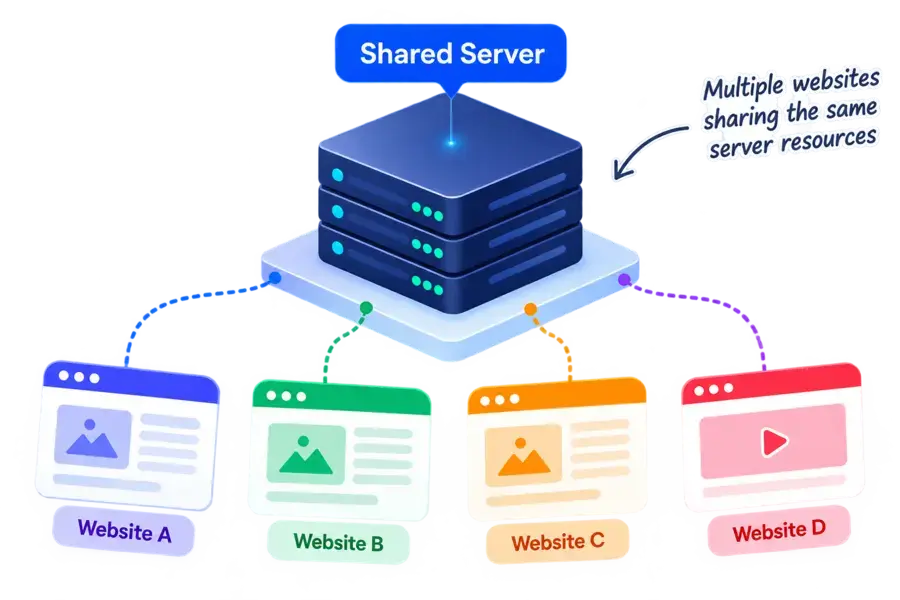
Shared hosting keeps website hosting affordable by placing multiple websites on the same server. It’s easy to manage and works well for many small websites, but server resources and control are shared.
Affordable Plans
One of the most budget-friendly hosting options.
Essential Features
Storage, bandwidth, SSL, email, and more.
Easy to Upgrade
Move to VPS or cloud hosting when you need.
Great for Small Sites
Ideal for blogs, portfolios, and small businesses.
Disclosure: ElegantEspace is supported by readers like yourself. We may earn an affiliate commission when you purchase through our links. Commissions do not affect our editors’ opinions or evaluations.
What Is Shared Hosting?
Shared hosting is a type of web hosting where multiple websites are hosted on the same physical server and share its available resources.
Instead of renting an entire server for your website, you share the underlying infrastructure with other websites. This keeps the cost low and makes shared hosting one of the easiest hosting options for beginners.
Each website still has its own hosting account, files, database, domain, and settings. The shared part is the server infrastructure and resources such as CPU, RAM, storage, and network capacity.
How Shared Hosting Works
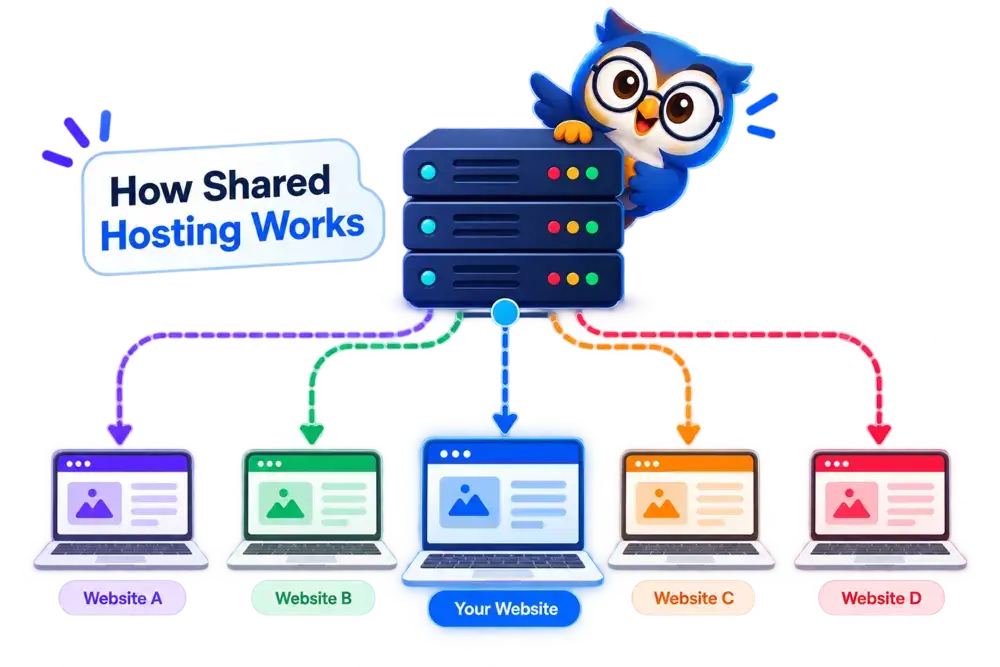
Shared hosting works by placing multiple websites on the same physical server and dividing the server’s available resources among them.
You don’t need to manage the physical server yourself. Your hosting provider takes care of the underlying infrastructure, while you manage your website through a hosting control panel.
Here's How It Works:
1. You Choose a Shared Hosting Plan
You purchase a hosting plan based on your website’s needs, such as storage, bandwidth, number of websites, and other included features.
2. Your Hosting Account is Created
The provider gives you a separate hosting account where your website files, databases, email accounts, and other settings are stored.
3. Your Website is Placed On a Shared Server
Your website runs on a physical server that also hosts other customers’ websites.
4. Server Resources are Shared
Websites on the server share resources such as CPU, RAM, storage, and network capacity. Your hosting plan may also have specific resource limits.
5. Visitors Access Your Website
When someone enters your domain name, their browser sends a request to the hosting server. The server processes the request and sends your website’s content back to the visitor.
6. The Hosting Provider Manages The Server
The provider handles much of the server-side maintenance, including hardware, networking, server software, security, and infrastructure management.
What Are the Benefits of Shared Hosting?
Shared hosting is popular because it removes much of the complexity and cost associated with running a website. For many beginners and small websites, you get the essentials without having to manage a server yourself.
1. Affordable Hosting
Shared hosting is usually one of the least expensive ways to host a website.
Because multiple customers share the same server infrastructure, the provider can spread the operating costs across many accounts.
This makes it particularly attractive when you’re launching a blog, portfolio, small business website, or new online project.
2. Beginner-Friendly
You don’t need to be a server administrator to use shared hosting.
Most providers give you a hosting control panel where you can manage common tasks such as:
- Installing WordPress
- Connecting domains
- Creating email accounts
- Managing files
- Creating databases
- Setting up SSL
- Managing backups
The hosting provider handles much of the underlying server management.
3. Easy to Set Up
Getting a website online can be relatively straightforward.
A typical setup looks like:
Choose a plan → Connect your domain → Install WordPress → Add your content → Launch
Many providers also offer one-click WordPress installation, free SSL, website migration, and website builders, although the exact features depend on the provider and plan.
4. Useful Features Included
Shared hosting plans often bundle several tools that would otherwise require separate services.
Depending on the provider, you may get:
SSL certificates · Email accounts · Backups · CDN · Malware protection · Website migration · Control panel · WordPress tools
Always check what’s actually included in your specific plan because features and limits vary considerably between providers.
5. No Server Maintenance
One of the biggest advantages is that you don’t have to maintain the physical server.
The hosting company is responsible for things such as:
- Server hardware
- Network infrastructure
- Operating system
- Server software
- Data-center operations
- Hardware maintenance
You can therefore spend more time working on your website rather than worrying about the machine running it.
6. Easy to Upgrade
Starting with shared hosting doesn’t mean you’re locked into it.
If your website grows and begins requiring more CPU, RAM, storage, or server control, you can usually upgrade to a VPS, cloud, or dedicated hosting plan.
That makes shared hosting a practical starting point for websites that are still growing.
Pros and Cons of Shared Hosting
- Affordable
- Beginner-friendly
- Easy to set up
- Managed infrastructure
- Easy to upgrade
Why These Features Stand Out
- Affordable: Shared hosting is generally cheaper than VPS, cloud, or dedicated hosting because the server infrastructure is shared among multiple customers.
- Beginner-friendly: Most hosting providers handle the server-side management, allowing you to focus on your website rather than server administration.
- Easy to set up: Features such as one-click WordPress installation, free SSL, website migration, and control panels can make getting started relatively simple.
- Managed infrastructure: The hosting provider takes care of the underlying server, hardware, network, and much of the technical maintenance.
- Easy to upgrade: As your website grows, you can usually move to a higher shared plan or upgrade to VPS or cloud hosting.
- Resources are shared
- Limited server control
- Performance can vary
- Resource limits
- Less customization
Potential Drawbacks Explained
- Shared resources: Your website shares server resources with other customers. Depending on the provider and plan, heavy resource usage by other accounts can affect the available capacity of the server.
- Limited server control: Unlike VPS or dedicated hosting, you generally don’t have the same level of access or configuration control over the server.
- Performance can vary: Website speed depends on factors such as server capacity, resource allocation, caching, your website itself, and how the hosting provider manages the server.
- Resource limits: Shared plans typically have limits on resources such as CPU usage, RAM, storage, processes, or other server resources.
- Less customization: Shared hosting environments are designed to support many customers, so some advanced server configurations and software may not be available.
How Much Does Shared Hosting Cost?
Shared hosting is generally one of the most affordable ways to host a website. Entry-level plans can cost just a few dollars per month, while higher-tier plans with more resources, additional websites, and extra features cost more.
However, the price you see when signing up isn’t always the price you’ll pay forever.
What Determines The Cost of Shared Hosting?
Several factors can affect the price of a shared hosting plan:
- Hosting provider
- Length of the billing period
- Number of websites you can host
- Storage and resource limits
- Free domain availability
- Email accounts
- Backups
- Security features
- Website migration
- Premium WordPress or website-building tools
What Should You Look For In a Shared Hosting Plan?
A cheap plan isn’t necessarily good value if important features are missing.
Before buying, check whether the plan includes:
- Free SSL: Protects the connection between your website and its visitors.
- Backups: Check how frequently backups are created and how long they’re retained.
- Enough resources: Look beyond storage and check CPU, RAM, processes, or other resource limits where disclosed.
- Free migration: Useful if you’re moving an existing website from another host.
- Support: Check how support is provided and whether it is available when you need it.
- Upgrade options: Your hosting provider should give you a clear path to a larger plan or VPS/cloud hosting if your website outgrows shared hosting.
Recommended Shared Hosting Providers
Looking for a shared hosting plan? These are some providers worth considering based on features, pricing, performance, support, and overall suitability.

Best Overall Hosting
- Free Domain
- Free SSL
- AI Website Builder
- LiteSpeed Servers
- 24/7 Live Support
From $2.99/mo
Renews at regular pricing.

Best for Beginners
- Free Domain
- Free SSL
- AI Website Builder
- 24/7 Support
- Beginner Friendly
From $1.99/mo
Renews at regular pricing.
Who Should Use Shared Hosting?
Shared hosting is a good starting point when you want to get a website online without paying for dedicated server resources or managing a server yourself.
It can work particularly well for websites with moderate resource requirements and predictable traffic.
Shared Hosting Is a Good Fit For:
- Blogs & Personal Websites: Ideal for bloggers, writers, and personal websites that don’t need large amounts of server resources.
- Small Business Websites: A practical option for businesses that mainly need a website to showcase their services, location, contact information, and other basic details.
- Portfolio Websites: Designers, developers, photographers, freelancers, and other professionals can use shared hosting to showcase their work.
- New Websites & Startups: If you’re launching a new website and don’t know how much traffic you’ll receive, shared hosting can provide an inexpensive place to start.
- Small Online Stores: Some smaller e-commerce websites can run on shared hosting, provided the hosting plan supports the store’s software and resource requirements.
- Informational Websites: Websites with articles, guides, documentation, or other mostly informational content can often work well on shared hosting.
- New WordPress Websites: Shared hosting is commonly used for WordPress because many providers offer one-click installation, SSL, automatic updates, caching, and other WordPress-related tools.
When Shared Hosting May Not Be the Right Choice
Shared hosting isn’t ideal for every website. You may want to consider VPS, cloud, or dedicated hosting if you need:
- Consistently high server resources
- Advanced server-level configuration
- Root or administrative access
- Highly customized software environments
- Infrastructure designed for substantial traffic
- More predictable or dedicated resource allocation
However, traffic alone doesn’t automatically mean you need to leave shared hosting. Your website’s software, resource consumption, optimization, traffic patterns, and hosting provider all matter.

Quick takeaway: If you’re starting a blog, portfolio, small business website, or relatively lightweight WordPress site, shared hosting can provide a simple and affordable starting point. As your website’s requirements grow, you can move to a more powerful hosting environment.
Shared Hosting Compared to Other Hosting Types
Shared hosting is only one way to host a website. As your website grows, you may come across VPS, cloud, and dedicated hosting, which offer different levels of resources, control, scalability, and cost.
The biggest difference is how the server resources are allocated and how much control you have over the hosting environment.
| Feature | Shared Hosting | VPS Hosting | Cloud Hosting | Dedicated Hosting |
|---|---|---|---|---|
Cost |
$2–$10/mo |
$5–$40+/mo |
$5–$50+/mo |
$70–$200+/mo |
Resources |
Shared |
Allocated |
Distributed |
Dedicated |
Performance |
Good For Smaller Sites |
Higher |
Highly Scalable |
Very High |
Server Control |
Limited |
High |
High |
Very High |
Scalability |
Moderate |
High |
Very High |
High |
Technical Knowledge |
Low |
Moderate–High |
Moderate–High |
High |
Best For |
Beginners & Small Websites |
Growing Websites |
Scaling & Variable Traffic |
High-Resource Websites |
Shared Hosting vs VPS Hosting
Shared hosting places multiple websites on the same server and shares its resources. VPS hosting still uses a physical server shared by multiple customers, but the server is divided into isolated virtual environments with dedicated or allocated resources.
| Metric | Shared Hosting | VPS Hosting |
|---|---|---|
| Cost | Lower | Higher |
| Resources | Shared | Allocated |
| Control | Limited | Much greater |
| Setup | Easy | More technical |
| Best for | Small websites | Growing websites |
Choose shared hosting when keeping costs low and managing your website easily are your priorities.
Consider VPS hosting when your website needs more resources, greater control, or a more isolated hosting environment.
Shared Hosting vs Cloud Hosting
Cloud hosting uses resources across a network of servers rather than relying on a single physical server in the traditional way. This can provide greater scalability and flexibility.
| Metric | Shared Hosting | Cloud Hosting |
|---|---|---|
| Cost | Lower | Usually higher |
| Infrastructure | Typically one physical server | Multiple interconnected servers |
| Scalability | Limited–Moderate | High |
| Resource flexibility | Lower | Higher |
| Best for | Smaller websites | Growing or variable workloads |
Shared hosting can be sufficient when your website has relatively modest and predictable resource requirements.
Cloud hosting becomes more relevant when scalability, flexibility, or handling changing workloads are important.
Shared Hosting vs Dedicated Hosting
With dedicated hosting, an entire physical server is allocated to a single customer. You don’t share the server’s hardware resources with other hosting accounts.
| Metric | Shared Hosting | Dedicated Hosting |
|---|---|---|
| Cost | Low | High |
| Hardware | Shared | Entire server |
| Control | Limited | Extensive |
| Performance | Suitable for smaller sites | High |
| Management | Easier | More technical |
| Best for | Small websites | High-resource websites |
Dedicated hosting provides substantially more control and hardware resources, but it also comes with a much higher cost and greater management responsibility.
Is Shared Hosting Right For Your Website?
Shared hosting is a good choice if you want affordable, easy-to-manage hosting for a blog, portfolio, small business website, or new WordPress site.
It gives you the essential tools to get started without the cost or complexity of managing a VPS or dedicated server.
However, if your website needs consistently high resources, advanced server control, or greater scalability, you may be better suited to VPS, cloud, or dedicated hosting.
For most beginners, the simplest approach is to start with the resources you actually need and upgrade as your website grows.
Frequently Asked Questions About Shared Hosting
1. What is shared hosting?
Shared hosting is a type of web hosting where multiple websites use resources from the same physical server. Each website has its own hosting account, files, database, and settings, while the underlying server infrastructure is shared.
2. Is shared hosting good for beginners?
Yes. Shared hosting is designed to be relatively easy to set up and manage, making it a common starting point for blogs, portfolios, small business websites, and new WordPress websites.
3. Is shared hosting safe?
Shared hosting can be secure when the hosting provider uses appropriate server security and account isolation. However, website owners still need to keep their software, plugins, themes, and passwords secure.
4. Is shared hosting fast enough for a website?
It can be. Many small and moderately visited websites can run well on shared hosting. Performance depends on the hosting provider, available resources, server configuration, website optimization, traffic, and other factors.
5. How many websites can be hosted on shared hosting?
There is no universal number. The number of websites you can host depends on your hosting plan and provider. Some plans allow one website, while others allow multiple websites.
6. Can I host WordPress on shared hosting?
Yes. WordPress works well on many shared hosting plans, and numerous providers offer features such as one-click WordPress installation, SSL, caching, backups, and WordPress management tools.
7. Can I host multiple websites on shared hosting?
Yes, if your plan supports multiple websites or domains. However, hosting several websites on one account also means they share the resources available to that plan.
8. What happens if my website outgrows shared hosting?
You can usually upgrade to a larger hosting plan or move to VPS, cloud, or dedicated hosting. The right option depends on your website’s resource requirements, traffic, and need for server control.
9. Is shared hosting cheaper than VPS hosting?
Generally, yes. Shared hosting is typically less expensive because multiple customers share the underlying server infrastructure. VPS hosting provides more isolated resources and control, which generally comes at a higher price.
10. Should I start with shared hosting or VPS hosting?
If you’re launching a relatively small website and don’t need advanced server control, shared hosting can be a practical starting point. VPS hosting becomes more relevant when your website requires additional resources, control, or a more isolated environment.

