
- October 2026
What Is Cloud Hosting? Benefits, Pros, Cons & More
Learn what cloud hosting is, how it works, its benefits and drawbacks, typical costs, and whether cloud hosting is right for your website.
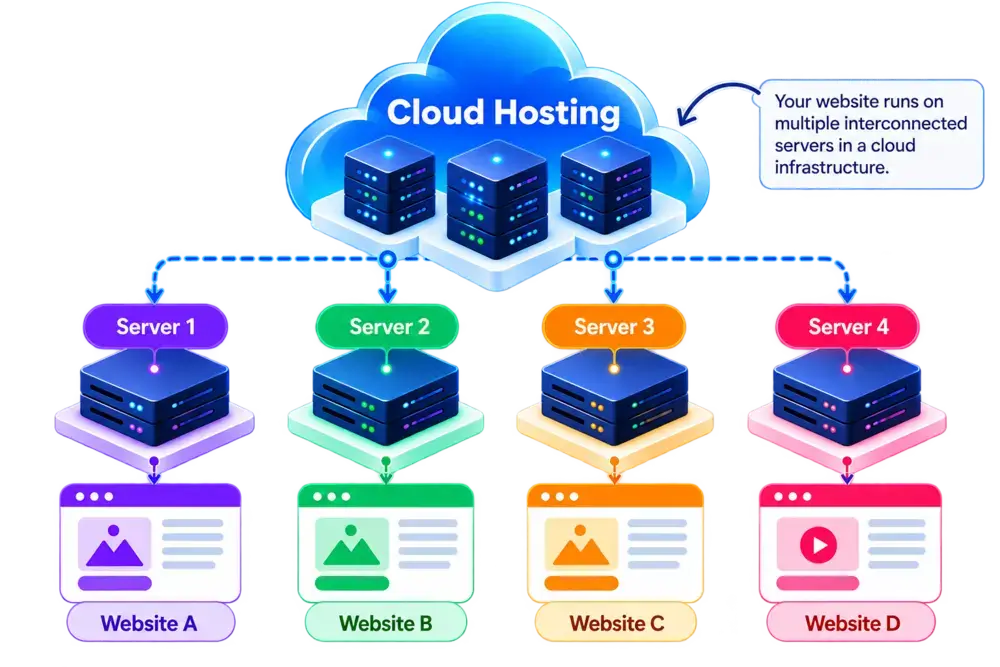
Cloud Hosting at a Glance
A quick overview of how cloud hosting works, who it’s for, and what to expect.
- Editor's Summary
Flexible Infrastructure
Scalable Cloud Resources
Best For
- Growing Websites
- Web Applications
- E-commerce Stores
- Businesses with Variable Traffic
What You Should Know
Cloud hosting uses cloud infrastructure to run websites and applications across a network of connected computing resources. Depending on the provider and plan, you can scale resources as your website grows and benefit from infrastructure designed for flexibility and availability.
It can be a practical choice for websites and applications with changing resource demands, growing traffic, or a need for flexible infrastructure.
Flexible Resources
Access computing resources such as CPU, RAM, and storage based on your cloud hosting plan.
Easy Scalability
Increase or decrease resources as your website traffic and application requirements change.
Cloud Infrastructure
Cloud infrastructure instead of a traditional single-server hosting setup.
High Availability Options
Some cloud platforms use redundancy and failover to minimize downtime.
Disclosure: ElegantEspace is supported by readers like yourself. We may earn an affiliate commission when you purchase through our links. Commissions do not affect our editors’ opinions or evaluations.
What Is Cloud Hosting?
Cloud hosting is a type of web hosting that uses cloud infrastructure to run websites and applications. Instead of relying solely on a single physical server, it uses computing resources from a cloud environment to deliver hosting services.
Depending on the provider, these resources may be distributed across multiple connected servers, allowing workloads to be scaled or moved when needed.
Unlike traditional hosting setups, some cloud hosting plans offer flexible resource allocation, on-demand scaling, and infrastructure redundancy. However, the features available depend on how the provider designs and manages its platform.
Cloud hosting can be a practical choice for growing websites, online stores, and web applications that need flexible resources to handle changing workloads.
How Cloud Hosting Works
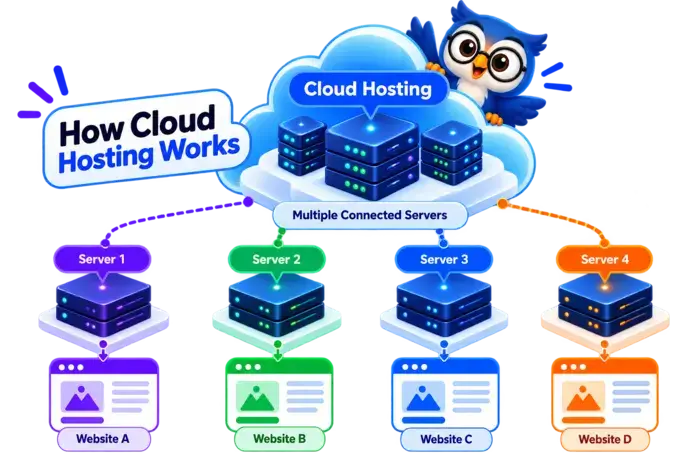
Cloud hosting works by using computing resources from a cloud infrastructure to run websites and applications. Depending on the platform, these resources may come from multiple interconnected servers, allowing workloads to be managed and scaled according to demand.
Unlike traditional single-server hosting setups, cloud hosting can offer flexible resource allocation and infrastructure redundancy. However, the exact capabilities depend on the provider and hosting plan.
Here's How It Works:
1. You Choose a Cloud Hosting Plan
You select a plan based on your website’s requirements, such as CPU, RAM, storage, bandwidth, expected traffic, and available management features.
2. Your Hosting Environment Is Set Up
The provider provisions a cloud hosting environment with the computing resources and software required to run your website or application.
3. Your Website Runs on Cloud Infrastructure
Your website files, databases, and applications run within the cloud environment. Depending on the architecture, the underlying resources may use one or multiple physical servers.
4. Cloud Resources Are Allocated
The platform assigns computing resources such as CPU, RAM, storage, and network capacity to your workload. Resource limits and allocation methods vary by plan.
5. Visitors Access Your Website
When someone enters your domain name, their browser sends a request to your hosting environment. The infrastructure processes the request and delivers your website’s content to the visitor.
6. Resources Can Scale With Demand
Depending on the provider and configuration, you may be able to upgrade resources manually or scale them automatically as traffic changes. Some cloud platforms also offer redundancy and failover features to help reduce downtime.
Quick takeaway: Cloud hosting uses cloud infrastructure to run websites and applications, with resource flexibility, scalability, and availability features that depend on the service you choose.
What Are the Benefits of Cloud Hosting?
Cloud hosting offers flexible computing resources, scalable infrastructure, and deployment options for websites and applications with changing resource needs.
Depending on the provider and plan, it can help businesses manage traffic growth, adjust server capacity, and build a hosting environment around their requirements.
1. Flexible Resource Allocation
Cloud hosting gives you access to computing resources such as CPU, RAM, storage, and network capacity based on your chosen plan.
Depending on the platform, you may be able to adjust these resources as your website or application grows.
This flexibility can be useful for growing blogs, business websites, online stores, and web applications with changing workloads.
2. Scalable Hosting
One of the main advantages of cloud hosting is the ability to increase resources when your website needs more capacity.
Depending on the provider, you may be able to:
- Upgrade CPU and RAM
- Increase storage capacity
- Adjust bandwidth or network resources
- Scale resources manually or automatically
- Handle increases in traffic more effectively
However, automatic scaling is not available with every cloud hosting plan. You should check the provider’s scaling options, resource limits, and pricing before choosing a service.
3. Flexible Infrastructure
Cloud hosting uses cloud-based computing infrastructure rather than relying exclusively on a traditional physical server.
Depending on the architecture, a cloud hosting environment may use virtual machines, multiple interconnected servers, or other cloud resources to run websites and applications.
This flexibility allows providers to offer different configurations for websites, databases, business applications, and resource-intensive workloads.
4. High Availability Options
Some cloud hosting platforms include redundancy, failover, and infrastructure monitoring to help reduce downtime when a component fails.
Depending on the architecture, workloads may be moved to healthy resources or supported by redundant infrastructure when problems occur.
These capabilities can be particularly useful for online stores, business-critical websites, and applications that need consistent availability.
Important: Cloud hosting does not automatically guarantee high availability. The level of redundancy, failover protection, and uptime depends on the provider, plan, configuration, and service-level agreement.
5. Support for Growing Websites and Applications
Cloud hosting can accommodate a wide range of workloads, from growing websites to more demanding applications.
It may be suitable for projects such as:
- E-commerce stores with fluctuating traffic
- Business websites experiencing steady growth
- Membership and subscription platforms
- Web applications and APIs
- Content-heavy websites with changing resource requirements
You can choose a configuration based on your workload and adjust it as your requirements change, subject to the platform’s capabilities.
6. Potential for Improved Reliability
Some cloud platforms distribute workloads across multiple infrastructure components or provide redundancy to reduce the impact of individual hardware failures.
This can improve resilience compared with a setup that depends entirely on one physical server.
However, reliability depends on the cloud architecture, network, storage system, configuration, and provider’s operational practices. Cloud hosting is not automatically more reliable than every shared hosting or VPS solution.
7. Flexible Hosting Configurations
Cloud hosting is available in different forms, including virtual servers, managed hosting platforms, and specialized application hosting services.
Depending on the provider, you may be able to choose:
- Managed or self-managed environments
- Different CPU, RAM, and storage configurations
- Operating systems and software stacks
- Backup and monitoring options
- Security and networking configurations
This variety makes cloud hosting useful for both users who prefer managed services and developers who need more control over their hosting environment.
8. Room to Grow Without Rebuilding Everything
As your website grows, you may need additional computing resources, storage, or a different hosting configuration.
Cloud hosting can make these changes easier when the provider supports resource upgrades or migration between configurations.
For example, an online store might start with modest resources and upgrade its hosting capacity as its product catalog, customer base, and traffic increase.
Keep in mind that scaling may involve additional costs, configuration changes, or temporary migration work, depending on the service.
Pros and Cons of Cloud Hosting
- Scalable Resources
- Flexible Configurations
- Handles Traffic Changes
- High Availability Options
- Flexible Infrastructure
- Supports Growing Workloads
Why These Features Stand Out
- Scalable Resources: Cloud hosting lets you increase computing resources such as CPU, RAM, and storage as your website grows. Available scaling options depend on your provider and plan.
- Flexible Configurations: You can choose hosting configurations based on your website’s resource requirements, software, and workload. Some providers also let you adjust resources without migrating to an entirely new hosting environment.
- Handles Traffic Changes: Cloud hosting can help accommodate fluctuations in website traffic by providing additional resources when needed. Automatic scaling depends on the provider, plan, and configuration.
- High Availability Options: Some cloud platforms offer redundancy and failover features to help reduce downtime if a server or infrastructure component fails. These features and their level of protection vary by provider and plan.
- Flexible Infrastructure: Cloud hosting can use virtual machines, interconnected servers, and other cloud resources to run websites and applications. This flexibility supports different hosting requirements, from simple websites to complex applications.
- Supports Growing Workloads: Cloud hosting can accommodate growing websites, online stores, and applications that need additional computing power over time. You can upgrade resources as requirements change, subject to the provider’s limits and pricing.
- Costs Can Increase
- Pricing Can Be Complex
- Technical Setup May Be Needed
- Resource Limits Still Apply
- Availability Isn't Guaranteed
- Provider Lock-In Is Possible
Potential Drawbacks Explained
- Costs Can Increase: Cloud hosting costs may rise as you use more computing resources, storage, bandwidth, or additional services. Some providers also charge separately for backups, data transfers, and other features.
- Pricing Can Be Complex: Pricing structures may include resource usage, fixed plan fees, bandwidth charges, and additional services. Understanding these costs before choosing a plan helps you avoid unexpected bills.
- Technical Setup May Be Needed: Some cloud hosting services require knowledge of server configuration, security, networking, and application deployment. Managed cloud hosting can reduce this workload, but the level of support varies by provider.
- Resource Limits Still Apply: Cloud hosting plans may have limits on CPU, RAM, storage, bandwidth, and other resources. Exceeding these limits can require an upgrade or result in additional charges or performance restrictions.
- Availability Isn’t Guaranteed: Cloud infrastructure does not eliminate downtime caused by software errors, network problems, misconfigurations, or provider outages. Redundancy, monitoring, backups, and suitable recovery plans can help reduce the impact.
- Provider Lock-In Is Possible: Moving from one cloud provider to another can require changes to your applications, databases, configurations, and deployment processes. Using portable technologies and maintaining regular backups can make future migration easier.
How Much Does Cloud Hosting Cost?
Cloud hosting costs vary depending on the provider, computing resources, management features, and billing model. Some plans charge a fixed monthly fee for a predefined set of resources, while others use usage-based pricing that changes according to your consumption.
Basic cloud hosting can be affordable for small websites, but costs may increase as you add CPU, RAM, storage, bandwidth, backups, or other services.
However, the advertised starting price may not reflect your total cost over time. Introductory discounts, renewal rates, and additional usage charges can all affect your budget.
What Determines the Cost of Cloud Hosting?
Several factors can affect the price of a cloud hosting plan:
- Hosting provider: Different providers offer different infrastructure, features, and pricing models.
- Billing model: Fixed monthly plans and pay-as-you-go services calculate costs differently.
- CPU and RAM: Higher computing capacity generally costs more.
- Storage: Storage capacity, type, and performance can affect the price.
- Bandwidth and data transfer: Some providers charge extra for outgoing data or usage beyond included limits.
- Traffic and resource usage: Usage-based plans may become more expensive as your website receives more visitors or processes more requests.
- Management features: Managed hosting, technical support, and server administration may increase the cost.
- Backups and security: Automated backups, advanced security tools, and monitoring may be included or billed separately.
- Scalability and availability: Load balancing, redundant infrastructure, and failover options can add to the total cost.
- Billing period and discounts: Promotional offers and longer commitments can affect the initial price and ongoing expenses.
What Should You Look For in a Cloud Hosting Plan?
A low starting price doesn’t necessarily mean a cloud hosting plan offers the best value. Check the available resources, included features, usage limits, and potential extra charges before choosing a provider.
Before buying, check whether the plan includes:
- Free SSL: Helps protect data exchanged between your website and its visitors.
- Backups: Check backup frequency, retention periods, restoration options, and any additional charges.
- Sufficient resources: Review CPU, RAM, storage, bandwidth, and other limits to ensure they suit your website’s needs.
- Scalability: Check whether you can upgrade resources easily and whether automatic scaling is supported.
- Security features: Look for firewalls, malware protection, access controls, and security updates appropriate to your setup.
- Monitoring and reliability: Check uptime commitments, monitoring tools, redundancy, and recovery options.
- Support and management: Confirm whether the provider offers managed services, technical assistance, and support availability that match your requirements.
- Transparent pricing: Understand charges for bandwidth, backups, additional resources, data transfers, and other services.
- Upgrade and migration options: Make sure you can adjust your hosting configuration or migrate to another plan as your website grows.
Quick tip: Estimate your expected monthly usage before choosing a cloud hosting provider. A plan with a higher advertised price may offer better value if it includes the resources and services your website needs without substantial additional charges.
Recommended Cloud Hosting Providers
Looking for a shared hosting plan? These are some providers worth considering based on features, pricing, performance, support, and overall suitability.

Beginner Friendly Managed Cloud
- Managed Cloud Hosting
- Scalable Computing Resources
- NVMe Storage on Supported Plans
- Free SSL Certificate
- Daily Backups on Eligible Plans
- CDN and WordPress Tools
From $7.99/mo
Renews at regular pricing.

Cloud Based Hosting
- Cloud-Based Hosting Infrastructure
- cPanel/WHM
- NVMe Storage
- Automated Backups
- Free Website & Server Migrations
- 24/7 Technical Support
From $53.87/mo
Renews at regular pricing.
Who Should Use Cloud Hosting?
Cloud hosting is a practical choice when your website or application needs flexible computing resources, room to grow, or infrastructure that can accommodate changing workloads.
It can work particularly well for websites and applications that need more flexibility than a basic hosting plan offers. However, the right choice depends on your resource requirements, technical skills, and budget.
Cloud Hosting Is a Good Fit For:
- Growing Websites: Websites experiencing increasing traffic or resource demands can benefit from cloud hosting plans that allow resources to be upgraded as needed.
- Small and Medium-Sized Businesses: Businesses that need flexible hosting resources, reliable infrastructure, and room to expand as their online presence grows may find cloud hosting useful.
- E-commerce Stores: Online stores can benefit from additional computing resources during busy shopping periods, provided their hosting platform supports the required scaling.
- High-Traffic Websites: Publishers, content-heavy websites, and established blogs may use cloud hosting to accommodate substantial traffic and resource-intensive workloads.
- Web Applications: Applications, APIs, membership platforms, and other dynamic services can benefit from configurable computing resources and flexible deployment environments.
- Websites With Variable Traffic: Websites that experience seasonal demand, promotional traffic spikes, or unpredictable workloads may benefit from cloud platforms that support resource scaling.
- Businesses Planning to Expand: Companies expecting to add new services, handle more customers, or expand their applications can use cloud hosting to adjust their infrastructure as requirements change.
When Cloud Hosting May Not Be the Right Choice
Cloud hosting isn’t the ideal solution for every website. You may prefer shared hosting or another hosting type if you need:
- The lowest possible hosting cost: A basic shared hosting plan may be more economical for a small website with modest resource requirements.
- Simple website management: Some cloud platforms require technical knowledge to configure and maintain, although managed options can reduce this workload.
- Predictable, uncomplicated billing: Usage-based pricing can make costs harder to estimate if your resource consumption fluctuates.
- A basic website with minimal resource needs: A portfolio, personal blog, or small informational website may not need the flexibility of cloud infrastructure.
- Specialized server control: Depending on your requirements, a VPS or dedicated server may offer a more suitable level of administrative control or resource allocation.
Cloud hosting isn’t automatically necessary just because your website receives more visitors. Your software, resource consumption, traffic patterns, performance requirements, and provider’s capabilities all influence which hosting solution makes sense.

Quick Takeaway: Cloud hosting is worth considering when you need flexible resources and room to scale. For smaller websites with predictable workloads, shared hosting may be sufficient and more economical.
Cloud Hosting Compared to Other Hosting Types
Cloud hosting is one of several ways to host a website. Compared with shared hosting, it can offer more flexible resource allocation and scaling options. VPS hosting provides a virtualized server environment with allocated resources, while dedicated hosting gives you an entire physical server.
The main differences come down to how resources are allocated, how much control you need, how easily you can scale, how the infrastructure is managed, and how much you’re willing to spend.
| Feature | Shared Hosting | VPS Hosting | Cloud Hosting | Dedicated Hosting |
|---|---|---|---|---|
Cost |
$2–$10/mo |
$5–$40+/mo |
$5–$50+/mo |
$70–$200+/mo |
Resources |
Shared |
Allocated |
Distributed |
Dedicated |
Performance |
Good For Smaller Sites |
Higher |
Highly Scalable |
Very High |
Server Control |
Limited |
High |
High |
Very High |
Scalability |
Moderate |
High |
Very High |
High |
Technical Knowledge |
Low |
Moderate–High |
Moderate–High |
High |
Best For |
Beginners & Small Websites |
Growing Websites |
Scaling & Variable Traffic |
High-Resource Websites |
Cloud Hosting vs Shared Hosting
Cloud hosting uses cloud infrastructure to run websites and applications, offering flexible resource configurations and scaling options depending on the provider. Shared hosting is designed for affordability and simplicity, making it suitable for smaller websites with modest resource requirements.
| Feature | Cloud Hosting | Shared Hosting |
|---|---|---|
| Cost | Typically higher, depending on resources | Usually lower |
| Resources | Configurable cloud resources, depending on the plan | Resources shared within a hosting environment |
| Performance | Depends on allocated resources and infrastructure | Suitable for modest workloads |
| Server Control | Varies by provider and management level | Usually limited |
| Isolation | Depends on the platform and hosting configuration | Shared hosting environment |
| Scalability | May support flexible or automatic scaling | Upgrades depend on the hosting plan |
| Technical Knowledge | Varies from beginner-friendly to advanced | Usually beginner-friendly |
| Best For | Growing websites, online stores, and web applications | Blogs, portfolios, and small websites |
Choose cloud hosting if you need flexible resource allocation, options to scale as your workload changes, or infrastructure suited to a growing website or application. Check whether your chosen plan supports automatic scaling, since it isn’t available with every service.
Choose shared hosting if your website has modest resource requirements and you want an affordable, straightforward hosting solution without managing server infrastructure yourself.
Cloud Hosting vs VPS Hosting
Cloud hosting uses cloud infrastructure to run websites and applications, often providing flexible resource allocation and scaling options. VPS hosting uses virtualization to create an isolated server environment with allocated resources and greater control over server configuration.
The two can overlap: a VPS can run on cloud infrastructure, so the main differences depend on the provider’s architecture, resource allocation, management, and scaling options.
| Feature | Cloud Hosting | VPS Hosting |
|---|---|---|
| Cost | Varies by resources and billing model | Usually a fixed plan fee, with some usage-based options |
| Resources | Flexible allocation, depending on the platform | Allocated CPU, RAM, and storage |
| Performance | Depends on infrastructure and configuration | Depends on server resources and configuration |
| Server Control | Varies from managed platforms to full control | Often greater control, especially with unmanaged VPS |
| Isolation | Depends on the hosting architecture | Isolated virtual server environment |
| Scalability | May support flexible or automatic scaling | Usually requires upgrading VPS resources |
| Technical Knowledge | Varies by provider and management level | Moderate to high for unmanaged plans |
| Management | Managed and self-managed options available | Managed and unmanaged options available |
| Best For | Workloads needing flexible infrastructure and scaling | Websites and applications needing an isolated, configurable server |
Choose cloud hosting if you need flexible infrastructure, options to scale resources, or a platform designed to accommodate changing workloads. Check the provider’s scaling capabilities, resource limits, and pricing before choosing a plan.
Choose VPS hosting if you want an isolated virtual server with defined resources and greater control over the operating system, software, and server configuration. A managed VPS can also suit users who need server resources without handling every maintenance task themselves.
Cloud Hosting vs Dedicated Hosting
Cloud hosting uses cloud infrastructure to run websites and applications, offering flexible resource configurations and scaling options depending on the provider. Dedicated hosting provides an entire physical server for your use, giving you greater control over its hardware resources and configuration.
The main differences come down to infrastructure, resource allocation, scalability, server control, maintenance, and cost.
| Feature | Cloud Hosting | Dedicated Hosting |
|---|---|---|
| Cost | Varies by resources and billing model | Typically higher due to dedicated hardware |
| Resources | Cloud-based resources allocated according to the plan | Entire physical server's resources |
| Performance | Depends on infrastructure and configuration | Depends on server hardware and configuration |
| Server Control | Varies by provider and hosting type | Extensive control over server configuration |
| Isolation | Depends on the cloud architecture | Physical server dedicated to your use |
| Scalability | Often offers flexible resource upgrades; automatic scaling depends on the platform | Usually requires hardware upgrades or additional servers |
| Technical Knowledge | Varies from beginner-friendly to advanced | Moderate to high, especially for unmanaged plans |
| Management | Managed and self-managed options available | Managed and unmanaged options available |
| Best For | Growing websites, variable workloads, and scalable applications | Resource-intensive applications and workloads requiring dedicated hardware |
Choose cloud hosting if you need flexible infrastructure, the ability to adjust resources as requirements change, or options for scaling during traffic fluctuations. Review the provider’s resource limits, availability features, and pricing model before committing.
Choose dedicated hosting if your workloads require an entire physical server, substantial hardware resources, or greater control over the server environment. It can also suit applications with specific hardware, security, or configuration requirements.
Is Cloud Hosting Right For Your Website?
Cloud hosting is a good choice if your website needs flexible computing resources, room to scale, or infrastructure that can accommodate changing workloads. It can suit growing websites, online stores, web applications, and businesses that need more flexibility than a basic shared hosting plan provides.
However, cloud hosting costs and complexity vary depending on the provider, resource usage, and level of management. Some plans offer automatic scaling and high availability features, while others require manual upgrades and technical configuration.
If you run a small website with predictable traffic, shared hosting may be sufficient and more affordable. If you need an isolated virtual server with greater configuration control, VPS hosting may be a better fit. Dedicated hosting is worth considering when your workload requires an entire physical server.
For most website owners, the best approach is to compare your resource requirements, technical experience, scalability needs, and budget before choosing a plan. Start with the resources you actually need, and upgrade as your website grows rather than paying for unused capacity.
Frequently Asked Questions About Cloud Hosting
1. What is cloud hosting?
Cloud hosting uses cloud computing infrastructure to run websites and applications. Depending on the provider, it can offer flexible resources, scalability, and infrastructure redundancy.
2. How does cloud hosting work?
Cloud hosting runs websites and applications in a cloud environment using resources such as CPU, RAM, storage, and network capacity. Depending on the platform, you may be able to increase resources manually or automatically as demand changes.
3. How much does cloud hosting cost?
Cloud hosting costs depend on the provider, computing resources, storage, bandwidth, and management features. Basic plans may be affordable, while high-resource or managed cloud services can cost significantly more.
4. Is cloud hosting better than shared hosting?
Cloud hosting can offer more flexible resource allocation and scaling options, while shared hosting is generally simpler and more affordable. The right choice depends on your website’s requirements, budget, and expected traffic.
5. What is the difference between cloud hosting and VPS hosting?
Cloud hosting emphasizes the capabilities of cloud infrastructure, while VPS hosting provides an isolated virtual server with allocated resources. The two can overlap because a VPS may run on cloud infrastructure.
6. Is cloud hosting suitable for WordPress?
Yes. Cloud hosting can run WordPress blogs, business websites, and online stores. You can choose managed WordPress cloud hosting or install WordPress on a cloud server, depending on your technical skills and requirements.
7. Is cloud hosting secure?
Cloud hosting may include firewalls, access controls, monitoring, and automated backups, depending on the provider and plan. Keeping software updated and configuring security settings correctly is also important.
8. Can cloud hosting handle high traffic?
Cloud hosting can support high-traffic websites when sufficient resources and suitable configurations are available. Handling sudden traffic spikes may require features such as automatic scaling, load balancing, and caching.
9. Does cloud hosting guarantee 100% uptime?
No. Cloud hosting does not guarantee uninterrupted service. Availability depends on the provider’s infrastructure, redundancy, configuration, and service-level agreement.
10. Who should use cloud hosting?
Cloud hosting can suit growing websites, e-commerce stores, web applications, and businesses that need flexible resources. Smaller websites with modest requirements may find shared hosting more economical.

