
- October 2026
Shopify vs WooCommerce: Which Is Better for Your Online Store?
Shopify makes it easy to launch and manage an online store, while WooCommerce gives you greater flexibility and control with WordPress. Compare pricing, features, SEO, and customization to find the right platform for your business.
- Compare store-building tools, ease of use, and customization.
- Explore pricing, payment fees, SEO, and e-commerce features.
- Discover which platform fits your budget and business goals.

Helping beginners build websites since 2017
400K+
Readers Helped
Updated for 2026
Latest Method
100%
Beginner Friendly
Shopify vs WooCommerce: Quick Comparison
Both can build excellent online stores, but they suit different business needs.
| Feature | Shopify | WooCommerce |
|---|---|---|
Platform type |
Hosted e-commerce platform |
Open-source e-commerce plugin for WordPress |
Hosting and SSL |
Hosting and SSL included |
You arrange hosting and SSL |
Initial setup |
Guided store setup |
Install WordPress, hosting, and WooCommerce |
Product limits |
Unlimited products on standard plans |
Unlimited products |
Extensions |
Shopify App Store and integrations |
WooCommerce extensions and WordPress plugins |
Blogging |
Built-in blog feature |
WordPress’s full publishing system |
SEO controls |
Editable metadata, redirects, sitemap, and SEO apps |
SEO plugins, editable settings, and broader technical control |
Payment processing |
Shopify Payments where available, or third-party gateways |
Supported payment gateways and extensions |
Platform transaction fees |
Third-party provider fees may apply, depending on plan and setup |
No WooCommerce platform transaction fee; payment processing fees still apply |
Security and updates |
Shopify manages platform infrastructure |
You manage WordPress, extensions, and hosting responsibilities |
Data and portability |
Export options, with some platform-dependent features |
Direct access to site files and database through hosting |
Core software cost |
Paid subscription for a full hosted store |
WooCommerce core plugin is free |
Ongoing costs |
Subscription, payment processing, and optional apps |
Hosting, domain, payment processing, and optional extensions |
Choose Shopify if…
You want hosting, checkout, inventory tools, and store management in one platform, with less hands-on technical maintenance.
Choose WooCommerce if…
You want control over WordPress, website files, hosting, content, and extensive customization through plugins and code.
The Bottom Line:
Shopify wins for managed store operations and ease of setup. WooCommerce wins for ownership and customization control. Neither is automatically cheaper: compare subscription costs, hosting, payment processing, paid extensions, and maintenance before choosing.
Disclosure: ElegantEspace is supported by readers like you. We may earn an affiliate commission when you purchase through our links. Commissions do not affect our editors’ opinions or evaluations.
What Is Shopify?
A simpler way to build, launch, and manage an online store.

Shopify is a hosted e-commerce platform that lets you create an online store, sell products, and manage your business from one dashboard.
It brings together storefront design, product listings, inventory management, checkout, order processing, and sales tools without requiring you to set up a separate web hosting account.
You can start with a pre-designed theme, customize your store, add products, connect a domain, and configure supported payment methods.
Shopify also offers apps and integrations that let you expand your store as your business grows
Your Store, Managed From One Dashboard
Manage products, track orders, process payments through supported providers, and customize your storefront without setting up separate hosting.
1. Store Builder
Themes and storefront editing tools
2. Order Management
Products, orders, and inventory
3. Checkout Tools
Payments through supported gateways
4. App integrations
Add features through apps
Pros and Cons of Shopify
- Beginner-friendly store setup
- Hosting and SSL included
- Built-in checkout and order management
- Customizable themes and app integrations
- Less server-level maintenance
- Monthly subscription costs
- Paid apps can increase expenses
- Less control over server infrastructure
- Advanced customization may require code
- Moving platforms can require rebuilding features
What Can You Do With Shopify?
Build an online store: Choose a theme and customize your storefront to match your brand.
Manage products and orders: Add product descriptions, images, prices, inventory, and order details.
Accept payments: Connect available payment providers based on your country and business requirements.
Expand store functionality: Add apps for marketing, reviews, shipping, customer support, and other features.
Sell through multiple channels: Reach customers through your online store and supported social, marketplace, or in-person selling channels.
Monitor business performance: Use available reports and analytics to track sales and understand store activity.
Who Should Use Shopify?
Shopify is a strong choice for beginners, small businesses, direct-to-consumer brands, and established retailers that want a managed e-commerce platform.
It handles much of the technical infrastructure, including hosting and platform maintenance, so you can focus more on products, customers, and sales.
However, Shopify is a subscription-based service, and paid themes, apps, payment processing, and applicable third-party transaction fees can increase your overall costs.
You also have less direct control over the underlying server and website infrastructure than you would with a self-hosted WooCommerce store.

Ready to Build Your Online Store with Shopify?
Launch an online store with customizable themes, integrated commerce tools, and managed hosting. Explore Shopify to see if it fits your business goals.
What Is WooCommerce?
A flexible way to turn a WordPress website into a fully featured online store.

WooCommerce is a free, open-source e-commerce plugin that turns a WordPress website into an online store.
It lets you sell products, manage orders, configure payment methods, and extend your store with additional plugins and extensions.
Unlike Shopify, WooCommerce does not bundle your entire store into a single hosted subscription.
You choose your WordPress hosting, domain, theme, and additional tools, giving you more control over how your website is built and maintained.
Build Your Store Your Way
Use WordPress to manage content and WooCommerce to sell products, manage orders, configure payments, and extend your store with plugins.
1. Flexible Design
Themes, page builders, and custom code
2. Product Control
Physical, digital, and variable products
3. Plugin Ecosystem
Add features with extensions
Store ownership
Control your hosting, files, and data
Pros and Cons of WooCommerce
- Free, open-source core plugin
- Extensive design and functionality control
- Full WordPress blogging and SEO ecosystem
- Wide choice of hosting and payment gateways
- Control over website files and data
- Hosting and domain cost extra
- You manage updates, backups, and security
- Premium extensions can increase costs
- More setup and maintenance responsibilities
- Performance depends on hosting and configuration
What Can You Do With WooCommerce?
- Build a custom online store: Design your storefront using WordPress themes, page builders, and custom code.
- Sell different types of products: Offer physical goods, digital downloads, product variations, and other supported product types.
- Manage orders and inventory: Organize products, monitor stock, and process customer orders from your WordPress dashboard.
- Choose payment methods: Integrate supported payment gateways based on your location and business needs.
- Extend your store: Add functionality for subscriptions, bookings, memberships, shipping, marketing, and more through compatible extensions.
- Create SEO-focused content: Combine your store with WordPress posts, pages, categories, and SEO plugins to support your content marketing strategy.
Who Should Use WooCommerce?
WooCommerce is a strong choice for WordPress users, content-driven businesses, affiliate marketers who also sell products, and store owners who want extensive control over their website.
It is especially useful when your online store needs to work alongside a blog, resource library, landing pages, or other custom website features.
However, you are responsible for choosing and maintaining suitable hosting, keeping WordPress and plugins updated, and managing backups and security.
Paid themes, extensions, hosting, and developer services can also add to the total cost.

Ready to Build Your Online Store with WooCommerce?
Create a customizable store with WordPress, flexible design tools, and a wide range of e-commerce extensions. Explore WooCommerce and build a store around your needs.
Shopify vs WooCommerce: Pricing Compared
Pricing is an important factor when choosing between Shopify and WooCommerce. Shopify charges a recurring subscription that includes hosting, while WooCommerce is free to install on WordPress but requires you to arrange hosting and any additional services.
Neither platform is automatically cheaper for every business. Your total cost depends on your store size, payment provider, design requirements, premium extensions, and ongoing maintenance.

Shopify
- Hosting included
- SSL included
- Store management tools
- Paid apps are optional

WooCommerce
- Hosting purchased separately
- Domain may cost extra
- Free and paid extensions
- Payment processing fees apply
Shopify Pricing Plans
Shopify offers several subscription plans for businesses at different stages.
| Shopify Plan | Yearly Billing | Monthly Billing |
|---|---|---|
| Basic | $29/month | $39/month |
| Grow | $79/month | $105/month |
| Advanced | $299/month | $399/month |
Shopify’s subscription includes hosting and SSL, along with store management features. You may still pay for premium themes, apps, payment processing, and applicable third-party transaction fees.
These are listed subscription prices and may change. Annual billing requires paying upfront for the applicable billing period.
WooCommerce Pricing
WooCommerce’s core plugin is free, with no required monthly WooCommerce platform subscription. However, running a store involves other potential expenses.
| Metric | Result | Verdict |
|---|---|---|
| WooCommerce Plugin | Free core plugin | Free |
| Web Hosting | Depends on the provider and store requirements | Variable Cost |
| Domain Name | May require an annual renewal fee | Recurring Cost |
| SSL Certificate | Often included with hosting | Often Free |
| Themes and Extensions | Free options available; premium tools cost extra | Optional Cost |
| Payment Processing | Fees charged by your chosen payment provider | Transaction Fees |
| Maintenance and Security | May require your own time or paid services | Variable Cost |
You can start with a modest setup and add paid features as your business grows. Larger stores or websites with demanding performance, security, and integration requirements may need a bigger budget.
Our Verdict: It Depends on Your Needs
There is no universal winner on price.
Shopify is convenient for businesses that value managed operations and predictable core platform costs.
WooCommerce offers more flexibility in how you spend and customize your store. Compare the full cost of your intended setup rather than choosing solely because WooCommerce’s core plugin is free.
Shopify vs WooCommerce: Which Is Easier to Use?
Shopify and WooCommerce take different approaches to store management.
Shopify combines store-building tools, hosting, and e-commerce management in one platform.
WooCommerce integrates with WordPress, giving you more control but requiring more setup and maintenance.

Shopify
A central dashboard for building and managing your store.
- Guided setup process
- Hosting managed for you
- Store tools in one place

WooCommerce
Build your store inside WordPress and choose your own tools.
- Install WordPress and WooCommerce
- Configure store settings
- Manage updates and backups
Shopify vs WooCommerce: Ease-of-Use Comparison
| Task | Shopify | WooCommerce |
|---|---|---|
Initial setup |
Guided and straightforward |
Requires WordPress and store setup |
Hosting |
Included |
You choose and manage it, or use managed hosting |
Store design |
Themes and visual customization |
Themes, page builders, and custom code |
Adding features |
Apps and integrations |
Plugins and extensions |
Technical maintenance |
Most platform infrastructure managed |
More responsibility for updates and security |
Technical skills |
Basic skills are enough for many stores |
More technical knowledge may be useful |
Our Verdict: Shopify Is Easier for Beginners
Shopify offers a simpler starting point because hosting and core store tools are managed in one platform.
WooCommerce takes more initial setup, but it gives you greater flexibility if you’re comfortable working with WordPress.
Shopify vs WooCommerce: Design and Customization
Your store’s design affects brand identity, shopping experience, and how easily customers find products.
Shopify offers a streamlined theme editor, while WooCommerce gives you access to the wider WordPress design ecosystem and more ways to customize your store.

Shopify
Customize a theme using built-in visual editing tools.
- Free and paid themes
- Edit sections, colors, and fonts
- Code customization with Liquid, HTML, CSS, and JavaScript

WooCommerce
Build custom layouts using WordPress themes and design tools.
- Wide range of compatible themes
- Page builders such as Elementor
- Extensive plugin and code customization
Shopify vs WooCommerce: Customization Comparison
| Feature | Shopify | WooCommerce |
|---|---|---|
Themes |
Curated free and paid themes |
Broad selection of WordPress themes |
Visual editing |
Built-in theme editor |
Block editor and compatible page builders |
Layout control |
Based on theme settings and supported customization |
More options through themes, builders, and code |
Code access |
Theme code, with platform-specific limitations |
Greater access to WordPress files and code through hosting |
Extra functionality |
Apps and integrations |
Plugins and WooCommerce extensions |
Maintenance |
Less infrastructure maintenance |
More responsibility for theme and plugin compatibility |
Our Verdict: WooCommerce Wins for Design Flexibility
WooCommerce offers more freedom to reshape your website using WordPress themes, Elementor, plugins, and custom code.
Shopify is the more straightforward choice if you want a polished storefront without managing as many design and technical decisions.
Shopify vs WooCommerce: Which Is Better for SEO?
SEO helps customers discover your products through organic search results.
Shopify includes essential SEO features out of the box, while WooCommerce benefits from WordPress’s content management tools and a wide range of SEO plugins.

Shopify
Essential SEO settings are integrated into the platform.
- Optimize product titles and meta descriptions
- Add alt text to product images
- Create SEO-friendly product and collection URLs within Shopify's URL structure
- Generate XML sitemaps automatically
- Manage product redirects when URLs change
- Add product details and structured data through compatible themes and apps

WooCommerce
WordPress supports flexible content publishing and SEO plugins.
- Optimize product titles and meta descriptions with SEO plugins
- Customize product and category permalinks
- Optimize product images with alt text and image SEO tools
- Add product schema and rich-result markup using compatible tools
- Control product categories, tags, and internal links
- Extend product SEO with plugins and custom configurations
Shopify vs WooCommerce: SEO Comparison
| SEO Factor | Shopify | WooCommerce |
|---|---|---|
Title tags and meta descriptions |
Built-in controls |
Core features and SEO plugins |
URL customization |
Supported |
Flexible permalink settings |
XML sitemaps |
Generated automatically |
Available through WordPress and SEO tools |
Product schema |
Structured data supported by themes; implementation varies |
Product structured data through WooCommerce themes and compatible plugins |
Image SEO |
Editable image alt text |
Editable image alt text and plugin-supported optimization |
Blogging and content marketing |
Built-in blogging functionality |
Full WordPress publishing system |
Technical SEO |
Many settings built in |
More freedom to customize |
SEO extensions |
Shopify SEO apps |
WordPress SEO plugins and WooCommerce extensions |
SEO maintenance |
Less technical maintenance |
More responsibility for plugin compatibility and technical configuration |
Our Verdict: WooCommerce Wins for SEO Flexibility
WooCommerce is better for store owners who want deeper control over content, URLs, plugins, and technical SEO.
Shopify is a strong alternative for businesses that want essential SEO features with less technical maintenance.
Neither platform guarantees better Google rankings.
Shopify vs WooCommerce: E-commerce Features Compared
The right e-commerce platform should make it easy to manage products, track inventory, accept payments, process orders, and fulfill customer purchases.
Shopify brings core commerce tools together in a managed platform. WooCommerce provides a flexible WordPress store that you can expand with compatible plugins and extensions.
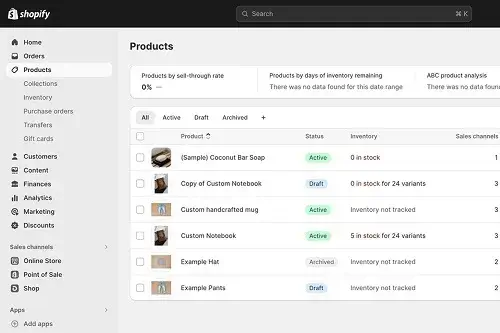
Shopify
Manage your store’s everyday operations from one dashboard.
- Physical and digital products
- Inventory and order management
- Built-in checkout and discount tools
- Shipping and sales channel integrations
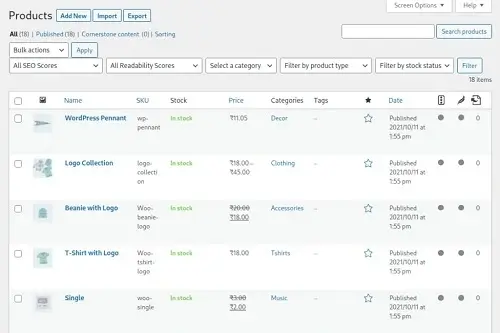
WooCommerce
Customize your store’s commerce features through WordPress.
- Simple, variable, and digital products
- Stock and order management
- Coupons and payment gateway integrations
- Shipping options and additional extensions
Shopify vs WooCommerce: Feature Comparison
| Store Feature | Shopify | WooCommerce |
|---|---|---|
Product types |
Physical and digital products, with supported apps for additional needs |
Physical, variable, and digital products, with extensions for more options |
Product variations |
Variants such as size and color |
Variable products with configurable attributes |
Inventory management |
Built-in stock tracking and inventory tools |
Built-in stock management for products and variations |
Checkout |
Managed checkout experience |
Configurable checkout with compatible extensions and customization |
Payments |
Shopify Payments where available and supported third-party gateways |
Supported gateways through extensions, including regional providers |
Discounts and coupons |
Built-in discount codes and automatic discounts |
Built-in coupon management, with extensions for advanced rules |
Shipping |
Shipping settings, rates, and supported integrations |
Shipping zones, methods, and extensions |
Additional features |
Apps and platform integrations |
WordPress plugins and WooCommerce extensions |
Our Verdict: Shopify for Convenience, WooCommerce for Flexibility
Shopify is a strong choice for merchants who want integrated store management and checkout tools with less technical setup.
WooCommerce is ideal for businesses that want to tailor product management, payments, shipping, and other store functions through the WordPress ecosystem.
Both can power capable online stores.
Shopify vs WooCommerce: Payment Gateways and Transaction Fees
Payment options determine how customers pay for products and how much your store spends processing transactions.
Shopify integrates payment processing into its hosted platform, while WooCommerce lets you choose from compatible payment gateways and their individual pricing structures.

Shopify
Use Shopify Payments where available or connect a supported third-party provider.
- Integrated checkout
- Credit cards and supported wallets
- Third-party transaction fees may apply

WooCommerce
Select compatible gateways based on your market, payment needs, and provider fees.
- Stripe, PayPal, and regional gateways
- UPI and other local methods through supported providers
- No WooCommerce platform transaction fee
Shopify vs WooCommerce: Payment Comparison
| Feature | Shopify | WooCommerce |
|---|---|---|
Payment setup |
Configure supported providers in Shopify admin |
Install and configure a compatible gateway extension |
Payment providers |
Shopify Payments where available, plus third-party providers |
Wide selection of compatible payment gateway extensions |
UPI and local methods |
Depends on supported providers and country |
Available through compatible regional gateways |
Platform transaction fee |
May apply to third-party transactions, depending on plan and setup |
No WooCommerce platform transaction fee |
Payment processing fee |
Applies; rates depend on provider, plan, and market |
Applies; rates depend on the selected provider |
Cash on delivery |
Supported |
Built-in payment method |
Gateway flexibility |
Subject to Shopify’s supported integrations |
Choose compatible gateways and extensions |
Our Verdict: WooCommerce Wins on Payment Flexibility
WooCommerce offers greater freedom to choose payment providers without an additional WooCommerce platform transaction fee.
Shopify provides a more integrated payment experience, but third-party transaction fees may apply. In either case, payment processor fees still matter.
Shopify vs WooCommerce: Shipping and Order Fulfillment
From calculating delivery charges to fulfilling customer orders, shipping tools help online stores deliver products efficiently.
Shopify offers centralized shipping and fulfillment settings, while WooCommerce provides configurable shipping methods that you can extend with compatible plugins and courier integrations.
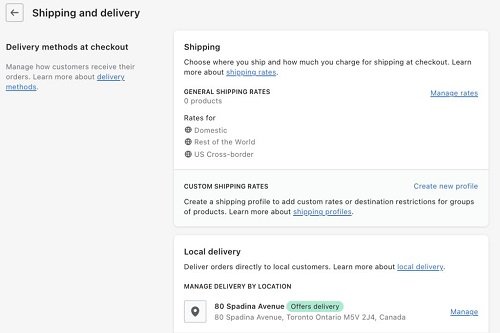
Shopify
Configure shipping and manage fulfillment from the Shopify admin.
- Flat-rate and free shipping
- Shipping profiles and carrier integrations
- Order tracking and fulfillment tools

WooCommerce
Set shipping rules in WordPress and add integrations for your delivery workflow.
- Shipping zones and flat rates
- Free shipping and local pickup
- Courier rates and labels through compatible extensions
Shopify vs WooCommerce: Shipping Comparison
| Feature | Shopify | WooCommerce |
|---|---|---|
Shipping rates |
Flat-rate, free, and supported carrier-calculated rates |
Flat-rate, free, and local pickup; live rates via extensions |
Shipping zones |
Shipping zones and profiles |
Flexible zones by region and postcode |
Shipping labels |
Available for eligible carriers and locations |
Available through compatible shipping services and extensions |
Order fulfillment |
Built-in order workflow and fulfillment integrations |
Order management with integrations for extended workflows |
Courier integrations |
Carrier support and shipping apps |
Shipping plugins and courier integrations |
Customization |
Shipping profiles, rates, and supported apps |
Shipping methods, classes, plugins, and custom code |
Our Verdict: Shopify Wins for Shipping and Fulfillment
Shopify is the better choice for merchants who want shipping settings, order management, and fulfillment integrations in one platform with less technical setup.
WooCommerce offers flexible shipping customization, but advanced carrier rates and shipping labels may require additional extensions.
Shopify vs WooCommerce: Analytics and Reporting
Understanding your store’s sales, customer behavior, and product performance helps you make smarter business decisions.
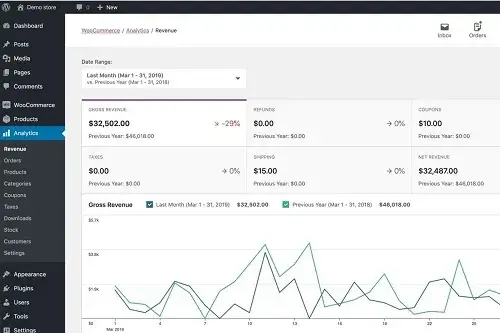
Shopify provides a centralized analytics dashboard with built-in sales reports, while WooCommerce offers detailed store analytics inside WordPress, including filters, product reports, revenue tracking, and CSV exports.
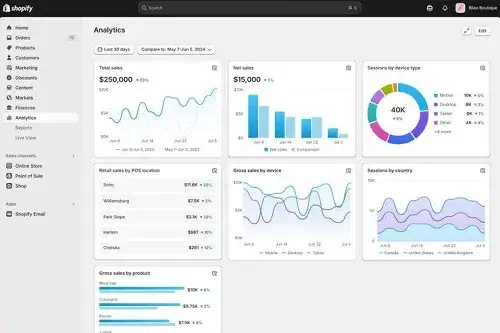
Shopify
- Track sales, sessions, orders, and conversion metrics
- Review sales by product and sales channel
- Compare performance across date ranges
- Customize dashboards and explore reports
WooCommerce
- Monitor revenue, orders, refunds, and average order value
- Analyze products, categories, coupons, and customers
- Filter reports by date and other available criteria
- - Export report data to CSV for further analysis
Shopify vs WooCommerce: Analytics Comparison
| Analytics Feature | Shopify | WooCommerce |
|---|---|---|
Shipping rates |
Built-in analytics dashboard |
Built-in analytics dashboard |
Revenue and orders |
Built-in reports |
Built-in reports |
Product performance |
Product and sales reports |
Product, category, and variation reports |
Customer insights |
Customer and sales metrics |
Customer reports and purchase-related metrics |
Traffic and conversion |
Sessions, conversion, and related metrics |
May require analytics integrations for deeper traffic insights |
Date comparisons |
Compare selected periods |
Compare selected periods |
Report customization |
Depends on available reports and plan |
Filters and dashboard customization |
Data export |
Export options vary by report | |
Advanced analytics |
Additional reports, integrations, or plan-dependent features may be needed |
Extensions and third-party analytics tools can expand reporting |
Our Verdict: Shopify Wins for Analytics and Reporting
Shopify is the better choice for merchants who want sales, traffic, conversion, and channel performance presented in one centralized dashboard with minimal setup.
WooCommerce also provides capable sales reporting and greater scope for custom integrations, but deeper visitor analytics may require additional tools.
Shopify vs WooCommerce: Multichannel Selling Compared
Selling through your website alone can limit your reach. Multichannel selling lets you reach customers through marketplaces, social media, search platforms, and physical retail stores.
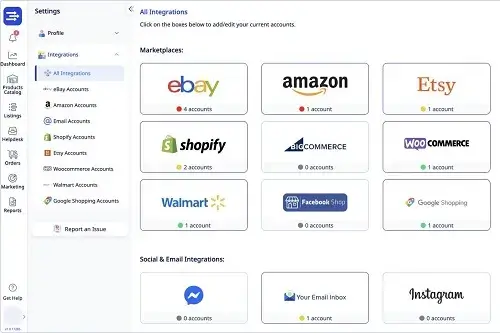
Both Shopify and WooCommerce support these channels, but Shopify makes it easier to coordinate many sales activities from one dashboard, while WooCommerce relies more on integrations and extensions.

Shopify
- Connect supported social commerce channels
- Sync products with supported marketplaces
- Sell online and in person with Shopify POS
- Manage connected channel activity from Shopify admin
WooCommerce
- Connect marketplaces through compatible extensions
- Sync product catalogs and inventory with supported tools
- Integrate social platforms and Google product listings
- - Build custom workflows through WordPress plugins and APIs
Shopify vs WooCommerce: Multichannel Comparison
| Multichannel Feature | Shopify | WooCommerce |
|---|---|---|
Online store |
Built-in |
Built-in |
Social commerce |
Supported channel integrations |
Supported integrations and extensions |
Marketplace selling |
Marketplace Connect and other channel apps |
Marketplace integrations and extensions |
Google Shopping |
Google and YouTube channel integration |
Google product-feed integrations |
Product catalog syncing |
Available through supported channels and apps |
Available through compatible extensions |
Inventory synchronization |
Supported integrations can sync inventory |
Depends on the connected integration |
Order management |
Centralized management for connected channels |
Can be centralized through compatible integrations |
In-person selling |
Shopify POS |
POS integrations and third-party solutions |
International selling |
Shopify Markets and supported channels |
Plugins, payment providers, and marketplace integrations |
Custom channel workflows |
Apps and supported development tools |
WordPress plugins, APIs, and custom development |
Setup and maintenance |
Generally simpler for supported integrations |
May require more configuration and plugin management |
Our Verdict: Shopify Wins for Multichannel Selling
Shopify is the better choice for businesses that want to manage their online store, connected marketplaces, social selling, and in-person sales through a more centralized system.
WooCommerce is a strong alternative for businesses that need custom integrations and greater control over their technology stack, but coordinating multiple channels can require additional extensions and setup.
Shopify vs WooCommerce: Security and Maintenance Compared
A secure online store protects customer information, payment activity, and business data while keeping the shopping experience reliable.
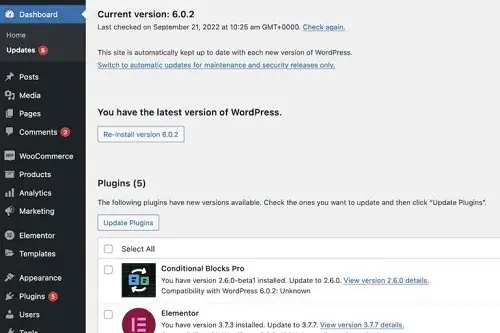
Shopify manages much of the underlying infrastructure, while WooCommerce relies on your hosting setup, WordPress installation, and chosen plugins to keep the store secure and up to da

Shopify
Shopify maintains the platform infrastructure and secures connections to the store.
- TLS encryption and SSL certificates
- Platform infrastructure managed by Shopify
- Less manual software maintenance
WooCommerce
You control security tools and maintenance through WordPress and your hosting provider.
- SSL through your hosting setup
- Updates for WordPress, plugins, and themes
- Backups and security tools you configure
Shopify vs WooCommerce: Security Comparison
| Feature | Shopify | WooCommerce |
|---|---|---|
SSL/TLS security |
Managed for Shopify stores |
Configured through hosting and SSL setup |
Platform updates |
Managed by Shopify |
WordPress and WooCommerce updates need attention |
Theme and plugin updates |
App and theme selection still requires care |
You maintain compatible, trusted plugins and themes |
Security tools |
Platform-provided protections and settings |
Choose from hosting features, security plugins, and other tools |
Backups and recovery |
Platform features and available recovery options |
Depends on your host, backup plugins, and recovery setup |
Security configuration |
Fewer server-level tasks for store owners |
More control over security tools and server configuration |
Technical maintenance |
Generally lower |
Generally higher |
Best for |
Users who prefer managed upkeep |
Users who want more technical control |
Our Verdict: Shopify Wins for Security and Maintenance
Shopify is the better choice for merchants who want managed infrastructure, fewer technical maintenance tasks, and built-in platform security.
WooCommerce can also be highly secure, but it requires more attention to hosting, updates, backups, and plugin security.
Shopify vs WooCommerce: Final Verdict
Choosing between Shopify and WooCommerce comes down to how you want to build and manage your online store.
Shopify offers a more convenient, managed experience, while WooCommerce gives you greater control over your website, code, hosting, and customization.
For most first-time store owners, Shopify is our overall recommendation because it combines hosting, checkout, store management, and ongoing platform maintenance in one service. This makes launching and operating an online store simpler.
However, if you already use WordPress or need deeper control over your store’s design, functionality, and technical setup, WooCommerce may be the better fit.
Compare the total cost of ownership, including hosting, payment processing, extensions, and maintenance, before deciding.
Choose Shopify
- Beginners launching their first store
- Businesses wanting managed hosting and security
- Sellers who prefer centralized store management
- - Entrepreneurs who want less technical maintenance Explore Shopify
Choose WooCommerce
- WordPress users building an online store
- Businesses needing extensive customization
- Store owners wanting control over hosting and code
- - Teams comfortable managing plugins and maintenance Explore WooCommerce