
Bluehost AI Builder Review: A Complete Guide
Discover Bluehost AI Builder, explore its website & web app creation features, customization options, pricing, and limitations. See how it works and whether it’s the right AI builder for your needs.
- Updated: November 2026
- 12-15 min read
Bluehost AI Builder at a Glance
A quick look at what Bluehost AI Builder offers, who it’s designed for, and what to know before getting started.
Main Advantage
Create websites and web apps using natural-language prompts, with hosting included.
Main Consideration
Limited AI building credits on the free plan; more credits and custom domains require a paid plan.
Best For
Small Businesses & Beginners
Business owners who want to create websites or web apps without coding.
Building Experience
Conversational AI Builder
Describe, generate, preview, and refine your project through chat.
Hosting & Support
Integrated Cloud Hosting
Hosting and 24/7 human support are advertised on every plan.
Website & App Types
Websites, Portals & Apps
Supports business sites, portfolios, bookings, forms, and customer portals.

Bluehost AI Builder
From $0/mo
Free plan available. Start creating websites and web apps with AI assistance. Upgrade for more credits and custom domain support.
Disclosure: ElegantEspace is supported by readers like you. We earn an affiliate commission when you purchase through our links. Commissions do not affect our editors’ opinions or evaluations.
Table of Content
- Bluehost AI Builder Overview
- What Is Bluehost AI Builder?
- Pros and Cons
- Pricing and Plans
- Key Features
- How to Build a Website
- Exploring the Generated Website
- Testing the Booking Form
- Managing Website Content
- Customizing Your Website With AI
- Website Settings and Publishing
- Publishing Your Website
- Who Should Use Bluehost AI Builder?
- Final Verdict
- FAQs
- User Review
- Bluehost AI Builder Alternatives
What Is Bluehost AI Builder?
Bluehost AI Builder is an AI-powered website and web app creation platform designed to help individuals and small businesses build an online presence using natural-language instructions.
Instead of manually designing every page, selecting layouts, and configuring website elements from scratch, you can describe the website or application you want to create.
The AI Builder then uses your instructions to generate an initial version of your project.
Bluehost takes a conversational approach to website creation.
You can describe your business, provide inspiration, add a logo or photos, and answer the AI’s questions to help shape the result.
Once the initial version is ready, you can preview it and request further changes through AI chat.
What makes Bluehost AI Builder particularly interesting is that it isn’t limited to creating traditional business websites.
It supports creating web apps, including booking websites, customer portals, forms, and other business-oriented functionality.
The platform combines website creation, hosting, and customer support into one service. Bluehost advertises 24/7 human support across its plans, including the free option.
If you’re new to website creation, our guide on what a website builder is and how it works will help you understand the basics.
Bluehost AI Builder: Pros and Cons
- Free plan available
- AI website and web app creation
- Guided conversational workflow
- Chat-based website editing
- Hosting included
- 24/7 human support
- Built-in business functionality
- SEO essentials
- Limited free AI credits
- Custom domain requires paid plan
- Paid credit top-ups
- Complex projects need refinement
- Feature availability varies
- Advanced customization needs testing
- Platform still in early stage
Bluehost AI Builder Pricing and Plans 2026
Currently, Bluehost AI Builder is offering three pricing plans.
AI Builder Free
$0/mo
No credit card required, 5 credits a day, up to 30 a month.
- Unlimited websites
- Unlimited apps
- Forms and data storage
- Bookings and scheduling
- User accounts and roles
- Admin panel
- bluehost.ai domains
- Cloud hosting
- 24/7 human support
AI Builder Lite
$20.00/mo
Up to 100 AI credits per month · No limit on daily usage.
- Everything in Free, plus:
- On-demand credit top-ups
- Remove the Bluehost badge
- Custom domains
- 24/7 human support
AI Builder Standard
$40.00/mo
200 AI credits every month for creating your projects.
- Everything in Lite
- 200 credits a month
How Do Bluehost AI Builder Credits Work?
Bluehost AI Builder uses a credit system for website creation and customization.
Each message that creates or changes your website or web app consumes one credit, regardless of how simple or detailed the request is.
Here are a few important things to know:
- One message = One credit: Your initial website generation and each requested design or content change use one credit.
- Free questions: Asking questions or answering the AI's initial onboarding questions doesn't consume credits.
- Publishing is free: Previewing, publishing, republishing, sharing, and hosting your website don't use credits.
- Credits expire: Monthly plan credits and purchased top-up credits expire 30 days after they're added or purchased. Unused credits don't roll over.
- Running out of credits: You can no longer request new changes until your credits refresh, you purchase additional credits, or upgrade your plan. However, your published website remains online.You can also purchase additional credit top-ups if you need more credits before your next renewal.
Accepted Payment Methods
- Major Credit & Debit Cards: Include Visa, MasterCard, American Express, and Discover.
- PayPal: Available in some regions (not always shown by default; usually offered upon request at checkout or via support).
- Bank transfers
Key Features of Bluehost AI Builder
Bluehost AI Builder combines AI-powered website creation with tools for editing, managing, and publishing websites and web apps. Here are six of its most important features.
1. AI-Powered Website and Web App Creation
Create websites and web apps by describing your requirements in simple text prompts. No coding knowledge is required to get started.
2. Design Personalization With Your Own Assets
Add your logo, images, and design references to help the AI create a website that matches your brand and preferred style.
3. Multi-Page and Mobile-Friendly Websites
Generate complete websites with multiple pages, navigation menus, and responsive layouts that adapt to different screen sizes.
4. AI-Powered Website Editing
Modify existing sections, update content, change images, or add new sections simply by chatting with the AI.
5. Built-in Business Management Tools
Create forms and business workflows, then manage website content, customer enquiries, and messages through the built-in dashboard.
6. Website Publishing and SEO Basics
Publish your website using a Bluehost subdomain or connect a custom domain with a paid plan. It also supports SEO essentials such as page titles, meta descriptions, and image alt text.
If you’re still exploring your options, check out our guide to the best website builders in 2026. It covers different platforms to help you find the right solution for your needs.
How To Build a Website With Bluehost AI Builder
Getting Started With Bluehost AI Builder
Getting started with Bluehost AI Builder is fairly straightforward.
Visit the Bluehost AI Builder website, describe the website or app you want to create, and add your logo, photos, or a reference website for design inspiration.
Once you’ve provided the details, click Build for free to get started.
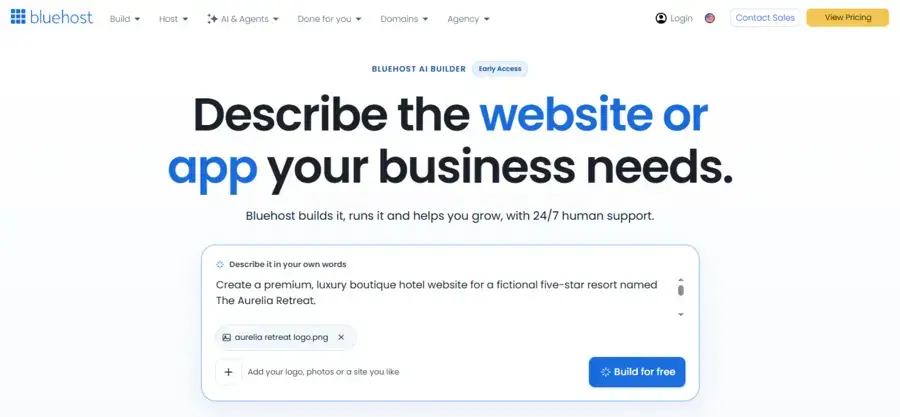
The prompt box is where you’ll explain your project in your own words.
You don’t need to write technical instructions or know how to code. Just describe your business, the type of website you need, and the features you’d like to include.
For our demonstration, we’ve entered a brief description of The Aurelia Retreat and uploaded its logo.
We then prepared a more detailed prompt outlining the website’s design, required pages, and functionality.
Rather than asking the AI to create a basic hotel website, we wanted to see how well it could handle a more detailed brief.
Our requirements included accommodation listings, dining experiences, spa and wellness offerings, and a booking enquiry form.
Here’s The Complete Prompt We Used:
Hands-on testing prompt
Create a premium, luxury boutique hotel website for a fictional five-star resort named The Aurelia Retreat.
The hotel offers luxury accommodation, private villas, fine dining, spa treatments and curated travel experiences.
Create a complete, responsive, multi-page website with:
1. Home
2. Rooms & Suites
3. Dining
4. Experiences
5. About Us
6. Contact
The homepage should feature a full-width luxury resort hero image, elegant headline, booking enquiry section, featured accommodation, dining experiences, wellness and spa offerings, guest testimonials and a newsletter section.
Use a sophisticated visual identity with warm ivory, muted gold, deep forest green and charcoal. Use refined serif headings paired with clean sans-serif body typography.
The design should feel editorial, sophisticated and luxurious, with generous whitespace, beautiful photography, subtle animations and elegant transitions.
Include room cards with pricing, descriptions and enquiry buttons. Add a booking enquiry form with check-in date, check-out date, number of guests and room preference.
Ensure all navigation, buttons, forms and interactive elements are properly implemented wherever supported by the platform.
The final website should look like a professionally designed luxury hospitality brand, not a generic website template.
We included these details to give Bluehost AI Builder a clear understanding of the website’s purpose, visual direction, and expected functionality.
This will also help us evaluate how well the AI translates a detailed prompt into a complete website.
After entering the prompt and uploading the logo, we clicked Build for free to begin the website creation process.
Creating a Bluehost Account
After clicking Build for free, Bluehost AI Builder takes you to an account registration screen.
You’ll need to create an account to save your website and access it later.
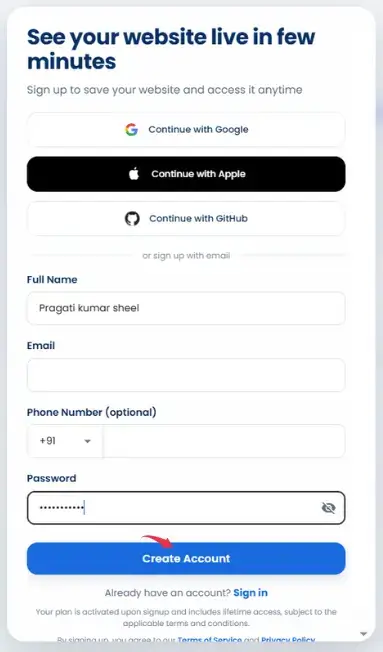
You can sign up using your Google, Apple, or GitHub account, or register with your email address by providing your name, email, and password. A phone number is optional.
If you already have a Bluehost AI Builder account, you can simply sign in instead.
Once you’ve completed registration, you can continue with your website creation.
Generating Your Website With Bluehost AI Builder
After completing the account registration, Bluehost AI Builder automatically starts working on your website.
You don’t need to submit the prompt again or go through another setup process.
During generation, the builder displays your original instructions in a panel on the left, while the main preview area shows the current progress.
In our case, it initially displayed the message “Understanding your business…“, indicating that the AI was processing our requirements.
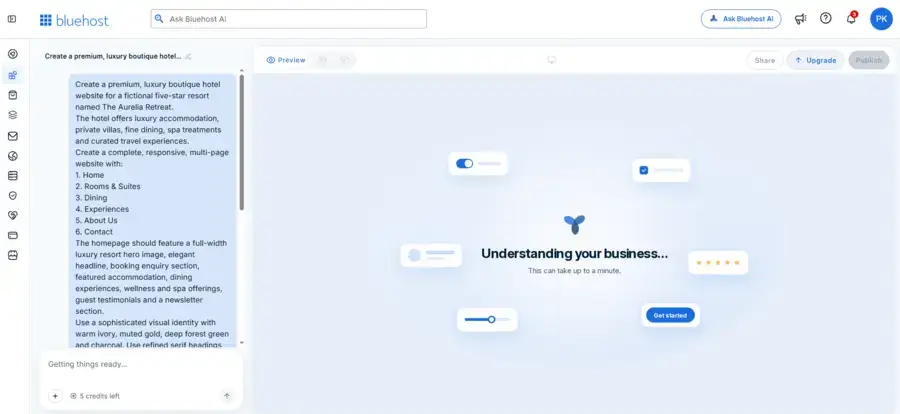
While the website was being generated, it presented four quick questions to understand our business and tailor its recommendations.
These questions covered the following areas:
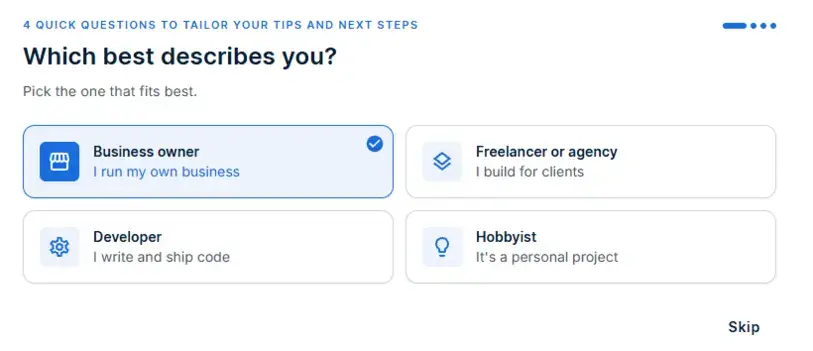
- Your role: Are you a business owner, freelancer, developer, or someone building a personal project?
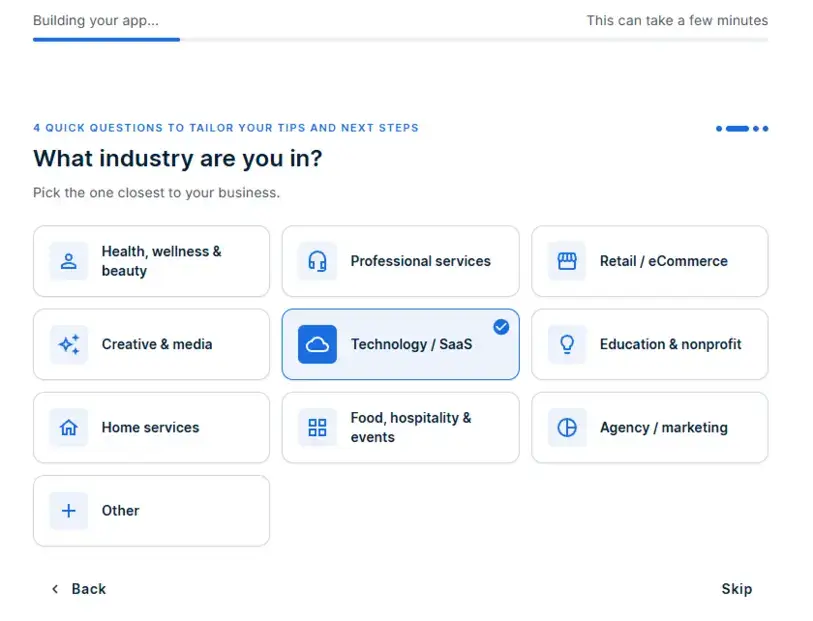
- Industry: Which industry best describes your business?
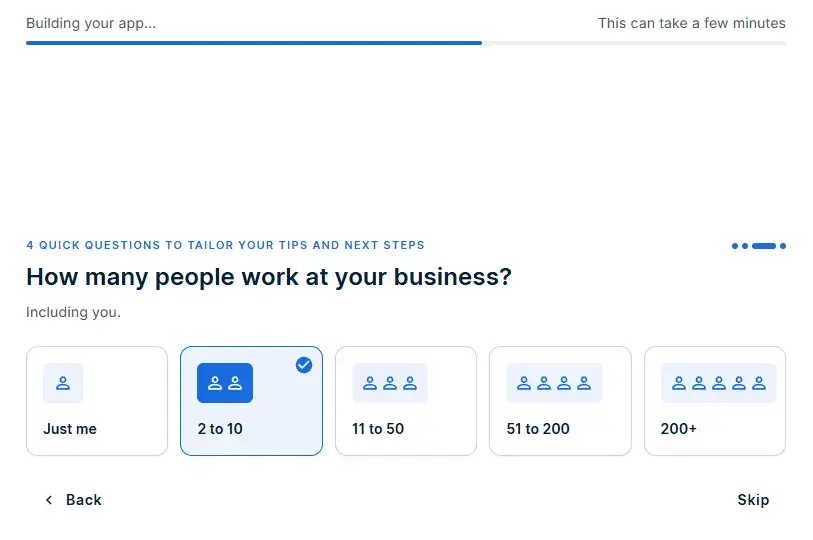
- Team size: How many people work at your business?
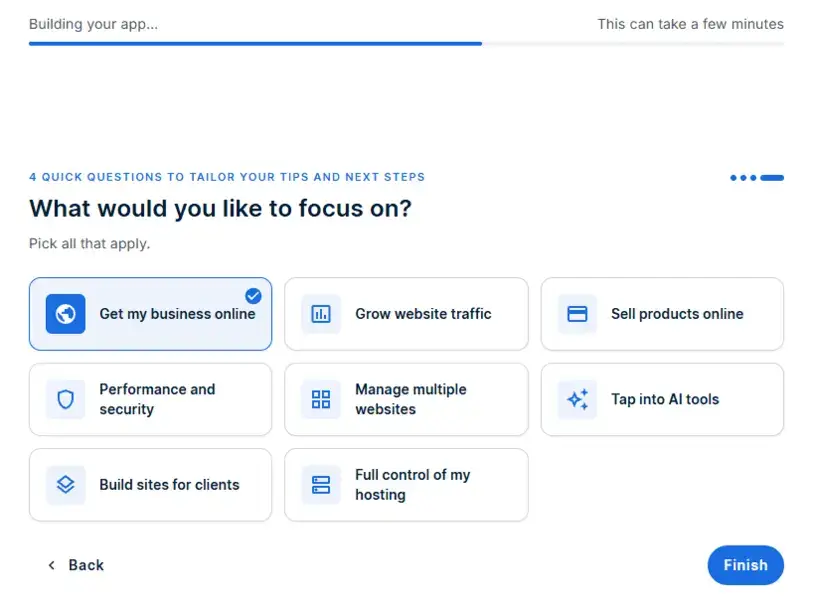
- Business goals: What would you like to focus on, such as getting your business online, growing website traffic, selling products, or exploring AI tools?
You can select the options that best describe your situation. Some questions allow multiple selections, while others ask you to choose a single answer.
For our demonstration, we selected getting our business online, a team size of 2 to 10 people, Technology / SaaS as the industry, and Business owner as our role.
These questions are designed to personalize the tips and recommendations Bluehost provides.
They are separate from the detailed website prompt we submitted earlier.
After answering the onboarding questions, we clicked Finish and allowed Bluehost AI Builder to complete the website creation process.
The builder continued working in the background, displaying a progress indicator with the message “Building your app…” and noting that the process could take a few minutes.
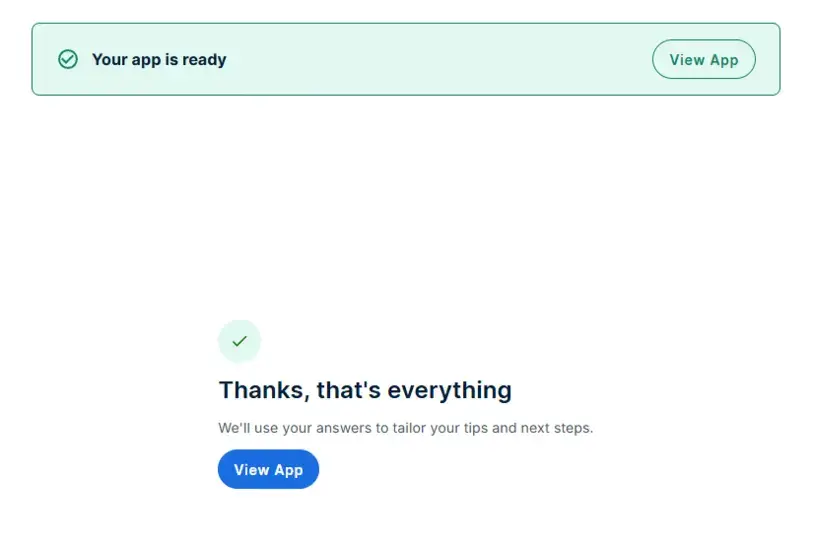
Once the generation was complete, Bluehost displayed a confirmation message saying “Your app is ready“, along with a View App button.
After clicking View App, we were taken to the generated website inside the Bluehost AI Builder interface.
Our first impression was positive.
The builder followed most of our design instructions, using a warm ivory background, muted gold accents, deep forest green elements, and elegant serif typography.
It also generated all six pages we requested: Home, Rooms & Suites, Dining, Experiences, About Us, and Contact.
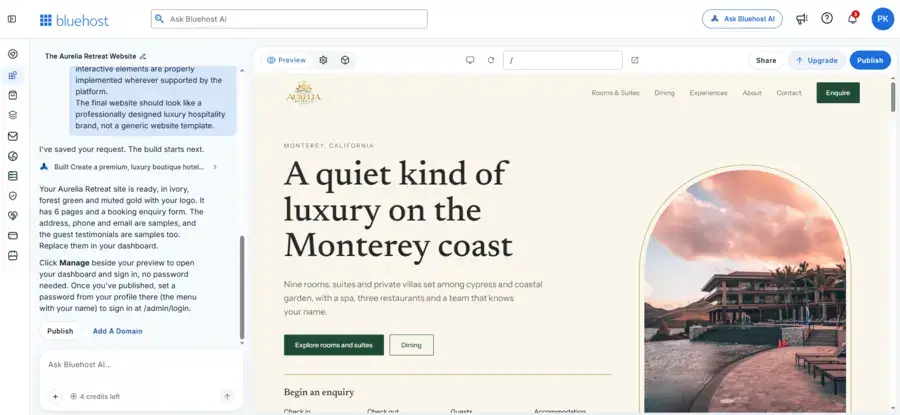
The homepage included a large resort hero section, accommodation listings, dining experiences, spa and wellness offerings, guest testimonials, a booking enquiry section, and a newsletter signup area.
We also found a booking enquiry form with options for selecting check-in and check-out dates, the number of guests, and accommodation preferences.
Overall, Bluehost AI Builder delivered a website that was much closer to our requested luxury hospitality design than a basic generic template.
However, we still need to test the individual pages, forms, navigation, and other interactive elements before judging the website’s overall functionality.
One thing worth mentioning is that our initial website generation consumed just one AI credit.
We started with five credits on the free plan, leaving four credits after the first build.
This was a good starting point for our testing, as we were able to generate a complete multi-page website without using multiple credits for the initial creation.
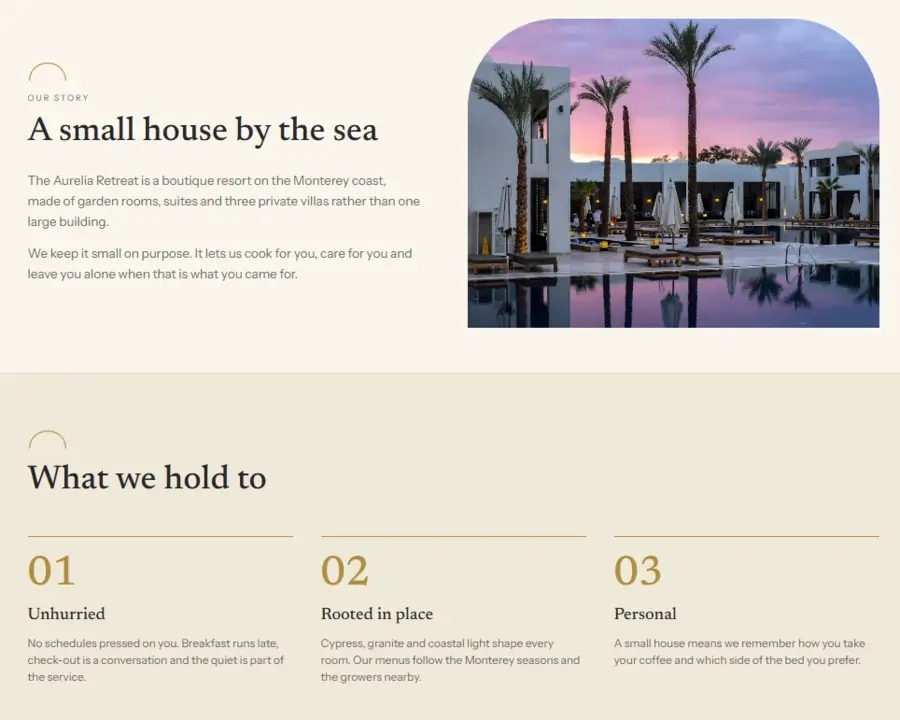
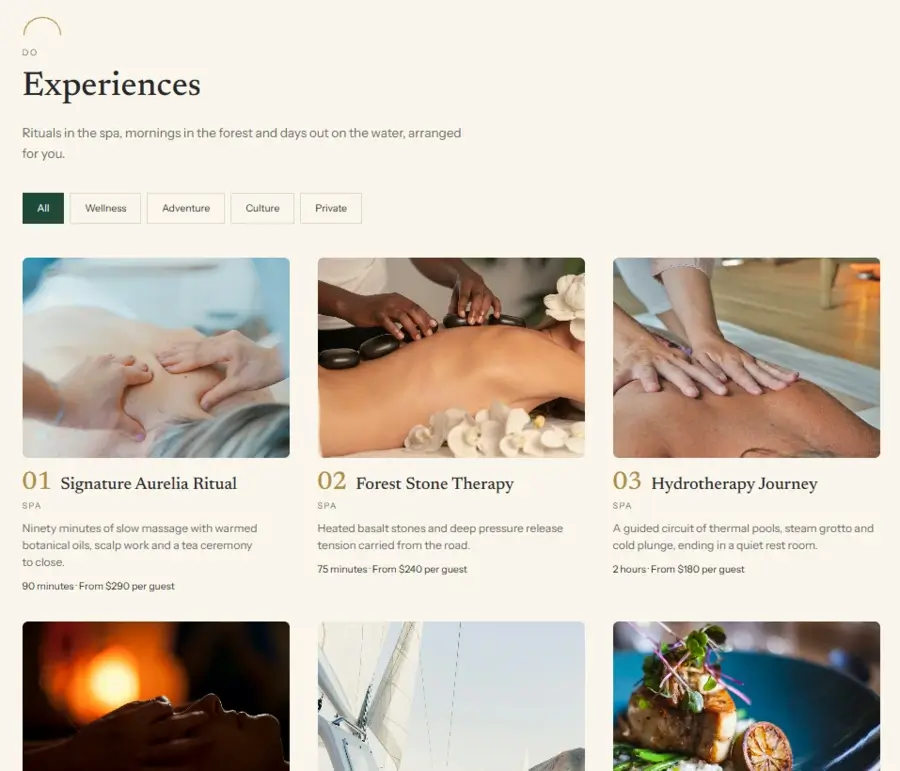
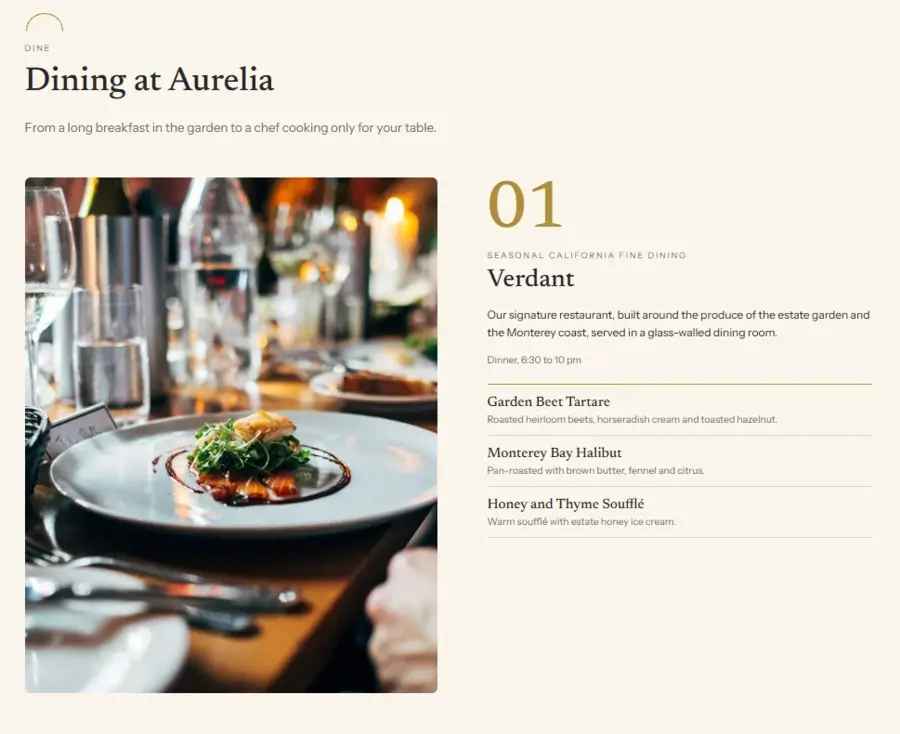
Exploring The Website Generated By Bluehost AI Builder
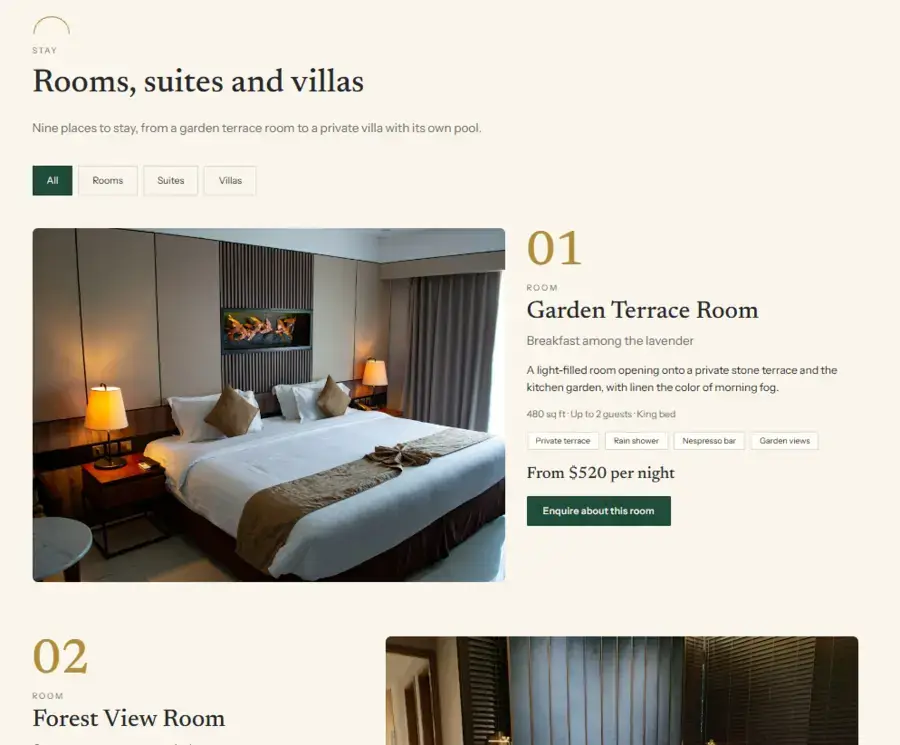
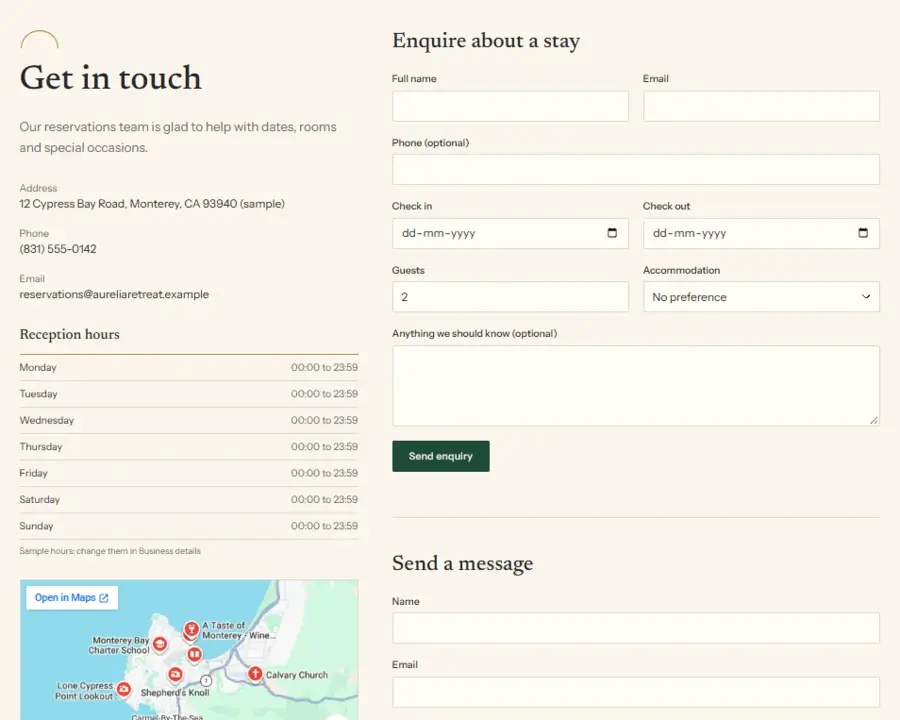
After reviewing the homepage, we explored the other pages to see how well Bluehost AI Builder handled the rest of our requirements.
One thing we liked was that it didn’t simply generate six pages with basic headings and placeholder sections.
Each page had its own layout and content, following the same visual style as the homepage.
Here’s a closer look at what it created.
Checking Mobile Responsiveness
A website should work just as well on mobile devices as it does on desktop.
We checked The Aurelia Retreat on a smaller screen to see how well Bluehost AI Builder adapted the layout.
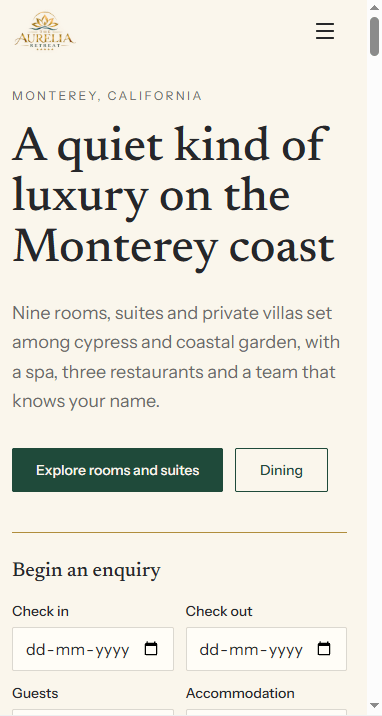
The result was good.
The website adjusted properly to the mobile screen, with readable text, well-arranged images, accessible navigation, and a booking enquiry form that remained easy to use.
We didn’t notice any major layout issues during our test. Overall, Bluehost AI Builder did a good job of making the generated website mobile-friendly without compromising its overall design.
Testing The Booking Enquiry Form Created By Bluehost AI builder
A booking enquiry form is an important feature of any hotel website.
We wanted to see whether Bluehost AI Builder could create a working form rather than simply adding one to the design.
The generated website includes fields for check-in and check-out dates, number of guests, room preferences, and visitor details.
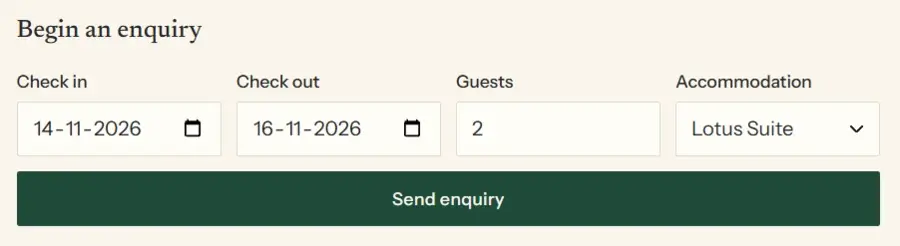
We tested the form by submitting sample booking information, and everything worked as expected.
What makes this more useful is the built-in dashboard created by the Bluehost AI builder.
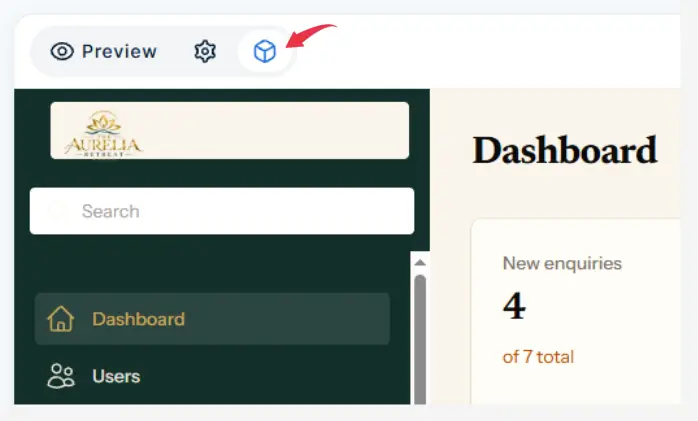
To access the dashboard, click on the cube icon as shown in the screenshot.
Submitted enquiries automatically appear in the Enquiries section, where the hotel owner can view guest details, requested dates, room preferences, and enquiry status.
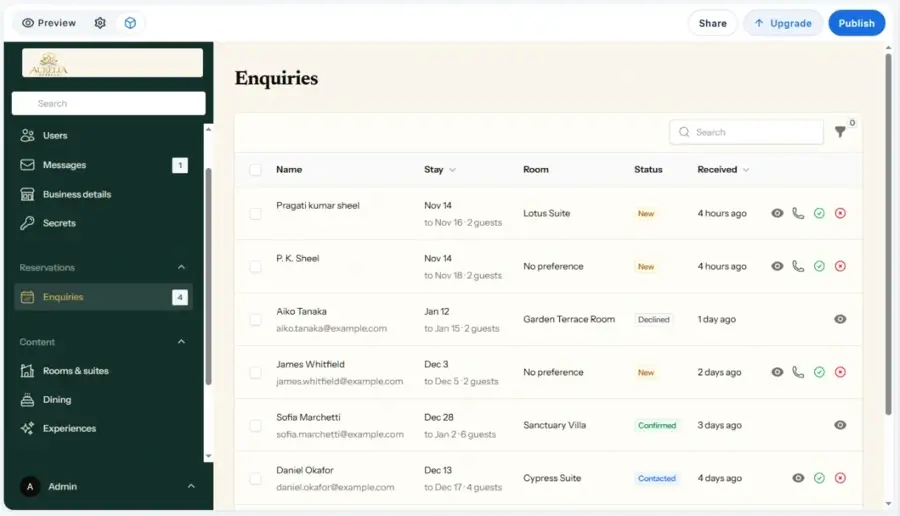
You can also review individual enquiries and manage their status, making it easier to keep track of potential bookings without manually checking website submissions.
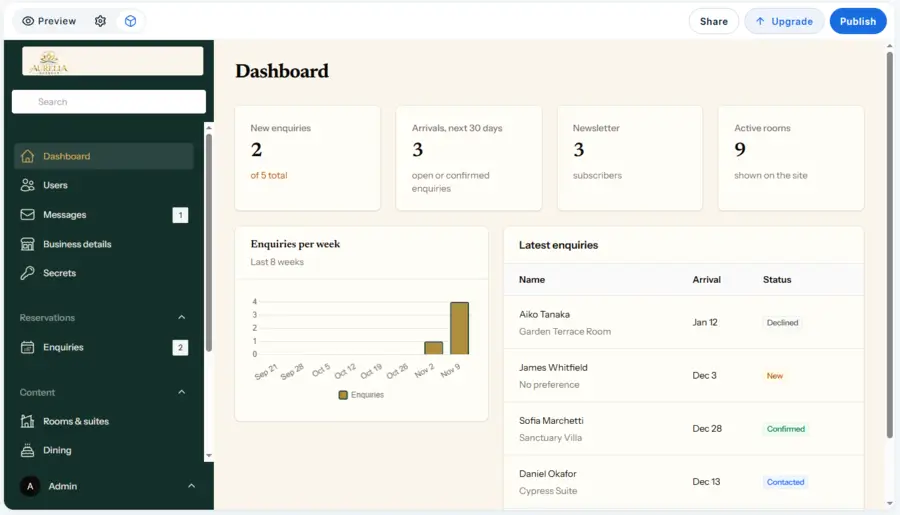
It’s worth noting that this is a booking enquiry system, not a complete hotel reservation system with live room availability and payment processing.
Managing Website Content From The Dashboard
Another useful part of Bluehost AI Builder is its built-in content management dashboard.
You don’t have to return to the AI chat every time you want to update basic website information. The generated dashboard provides dedicated sections for managing different types of content.
For The Aurelia Retreat, we found separate management areas for Rooms & Suites, Dining, and Experiences.
The Rooms & Suites section displays the existing accommodation options along with their images, names, prices, and categories.
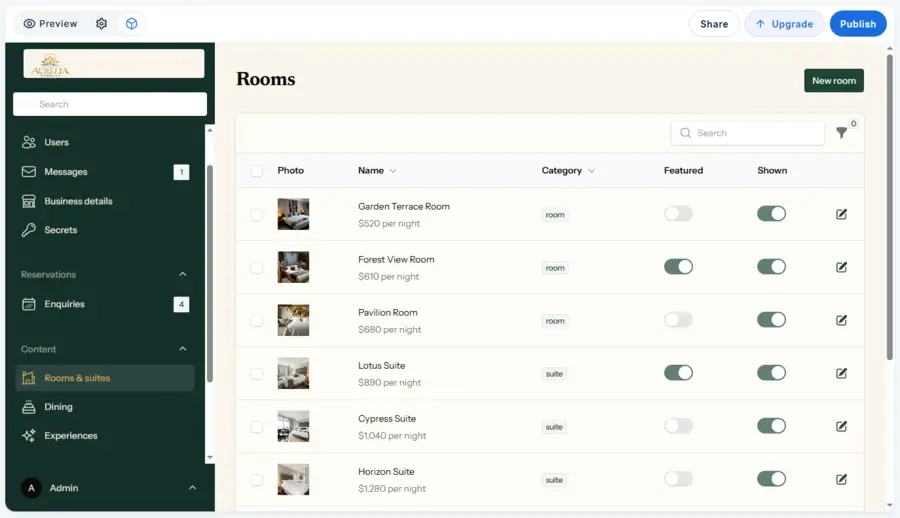
You can also mark rooms as featured, control whether they appear on the website, and edit their details.
There’s also an option to add new rooms.
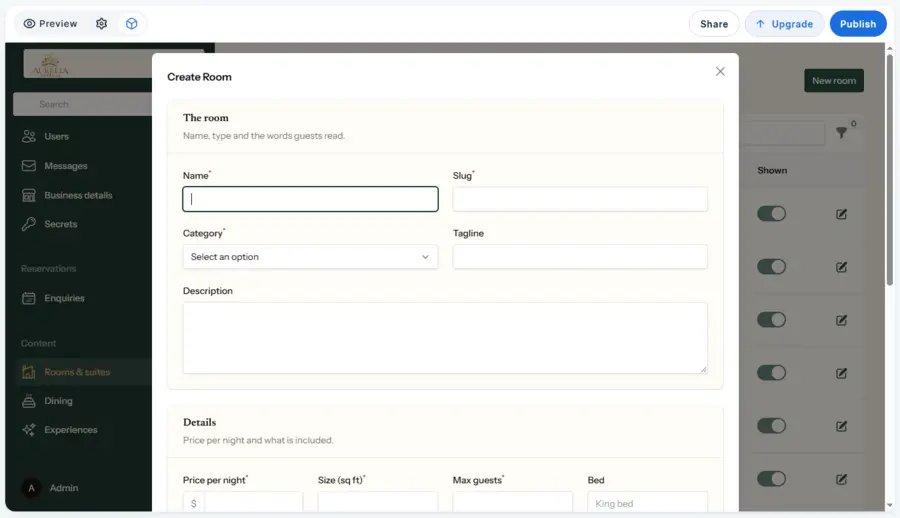
Similarly, the Dining and Experiences sections allow you to manage the corresponding content displayed on the website.
This is useful because hotel owners frequently need to update room descriptions, change prices, add new experiences, or modify their offerings.
Having these options available in the dashboard makes routine content management more convenient.
Managing Guest Messages
Apart from booking enquiries, Bluehost AI Builder also provides a separate Messages section for managing website communications.
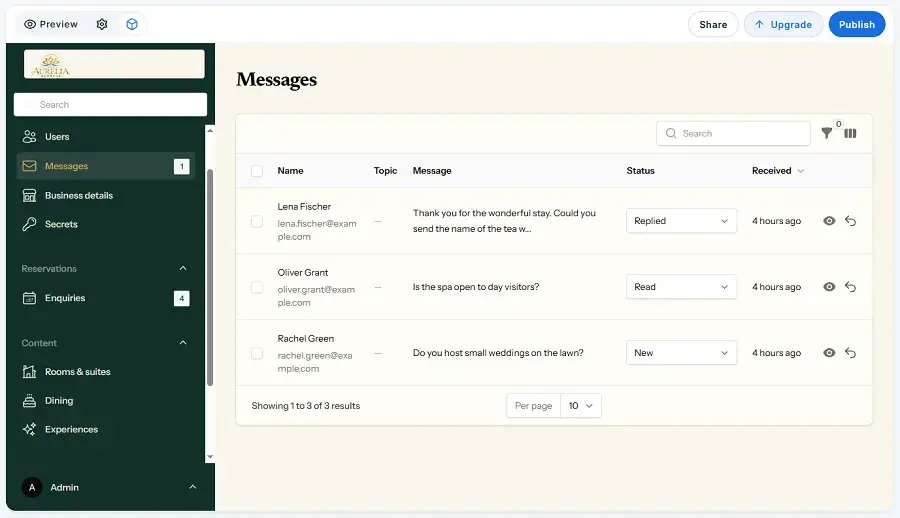
Here, you can view incoming messages, check the sender’s details, read their messages, and update their status to New, Read, or Replied.
This gives business owners a convenient place to keep track of customer questions and enquiries directly from the website dashboard.
Customizing Your Website With Bluehost AI Chat
Till this point, everything was working as we expected.
The website was generated successfully, the booking enquiry form worked, and we could manage website content and customer enquiries through the dashboard.
But creating the initial website is only the first step. We also wanted to see how easily we could customize the website and add new sections using AI.
Bluehost AI Builder allows you to request changes through its conversational AI interface.
Instead of manually editing every element, you can describe what you want in plain language, and the AI attempts to make those changes for you.
To test this, we tried two different customization requests on The Aurelia Retreat website.
1. Redesigning The Homepage Hero Section:
Our prompt
Redesign the homepage hero section to give it a more premium, five-star resort feel.
Use a beautiful tropical beachfront resort image, add a subtle dark overlay to improve text readability, and make the headline more elegant. Keep the existing colour palette and typography consistent with the rest of the website.
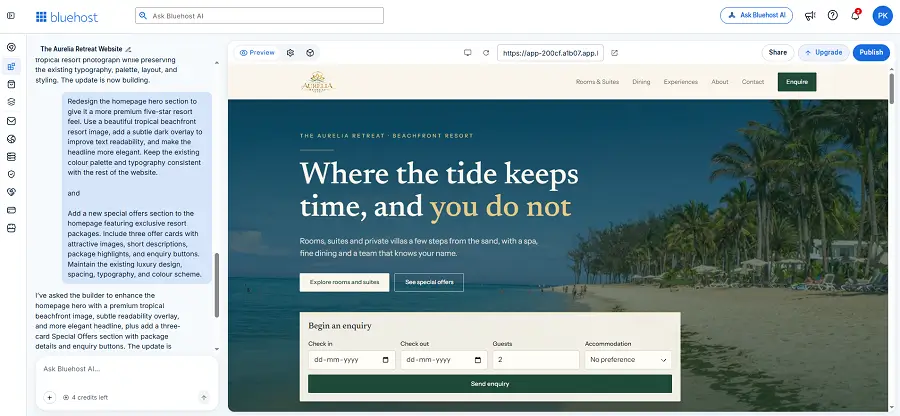
The AI updated the hero section with a tropical beachfront image, a darker overlay, and a redesigned headline.
It also retained the website’s existing luxury-inspired colour scheme and overall visual identity.
Next, we wanted to see whether the AI could add an entirely new section to an existing homepage.
We asked it to create a Special Offers section featuring three exclusive resort packages, each with an image, description, package highlights, and an enquiry button.
2. Adding a Special Offers Section:
Our prompt
Add a new special offers section to the homepage featuring exclusive resort packages.
Include three offer cards with attractive images, short descriptions, package highlights, and enquiry buttons. Maintain the existing luxury design, spacing, typography, and colour scheme.
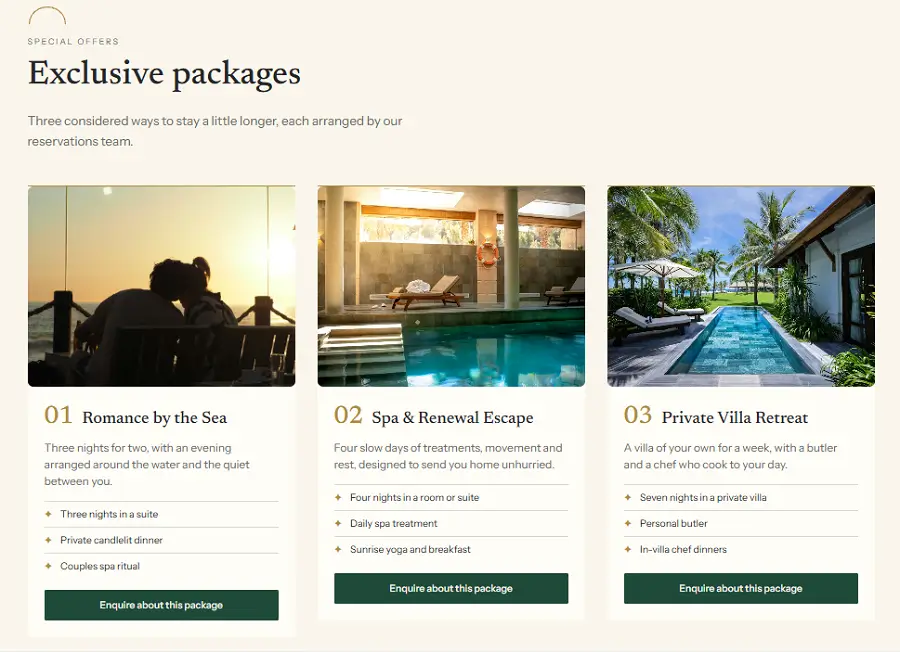
Perfect, it created a new section titled “Exclusive packages” with three offers: Romance by the Sea, Spa & Renewal Escape, and Private Villa Retreat.
Each card included an image, a short description, package highlights, and an enquiry button.
Overall, these tests showed that Bluehost AI Builder could do more than generate a website from scratch.
It could also redesign existing sections and add new content based on simple text instructions.
This makes website customization easier, particularly for beginners who may not be comfortable with manual editing or coding.
However, AI-generated changes should always be reviewed before publishing.
Check the updated content, images, layout, and functionality to make sure everything looks and works as intended.
It’s also worth checking the changes on mobile devices to ensure the website remains responsive.
Overall, we were impressed with how easily Bluehost AI Builder handled these customization requests.
Managing Website Settings and Publishing
Before publishing the website, we explored the general settings available in the Bluehost AI Builder dashboard.
This is where you can manage your project name, preview access, public preview link, and website address.
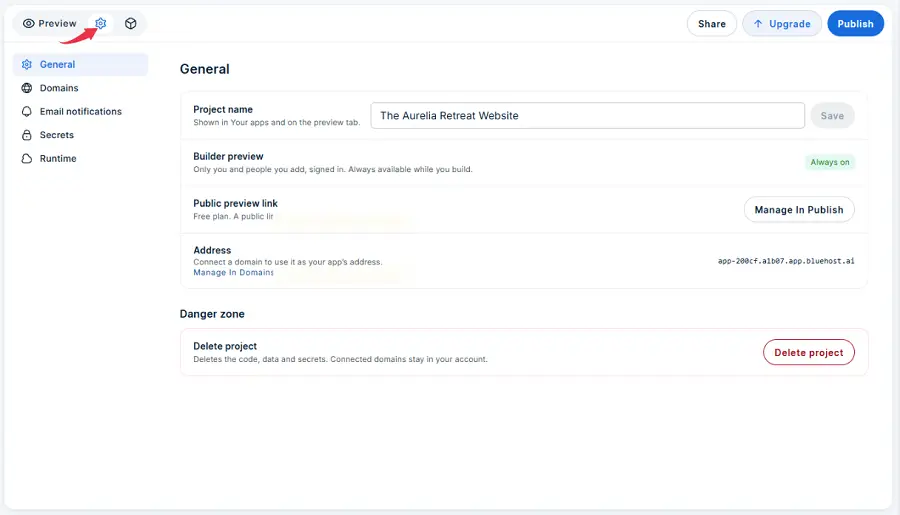
One useful option is the public preview link, which allows anyone with the link to access the website, even on the free plan.
The builder preview, on the other hand, remains available to you and people you invite while working on the project.
Bluehost AI Builder also provides a default Bluehost subdomain for your website.
If you want to use your own domain name, you can connect it through the Domains settings.
Apart from these options, the dashboard includes settings for email notifications, secrets, and runtime, giving you access to additional project configurations.
Publishing Your Website With Bluehost AI Builder
After customizing the website, the next step was to see how the publishing process works. Bluehost AI Builder provides a straightforward way to publish your project directly from the website editor.
When we clicked the Publish button, it displayed the available publishing options.
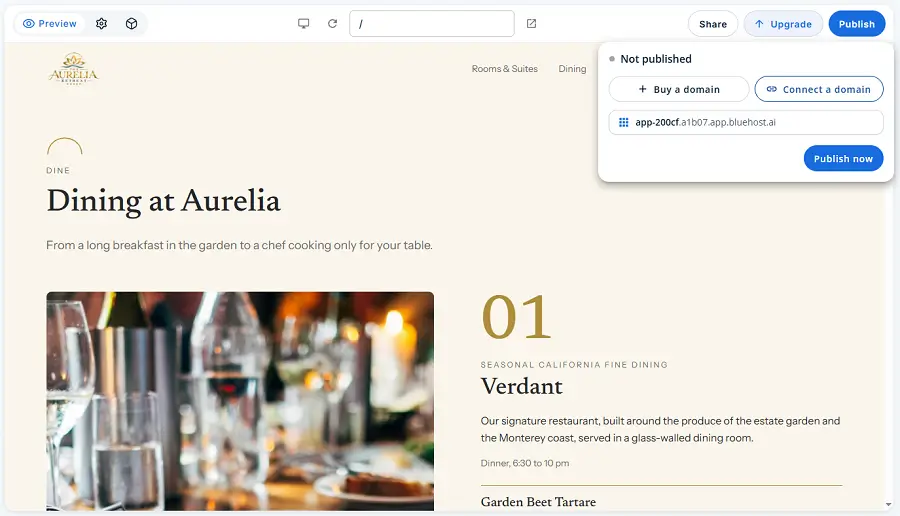
We could publish the website using the free Bluehost subdomain or choose to use a custom domain.
Publishing With a Bluehost Subdomain
If you want to publish your website without purchasing a domain, Bluehost AI Builder provides a default Bluehost subdomain.
In our case, the website address was app-200cf.a1b07.app.bluehost.ai.
Connecting a Custom Domain
If you prefer a more professional website address, you can choose to purchase a new domain or connect an existing one.
Bluehost AI Builder provides both options directly in the publishing interface.
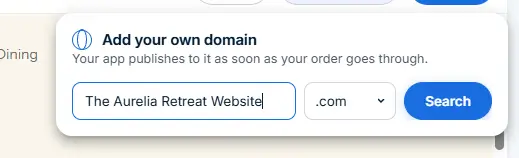
For our test, we explored the domain options and found that using a custom domain requires moving to a paid plan.
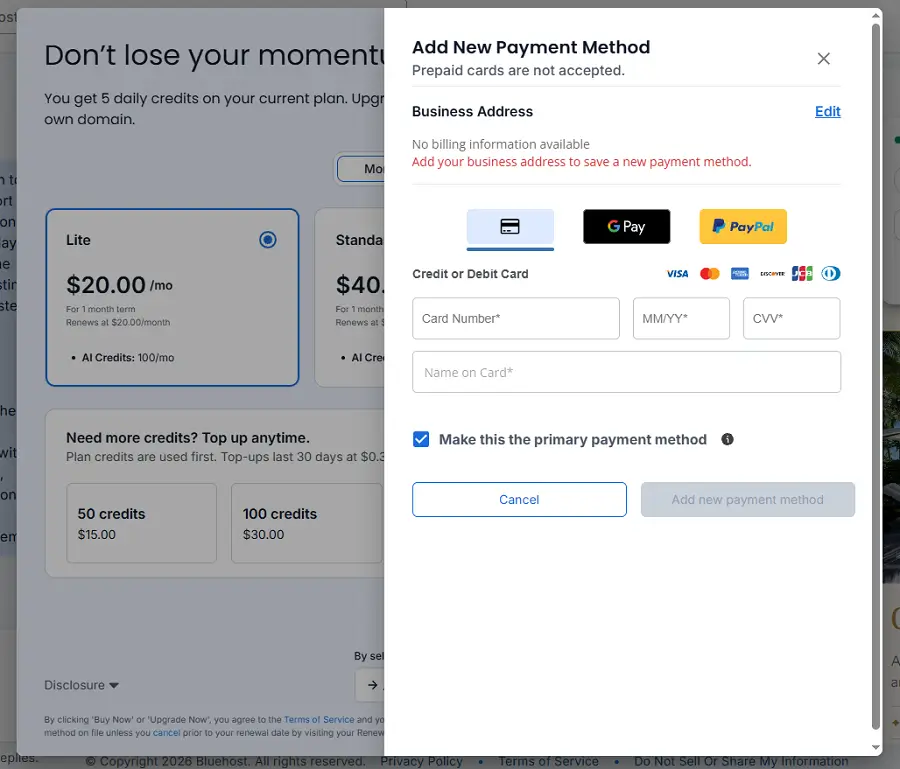
This is worth considering if you want to launch a business website with your own branded domain.
SEO Consideration: Although Bluehost AI Builder generates SEO essentials such as page titles, meta descriptions, and image alt text, websites published on the free Bluehost subdomain are not indexed by search engines.
You’ll need to connect a custom domain on a paid plan before your website becomes eligible for search engine indexing. However, indexing and search rankings are not guaranteed.
Overall, the publishing process is simple, and the free Bluehost subdomain gives beginners a way to make their website accessible without purchasing a domain upfront.
However, businesses planning to establish a professional online presence should consider using a custom domain.
For this review, we chose the free Bluehost subdomain option and published The Aurelia Retreat website to see how the process works.
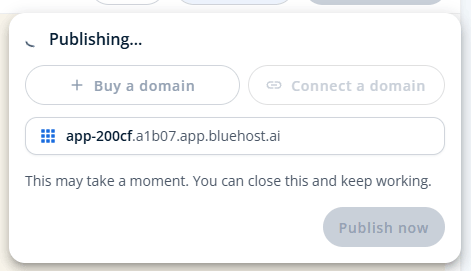
Here is the link to our live website: The Aurelia Retreat website
Who Should Use Bluehost AI Builder?
Bluehost AI Builder is a good option for people who want to create websites or simple web apps using AI without dealing with coding or complex development processes.
Use Bluehost AI Builder if...
- You're a beginner: You want to create a website without coding or technical experience.
- You own a small business: You need a professional website to showcase your services and collect customer enquiries.
- You're a freelancer or creator: You want to build a portfolio or personal website quickly.
- You're launching a startup: You want to turn an idea into a website or web app without starting development from scratch.
But if you need...
- More design flexibility: Consider Wix for its visual editing tools and design options.
- Greater website control: Choose WordPress with Elementor for more customization and plugin options.
- Advanced online store features: Consider Shopify for managing products, payments, and ecommerce operations.
Create a Website Without Coding With Bluehost AI Builder
Turn your ideas into a website or web app using simple AI prompts. Explore Bluehost AI Builder, create your website, and customize it without coding.
Final Verdict on Bluehost AI Builder
After testing Bluehost AI Builder, we found it to be a useful tool for creating and managing websites without coding.
It successfully generated our six-page hotel website, handled customization requests, created new sections, and provided a working booking enquiry form with a dashboard to manage submissions.
We particularly liked its conversational editing experience, which made it easy to modify the website using simple text instructions.
The mobile-responsive design and built-in business management tools were also useful.
However, the free plan has limited AI credits, and you’ll need a paid plan to connect a custom domain. AI-generated designs and content may also require some refinement.
Overall, Bluehost AI Builder is worth considering if you’re a beginner, freelancer, or small business owner looking for a quick way to build a website.
But if you need advanced customization, complex integrations, or greater control, WordPress may be a better choice.
FAQ On Bluehost AI Builder
1. Is Bluehost AI Builder free to use?
Yes. Bluehost AI Builder offers a free plan with limited AI credits. You can create and publish a website using a Bluehost subdomain, but you’ll need a paid plan for a custom domain.
2. Can Bluehost AI Builder create a complete website?
Yes. It can generate multi-page websites with layouts, images, content, navigation, and business features based on your prompts. We used it to create a six-page hotel website for our hands-on test.
3. Does Bluehost AI Builder require coding knowledge?
No. You can create and customize websites using simple text instructions. You don’t need coding knowledge to get started.
4. Can I use my own domain with Bluehost AI Builder?
Yes. You can connect an existing domain or purchase a new one. However, using a custom domain requires a paid plan.
5. Can Bluehost AI Builder create web apps?
Yes. Bluehost AI Builder supports creating web apps as well as websites. You can describe the functionality you need and let the AI generate an initial version.
6. Can I edit my website after generating it?
Yes. You can use the conversational AI interface to update content, change images, redesign existing sections, and add new sections through text prompts.
7. Is Bluehost AI Builder good for beginners?
Yes. Its prompt-based website creation and conversational editing make it accessible to beginners, freelancers, and small business owners who want to build a website without coding.
8. Does Bluehost AI Builder include hosting?
Yes. Bluehost provides hosting as part of its AI Builder offering, so you don’t need to arrange separate web hosting for your project.
9. How many credits does Bluehost AI Builder use per prompt?
Each message that creates or changes your website uses one AI credit, regardless of its length. Your initial website generation also consumes one credit, while questions that don’t change your website are free.
10. Do Bluehost AI Builder credits expire?
Yes. Monthly plan credits and purchased top-up credits expire after 30 days. Unused credits don’t roll over to the next billing period.
11. What happens when I run out of Bluehost AI Builder credits?
You won’t be able to request new website changes until your credits refresh, you purchase a top-up, or upgrade your plan. However, your already-published website remains online and accessible to visitors.
Real User Review On Bluehost AI Builder
There are no reviews yet. Be the first one to write one.
- Bluehost AI Builder Overview
- What Is Bluehost AI Builder?
- Pros and Cons
- Pricing and Plans
- Key Features
- How to Build a Website
- Exploring the Generated Website
- Testing the Booking Form
- Managing Website Content
- Customizing Your Website With AI
- Website Settings and Publishing
- Publishing Your Website
- Who Should Use Bluehost AI Builder?
- Final Verdict
- FAQs
- User Review
- Bluehost AI Builder Alternatives
Bluehost AI Builder Alternative

Wix
Best for design flexibility
A visual website builder with extensive templates, drag-and-drop editing, and AI-powered design tools. A good choice if you want more creative control.

Hostinger
Best for AI-powered website creation
Creates professional websites quickly using AI, with customizable designs, built-in hosting, and easy editing tools for beginners and small businesses.