
Helping beginners build websites since 2017
400K+
Readers Helped
Updated for 2026
Latest Method
100%
Beginner Friendly
Disclosure: ElegantEspace is supported by readers like you. We may earn an affiliate commission when you purchase through our links. Commissions do not affect our editors’ opinions or evaluations.
Table of Content
- What Is Off-Page SEO?
- Why Is Off-Page SEO Important?
- Off-Page SEO vs. On-Page SEO vs. Technical SEO
- Key Factors That Influence Off-Page SEO
- How to Build High-Quality Backlinks
- Create Link-Worthy Content
- Guest Posting
- Analyze Competitors' Backlinks
- Broken Link Building
- Find Unlinked Brand Mentions
- Build Industry Relationships
- Create Resource Pages and Useful Tools
- Contribute Expert Insights
- Improve Your Local Online Presence
- Promote Content on Social Media
- How to Evaluate a High-Quality Backlink
- Off-Page SEO Practices to Avoid
- How to Check Your Website's Backlinks
- How to Measure Off-Page SEO Performance
- Common Off-Page SEO Mistakes
- Off-Page SEO Checklist
- FAQs About Off-Page SEO
- Next Lesson
Publishing quality content and building backlinks are important for SEO, but your website also needs a strong technical foundation.
Technical SEO helps search engines discover, crawl, understand, and index your website’s pages.
Issues such as broken links, incorrect indexing settings, duplicate URLs, slow loading speeds, and poor website structure can interfere with this process.
In this guide, you’ll learn how to perform a technical SEO audit, identify common website problems, and fix them step by step.
We’ll use practical examples, screenshots, and tools such as Google Search Console, PageSpeed Insights, Screaming Frog, and WordPress SEO plugins to help you implement each technique.
Whether you manage a blog, affiliate website, business website, or online store, this guide will help you improve your website’s technical SEO.
What Is Technical SEO?
Technical SEO is the process of improving your website’s technical foundation so search engines can discover, crawl, render, and index its pages effectively.
It focuses on your website’s infrastructure rather than the content or backlinks themselves.
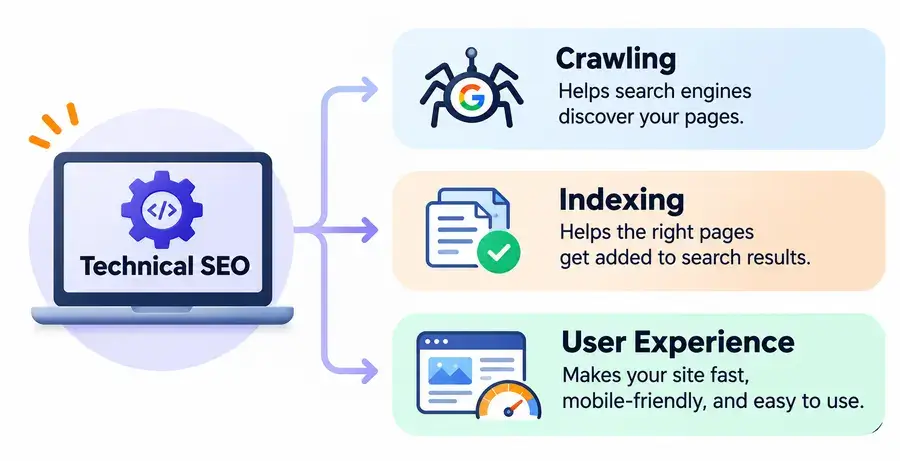
Key Areas Of Technical SEO
| Area | What it involves |
|---|---|
| Crawlability | Helping search engines discover website pages. |
| Indexing | Making important pages eligible for search results. |
| Website architecture | Organizing pages and internal links logically. |
| Website performance | Improving loading speed and Core Web Vitals. |
| Mobile optimization | Making pages work properly on mobile devices. |
| HTTPS | Securing connections between visitors and your website. |
| Structured data | Helping search engines understand page information. |
Practical Example
Imagine you publish an article on your WordPress website:
https://elegantespace.com/what-is-technical-seo/
Before this page can appear in Google search results:
- Googlebot needs to discover and crawl the URL.
- Google needs to render and understand its content.
- Google needs to determine whether the page is eligible for indexing.
- Google evaluates the page when deciding whether and where to show it for relevant searches.
Technical SEO helps ensure that your website does not create unnecessary obstacles during these processes.
Remember
Technical SEO does not guarantee indexing or higher rankings. It helps search engines access and process your website more effectively.
Why Is Technical SEO Important?
Technical SEO helps search engines access your website and provides visitors with a better browsing experience.
Without a properly configured website, even useful content may face unnecessary technical obstacles.
5 Reasons Technical SEO Matters
Improves Website Crawling
- Helps search engines discover important pages.
- Provides clear internal links and website navigation.
- Prevents accidental crawler restrictions.
Supports Proper Indexing
- Helps search engines identify pages eligible for indexing.
- Prevents important pages from being accidentally marked noindex.
- Helps manage duplicate URLs using canonical tags.
Improves Website Performance
- Reduces unnecessary loading delays.
- Helps improve Core Web Vitals.
- Creates a smoother browsing experience.
Enhances Mobile Experience
- Makes your website usable across screen sizes.
- Improves navigation and readability on smartphones.
- Supports Google's mobile-first indexing approach.
Helps Search Engines Understand Your Website
- Establishes a logical website structure.
- Uses descriptive URLs and structured data.
- Makes relationships between related pages easier to understand.
How Technical Issues Affect a Website
| Technical issue | Possible consequence |
|---|---|
| Important page blocked by robots.txt | Search engines cannot crawl its content. |
Accidental noindex tag |
Page excluded from Google's index. |
| Broken internal links | Visitors and crawlers encounter dead ends. |
| Slow page loading | Poorer user experience. |
| Incorrect canonical tag | Search engines receive an unintended canonical preference. |
Technical SEO helps ensure that your website does not create unnecessary obstacles during these processes.
Remember
Technical SEO does not guarantee indexing or higher rankings. It helps search engines access and process your website more effectively.
How To Perform a Technical SEO Audit
A technical SEO audit helps identify problems that may affect your website’s crawling, indexing, performance, and usability.
You can start with three essential tools:
Set Up Google Search Console
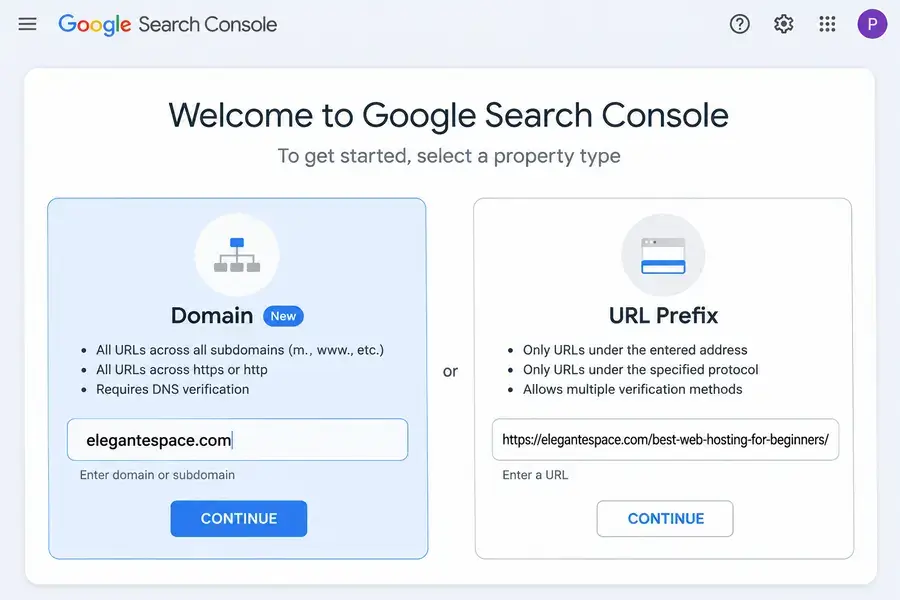
- Open Google Search Console.
- Sign in with your Google account.
- Click Add Property.
- Choose Domain or URL Prefix.
- Enter your website address.
- 1. Complete the ownership verification process.
Check Website Indexing
- Open Google Search Console.
- Go to Indexing → Pages.
- Review indexed and non-indexed pages.
- Examine the reasons listed for non-indexing.
- Identify important URLs that should be indexed but aren't.
Pay attention to issues such as:
- Page with redirect
- Not found (404)
- Excluded by noindex
- Blocked by robots.txt
- Duplicate page
- Crawled or discovered, currently not indexed
Not every excluded URL is a problem. Focus on pages you actually want Google to index.
Improves Website Performance
- Reduces unnecessary loading delays.
- Helps improve Core Web Vitals.
- Creates a smoother browsing experience.
Enhances Mobile Experience
- Makes your website usable across screen sizes.
- Improves navigation and readability on smartphones.
- Supports Google's mobile-first indexing approach.
Helps Search Engines Understand Your Website
- Establishes a logical website structure.
- Uses descriptive URLs and structured data.
- Makes relationships between related pages easier to understand.
How Technical Issues Affect a Website
| Technical issue | Possible consequence |
|---|---|
| Important page blocked by robots.txt | Search engines cannot crawl its content. |
Accidental noindex tag |
Page excluded from Google's index. |
| Broken internal links | Visitors and crawlers encounter dead ends. |
| Slow page loading | Poorer user experience. |
| Incorrect canonical tag | Search engines receive an unintended canonical preference. |
Technical SEO helps ensure that your website does not create unnecessary obstacles during these processes.
Remember
Technical SEO does not guarantee indexing or higher rankings. It helps search engines access and process your website more effectively.
- What Is Off-Page SEO?
- Why Is Off-Page SEO Important?
- Off-Page SEO vs. On-Page SEO vs. Technical SEO
- Key Factors That Influence Off-Page SEO
- How to Build High-Quality Backlinks
- Create Link-Worthy Content
- Guest Posting
- Analyze Competitors' Backlinks
- Broken Link Building
- Find Unlinked Brand Mentions
- Build Industry Relationships
- Create Resource Pages and Useful Tools
- Contribute Expert Insights
- Improve Your Local Online Presence
- Promote Content on Social Media
- How to Evaluate a High-Quality Backlink
- Off-Page SEO Practices to Avoid
- How to Check Your Website's Backlinks
- How to Measure Off-Page SEO Performance
- Common Off-Page SEO Mistakes
- Off-Page SEO Checklist
- FAQs About Off-Page SEO
- Next Lesson