
- October 2026
How to Register a Domain Name
Registering a domain name is the first step toward putting your website online. Learn how to choose the right domain, find an available name, select a domain registrar, and register your domain step by step.
Helping beginners build websites since 2017
400K+
Readers Helped
Updated for 2026
Latest Method
100%
Beginner Friendly
How Do I Register a Domain Name?
Choose an available domain name, select a domain registrar, complete your registration details, and pay for the domain. Most domains can be registered in just a few minutes.
Typical Cost
$10-$20 / Year
Time to Register
5-10 Minutes
Popular Extension
.com, .org, .net
What You'll Learn
By the end of this guide, you’ll be able to:
- Choose the right domain name for your website
- Check if your domain name is available
- Compare domain registrars and pricing
- Register your domain step by step
- Understand domain extensions like .com, .org, and .net
- Learn how to get a domain free with eligible hosting plans
Disclosure: ElegantEspace is supported by readers like yourself. We may earn an affiliate commission when you purchase through our links. Commissions do not affect our editors’ opinions or evaluations.
If you’re planning to start a website, blog, online store, or business, you’ll need a domain name. It is the web address people use to find your website, such as yourbusiness.com.
The good news is that registering a domain name is usually quick and straightforward. You don’t need technical knowledge, and you can complete the process through a domain registrar in just a few minutes.
In this guide, I’ll show you how to register a domain name step by step, from choosing a name and checking its availability to selecting a registrar, completing the registration, and managing your new domain.
I’ll also explain:
- How much a domain name costs
- Where you can register a domain
- Which domain extension you should choose
- What information you need to register a domain
- How long domain registration lasts
- Whether you can get a domain name for free
- What to check before buying a domain
- How domain registration works with web hosting
Quick answer: To register a domain name, choose an available domain, select a reputable registrar, create an account, enter your registration details, choose the registration period, and complete the payment. Once the registration is completed, the domain is added to your account and you can manage its DNS and other settings through the registrar.
When Should You Register a Domain Name?
You don’t necessarily need to wait until your website is finished to register a domain.
If you’ve already decided on a name and found an available domain that fits your brand, you can register it before building the website.
This can be useful if:
- You’ve already chosen your business name
- You’re preparing to launch a blog
- You’re developing a new online store
- You want to secure your brand name
- You’re still building the website
- You want to prevent someone else from registering the domain you want
There are hundreds of millions of registered domain names worldwide. At the end of 2025, the global domain name base stood at 386.9 million registrations, while .com alone had 161 million registered domains.
That doesn’t mean you need to panic-buy every possible variation of your business name. It simply means that domain availability can change, so if you’ve found a name that genuinely fits your business, it’s worth checking its availability before you build your brand around it.
How to Register a Domain Name
The basic process looks like this:
- Choose Your Domain Name
- Check Whether the Domain Is Available
- Choose a Domain Registrar
- Register Your Domain With Hosting
- Protect Your Domain Registration Information
- Verify Your Domain
- Connect Your Domain to Web Hosting
Choose a reputable registrar with good customer support and clear terms and conditions. Also, keep your contact information up to date with the registrar, so you receive important notifications about your domain.
Once your domain is registered, you can start building your website and using your domain.
Step 1: Choose Your Domain Name
Start by deciding what domain name you want to register.
Ideally, your domain should be:
- Easy to remember
- Easy to spell
- Easy to pronounce
- Relevant to your website or brand
- Short enough to type comfortably
- Free from unnecessary numbers and hyphens
For example, if you’re starting a photography business called Bright Lens, a domain such as:
brightlens.com
may be easier for customers to remember than something like:
bright-lens-photography-2026.com
Don’t worry if your first choice isn’t available. Have a few alternatives ready before you start searching.
If you need help coming up with ideas, see our detailed guide on how to choose a domain name.
Step 2: Check Whether the Domain Is Available
Once you’ve chosen a name, search for it using a domain registrar’s domain search tool.
For example, enter:
yourbusiness.com
The registrar will tell you whether the domain is available.
If it is available, you can proceed with registration.
If it isn’t, the registrar may suggest:
- Another domain extension
- Alternative names
- Different variations of your original name
Don’t automatically choose the first alternative
If yourbusiness.com isn’t available, don’t immediately purchase a strange extension just because it’s cheap.
Think about whether the alternative is:
- Easy to remember
- Relevant to your audience
- Appropriate for your business
- Easy to communicate verbally
- Something you will be comfortable putting on your marketing materials
For more help, check our guide to choosing the right domain extension.
Step 3: Choose a Domain Registrar
A domain registrar is a company that lets you register and manage a domain name.
When you register a domain, you’re entering into a registration agreement with the registrar. After registration, you can manage your domain settings, renewal, DNS, transfers, and other features through your registrar account.
There are many domain registrars available, including:
- GoDaddy
- Namecheap
- Domain.com
- Hostinger
- Other ICANN-accredited registrars and their resellers
Instead of choosing a registrar simply because it advertises the lowest first-year price, compare the full cost and features before buying.
What Should You Look for in a Domain Registrar?
Before registering your domain, check:
- First-year registration price
- Renewal price
- Available domain extensions
- Domain transfer policies
- Domain privacy options
- DNS management
- Account security features
- Customer support
- Additional fees
- Optional products added during checkout
If you’re looking for a straightforward option for registering a domain, GoDaddy is one of the registrars you can consider.
How to Register a Domain Name With GoDaddy
If you want to use GoDaddy, here’s how the process works.
1. Search for Your Domain
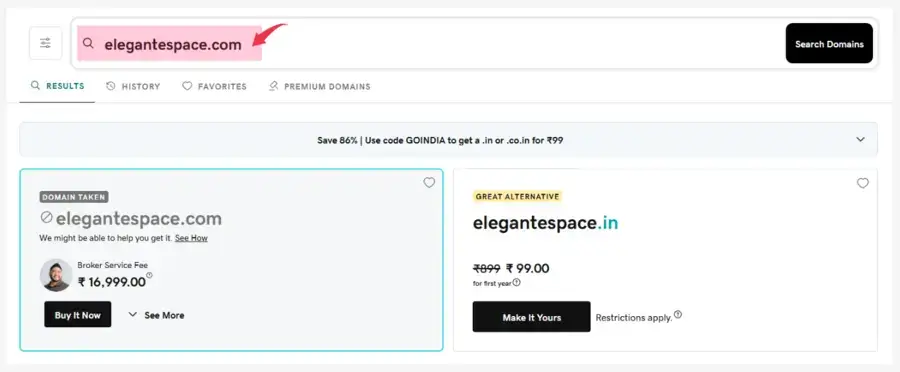
Visit GoDaddy and enter the domain name you want to register in the domain search box.
For example:
yourbusiness.com
GoDaddy will check whether the domain is available.
If your preferred domain is available, you can continue with the registration. If it’s already registered, GoDaddy may suggest alternative domain names or extensions.
2. Add the Domain to Your Cart
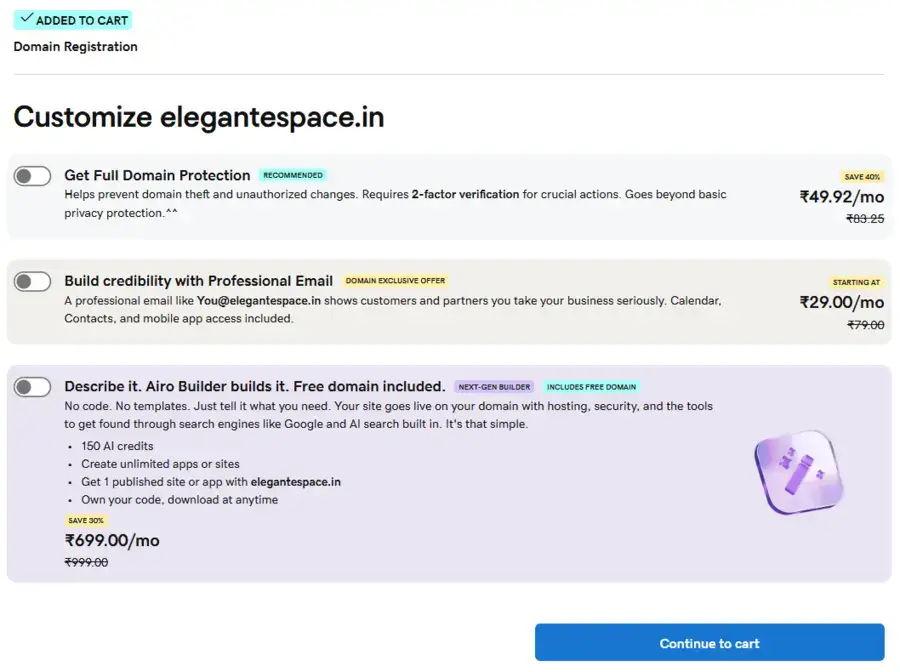
Once you’ve found an available domain, add it to your cart.
During checkout, GoDaddy may also show additional products such as:
- Domain privacy
- Professional email
- Web hosting
- Website builder
- Other security or website services
You don’t necessarily need all of these products just to register a domain.
Review each option carefully and select only the services you actually need.
3. Create or Sign In to Your GoDaddy Account
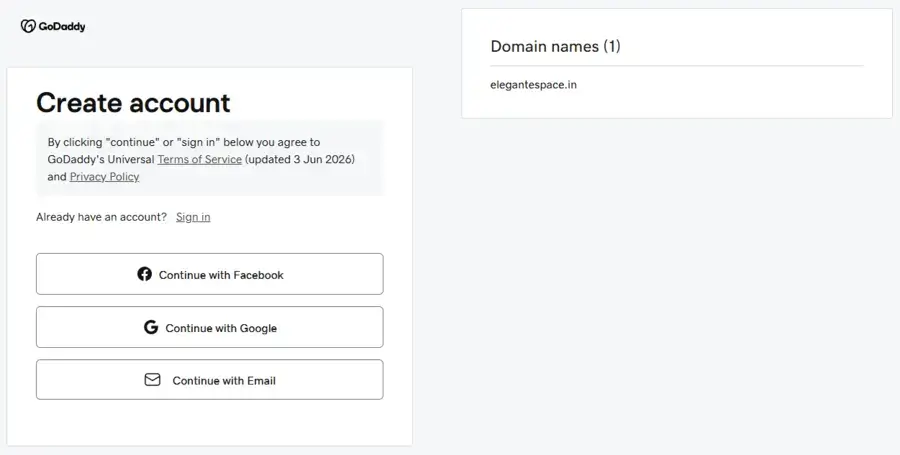
If you already have a GoDaddy account, sign in.
If you’re a new customer, you’ll need to create an account and provide the required information.
Use an email address that you regularly check because your registrar may send important notifications about your domain, including verification and renewal reminders.
4. Review Your Registration Period
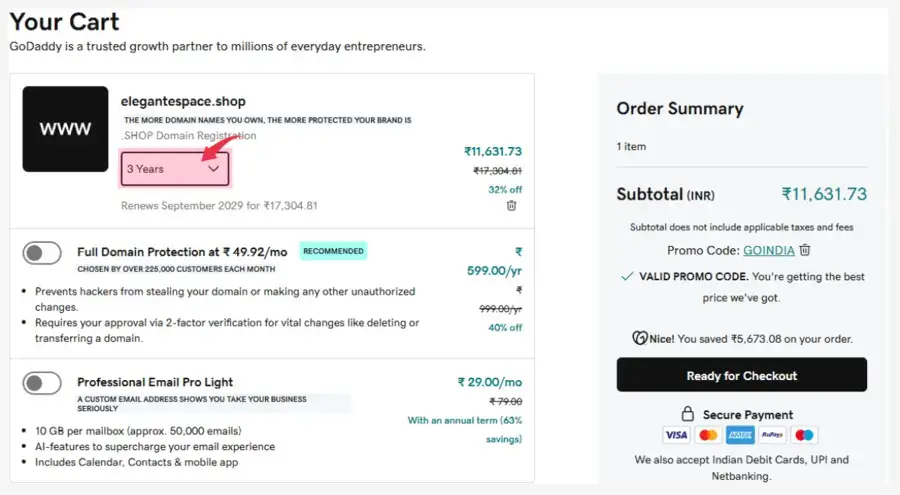
Next, choose the registration period available for your domain.
Depending on the domain extension and current offer, you may be able to register it for one year or multiple years.
Before continuing, check both:
Registration price: What you’re paying now
Renewal price: What you’ll pay when the domain renews
5. Review Your Order & Complete the Payment
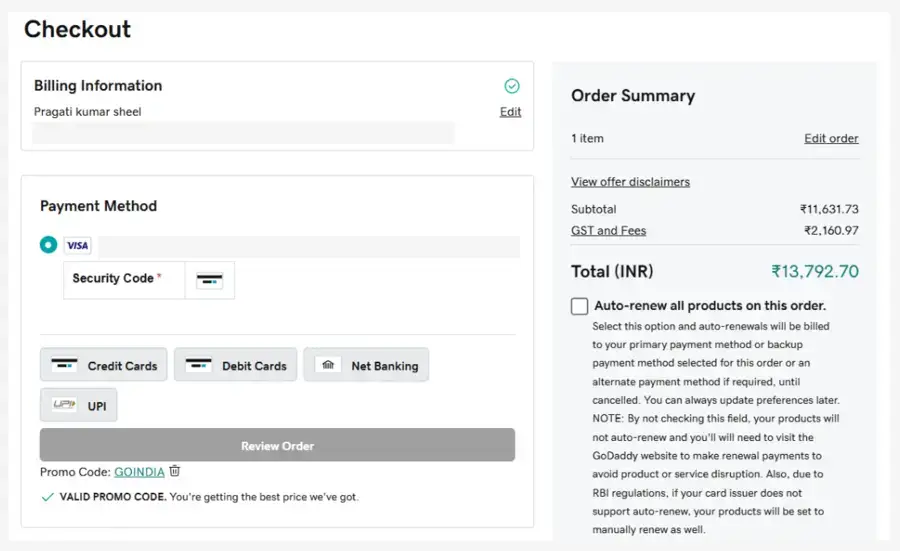
Before making the payment, carefully review your order.
Make sure:
- Your domain name is spelled correctly
- You’ve selected the correct registration period
- You understand the renewal price
- Unwanted add-ons have been removed
- The final price is what you expect
This is also a good time to check whether domain privacy or other useful services are included or offered separately.
Once everything looks correct, complete the payment.
After the transaction is successfully processed, your domain will appear in your GoDaddy account.
You can then manage your domain, update its DNS settings, renew it, or connect it to your web hosting account.
Step 4: Register Your Domain With Hosting
If you’re registering a domain because you’re about to build a website, you may also need web hosting.
You have two options:
Option 1: Buy Your Domain Separately
You can register your domain with a domain registrar and purchase hosting from a different company.
For example:
GoDaddy → Domain
Hostinger → Web Hosting
This gives you the flexibility to choose different providers for each service.
Option 2: Buy Domain and Hosting Together
If you’re a beginner and haven’t purchased hosting yet, buying both from the same provider can make setup easier.
Some hosting companies also include a free domain for the first year with eligible hosting plans.
For example, Hostinger offers a free domain for the first year with eligible hosting plans.
Check Hostinger’s Current Plans →
However, don’t choose a hosting provider simply because it offers a free domain.
Compare the:
- Hosting price
- Renewal price
- Domain renewal price
- Performance
- Support
- Security features
- Backup options
- Included features
A domain that is free for the first year can still have a regular renewal price afterward.
Step 5: Protect Your Domain Registration Information
When registering a domain, you’ll need to provide contact information.
Depending on the domain extension and registrar, privacy or proxy services may be available to limit the amount of personal contact information displayed through public registration-data services.
If your registrar offers domain privacy, check whether it’s included in the registration price or charged separately.
Also make sure your registration email address is accurate and accessible. Your registrar may use it for important verification and renewal communications.
Step 6: Verify Your Domain
After completing your registration, check the email address associated with your domain account.
Your registrar may send a verification email or other instructions that you need to complete.
Don’t ignore these messages.
Once any required verification is complete, your domain will be ready to configure.
Step 7: Connect Your Domain to Web Hosting
Registering a domain does not automatically create a website.
If you purchased your domain and hosting from different companies, you’ll need to connect them.
This is usually done through your domain’s DNS settings.
Your hosting provider will normally give you the nameservers or DNS records you need.
The basic setup looks like this:
Domain Name → DNS → Hosting Server → Your Website
Once the DNS settings are configured and the changes have propagated, your domain can point visitors to your website.
If you’re using WordPress, you can then continue with our guide on how to make a website.

EXCLUSIVE OFFER
Get a Free Domain for Lifetime with FlashCloud Hosting
Start your website with FlashCloud and get a domain name for life time at no extra cost. Perfect for beginners who want a reliable and affordable hosting solution.
Frequently Asked Questions On Domain Names
1. How long does it take to register a domain name?
The registration process itself can usually be completed within a few minutes once you’ve selected an available domain and completed payment. Connecting the domain to hosting can take additional time depending on the DNS changes involved.
2. Can I register a domain without buying hosting?
Yes. A domain and web hosting are separate services. You can register a domain now and purchase hosting later.
3. Can I buy a domain permanently?
No. Domain names are generally registered for a specific period and must be renewed to keep the registration active.
4. Can I change my domain name later?
You can register a different domain and move your website to it, but changing domains can affect branding, links, and SEO. It’s better to choose carefully before building your website around a domain.
5. Can I register a domain without a website?
Yes. You can register a domain even if you don’t have a website yet.
6. Is .com better than other domain extensions?
.com is a widely recognized extension, but that doesn’t mean it is automatically the right choice for every website. Consider your audience, brand, location, availability, and budget.
7. What happens if I don't renew my domain?
If you don’t renew a domain, it can eventually expire and may become available for registration again. The exact expiration and recovery process depends on the domain extension and registrar.
8. Should I buy domain privacy?
If privacy protection is available for your domain, understand what information it protects and what your registrar includes with the registration. The availability and rules can vary by extension and registrar.


Informative article, exactly what I was looking for.
Cheers