
Bluehost AI Builder vs Hostinger AI Builder: Which Is Better in 2026?
Discover how both AI builders perform in real-world testing, compare their designs, editing tools, pricing, and features, and find out which one is right for your website.
- Updated: November 2026
- 12-15 min read
Bluehost AI Builder vs Hostinger AI at a Glance
Before getting into the details, here’s a quick overview of what each platform offers.

Bluehost AI Builder
Free plan available
From $0/mo
5 credits daily, up to 30/month
- Main Advantage: Build websites and browser-based web apps using natural-language prompts.
- Best For: Beginners and businesses looking for conversational AI website creation.
- Building Experience: Describe your project, generate a website, and refine it through chat.
- Customization: Make design and content changes by giving instructions to the AI.
- Hosting & Support: Cloud hosting and 24/7 human support are included with every plan.
- AI Credits: Free plan includes 5 daily credits, up to 30 per month.

Hostinger AI Builder
Paid plan
From $1.99/mo
Premium promotional monthly rate
- Main Advantage: Build websites and web apps using AI generation and visual editing tools.
- Best For: Beginners and businesses looking for flexible AI website creation.
- Building Experience: Choose Agentic AI generation or Manual mode with a visual editor.
- Customization: Edit layouts visually or use AI prompts to refine your website.
- Hosting & Support: Web hosting and 24/7 customer support are included with eligible plans.
- AI Credits: Includes a one-time AI credit allowance based on your selected plan.
- Note: Features, credit allowances, and prices depend on the selected plan, building mode, billing term, and region.
Disclosure: ElegantEspace is supported by readers like you. We earn an affiliate commission when you purchase through our links. Commissions do not affect our editors’ opinions or evaluations.
Table of Content
- Bluehost AI Builder vs Hostinger AI Builder at a Glance
- Bluehost AI Builder vs Hostinger AI Builder Pricing
- Bluehost AI Builder vs Hostinger AI Builder: Hands-on Testing
- Design Comparison of the Generated Websites
- Testing Website Functionality
- Bluehost vs Hostinger: Ease of Editing
- Hosting, Domains and Website Publishing
- Ease of Use and Customer Support
- Pricing and Value for Money
- Final Verdict
- Frequently Asked Questions
Bluehost AI Builder vs Hostinger AI Builder
AI website builders are making it easier to create websites and web apps without writing code.
Two options worth comparing are Bluehost AI Builder and Hostinger AI Builder.
Both let you describe what you want and use AI to build it, but their approaches are different.
Bluehost focuses on conversational, prompt-based creation, while Hostinger offers both AI-powered Agentic mode and a Manual mode with a drag-and-drop editor.
In this comparison, we’ll look at their features, AI credits, pricing, customization options, hosting, and overall building experience.
We’ll also use the same luxury hotel website project, The Aurelia Retreat, to evaluate what each platform can actually create.
Let’s find out which AI builder offers the better experience.
| Feature | Bluehost AI Builder | Hostinger AI Builder |
|---|---|---|
| Building approach | Conversational AI | Agentic and Manual modes |
| What you can create | Websites and web apps | Websites and web apps |
| Free access | Free plan available with limited AI credits | Try AI website creation before purchasing a paid hosting plan. |
| AI credits | 5 daily, up to 30 per month on Free | One-time credit allowance based on plan |
| Visual editing | Refine websites through prompts | Drag-and-drop editor in Manual mode |
| Templates | AI-generated designs | 140 Agentic mode templates and 300 Manual mode templates |
| Code editing | Not available | Code editor and export in Agentic mode |
| Website hosting | Included on every plan | Included with paid plans |
| Custom domain | Requires a paid plan | Free for one year on eligible plans |
| Human support | 24/7 human support on every plan | 24/7 support advertised |
Bluehost AI Builder vs Hostinger AI Builder Pricing
Bluehost AI Builder Pricing
Bluehost AI Builder offers a free plan alongside three paid options: Lite, Standard, and Pro.
All plans include website and web app hosting, while the main difference between paid plans is the number of AI credits available and the ability to connect a custom domain.
AI Builder Free
$0/mo
No credit card required, 5 credits a day, up to 30 a month.
- Unlimited websites
- Unlimited apps
- Forms and data storage
- Bookings and scheduling
- User accounts and roles
- Admin panel
- bluehost.ai domains
- Cloud hosting
- 24/7 human support
AI Builder Lite
$20.00/mo
Up to 100 AI credits per month · No limit on daily usage.
- Everything in Free, plus:
- On-demand credit top-ups
- Remove the Bluehost badge
- Custom domains
- 24/7 human support
AI Builder Standard
$40.00/mo
200 AI credits every month for creating your projects.
- Everything in Lite
- 200 credits a month
AI Builder Pro
$80.00/mo
400 AI credits every month for creating your projects.
- Everything in Standard
- 400 credits a month
The Free plan doesn’t require a credit card or have an expiry date. You can create and publish websites using a Bluehost subdomain.
To connect your own domain, you’ll need a paid plan. Hosting is included with every plan and doesn’t consume AI credits.
How Do Bluehost AI Builder Credits Work?
Bluehost AI Builder uses a credit system for website creation and customization.
Each message that creates or changes your website or web app consumes one credit, regardless of how simple or detailed the request is.
Here are a few important things to know:
- One message = One credit: Your initial website generation and each requested design or content change use one credit.
- Free questions: Asking questions or answering the AI's initial onboarding questions doesn't consume credits.
- Publishing is free: Previewing, publishing, republishing, sharing, and hosting your website don't use credits.
- Credits expire: Monthly plan credits and purchased top-up credits expire 30 days after they're added or purchased. Unused credits don't roll over.
- Running out of credits: You can no longer request new changes until your credits refresh, you purchase additional credits, or upgrade your plan. However, your published website remains online.You can also purchase additional credit top-ups if you need more credits before your next renewal.
Hostinger AI Builder Pricing
Hostinger offers three main plans for its AI Builder: Premium, Unlimited, and Cloud Startup.
Each plan includes hosting, access to Agentic and Manual building modes, and a one-time allowance of AI credits.
AI Builder Premium
$1.99/mo
Launch your website with AI tools, hosting, and everything you need to get started.
- 500 AI credits (Black Friday offer, normally 250)
- Create up to 3 websites
- 2 mailboxes per website, free for 1 year
- Custom domain, free for 1 year
- 900+ website templates
- Fast and secure web hosting
- AI assistant for your online store
- Chatbot support from Hostinger Agent
AI Builder Unlimited
$2.79/mo
Build and grow your online presence with more flexibility and additional business features.
- 1,000 AI credits (Black Friday offer, normally 500)
- Unlimited websites
- Unlimited mailboxes per website, free for 1 year
- Custom domain, free for 1 year
- Ecommerce, free for 1 year
- 900+ website templates
- Priority 24/7 expert support
- Free AI email marketing for 1 year, up to 100 subscribers
AI Builder Cloud Startup
$7.99/mo
Get enhanced hosting performance and scalability for growing businesses.
- 2,000 AI credits (Black Friday offer, normally 1,000)
- Unlimited websites
- Unlimited mailboxes per website, free for 1 year
- Custom domain, free for 1 year
- Ecommerce, free for 1 year
- 900+ website templates
- Priority 24/7 expert support
- Free AI email marketing for 1 year, up to 100 subscribers
These promotional rates require a 48-month subscription paid upfront.
For example, the Premium plan costs $95.52 upfront for four years, rather than $1.99 being charged month by month.
The plans differ in website limits, storage, support, and additional business features.
Premium supports up to three websites, while Unlimited and Cloud Startup support unlimited websites.
How Hostinger AI credits work
Hostinger uses a different credit system from Bluehost:
- AI credits are provided as a one-time allowance with the hosting plan.
- Credits are used when you create or edit websites and apps in Agentic mode.
- Credit consumption varies depending on the complexity of your request.
- You can purchase additional credits when needed.
- Credits are shared across supported Hostinger AI services.
- Unused credits have expiry rules that depend on their source.
Unlike Bluehost, where a website-changing message uses exactly one credit, Hostinger calculates credit usage dynamically.
A simple request may use less than one credit, while a more complex task can consume more.
Manual mode also provides a visual editing workflow, so it shouldn’t be confused with the credit-based Agentic workflow.
Which Builder Offers Better Pricing?
At first glance, Hostinger appears considerably cheaper, particularly with its promotional four-year plans. However, the comparison isn’t quite that simple.
Bluehost offers a genuinely free plan with recurring credits and monthly paid subscriptions.
Hostinger’s lower advertised price requires a substantial upfront payment, and its included AI credits are a one-time allowance rather than a recurring monthly allocation.
If you want to experiment without paying, Bluehost has the advantage.
If you want a lower introductory hosting cost and access to both visual and conversational building modes, Hostinger is worth considering.
Remember to compare renewal prices and the actual credit requirements of your project before choosing.
If you’re still exploring your options, check out our guide to the best website builders in 2026. It covers different platforms to help you find the right solution for your needs.
Bluehost AI Builder vs Hostinger AI Builder: Hands-on Testing
Pricing and feature lists only tell part of the story.
To understand how Bluehost AI Builder and Hostinger AI Builder perform in practice, I tested both platforms by creating the same website project.
The goal was to see how well each builder could turn a written description into a complete website, how much control it offered during editing, and how much additional work was needed to achieve the desired result.
To keep the comparison fair, I provided both platforms with the same written prompt and brand logo.
I did not upload any additional website images.
This helped me evaluate how well each AI builder interpreted the project requirements, selected relevant visuals, and created a consistent website design without relying on externally supplied images.
Both platforms were given the same creative direction and website requirements, allowing me to compare their initial results more fairly.
Our Test Project: The Aurelia Retreat
For this comparison, I chose a fictional luxury hotel brand called The Aurelia Retreat.
The hotel offers luxury accommodation, private villas, fine dining, spa treatments, and curated travel experiences.
I wanted to create a professional hospitality website that reflected the brand’s premium positioning.
Here’s The Complete Prompt We Used:
Hands-on testing prompt
Create a premium, luxury boutique hotel website for a fictional five-star resort named The Aurelia Retreat.
The hotel offers luxury accommodation, private villas, fine dining, spa treatments and curated travel experiences.
Create a complete, responsive, multi-page website with:
1. Home
2. Rooms & Suites
3. Dining
4. Experiences
5. About Us
6. Contact
The homepage should feature a full-width luxury resort hero image, an elegant headline, a booking enquiry section, featured accommodation, dining experiences, wellness and spa offerings, guest testimonials, and a newsletter section.
Use a sophisticated visual identity with warm ivory, muted gold, deep forest green, and charcoal. Use refined serif headings paired with clean sans-serif body typography.
The design should feel editorial, sophisticated and luxurious, with generous whitespace, beautiful photography, subtle animations and elegant transitions.
Include room cards with pricing, descriptions, and enquiry buttons. Add a booking enquiry form with check-in date, check-out date, number of guests, and room preference.
Ensure all navigation, buttons, forms, and interactive elements are properly implemented wherever supported by the platform.
The final website should look like a professionally designed luxury hospitality brand, not a generic website template.
Creating The Website With Bluehost AI Builder
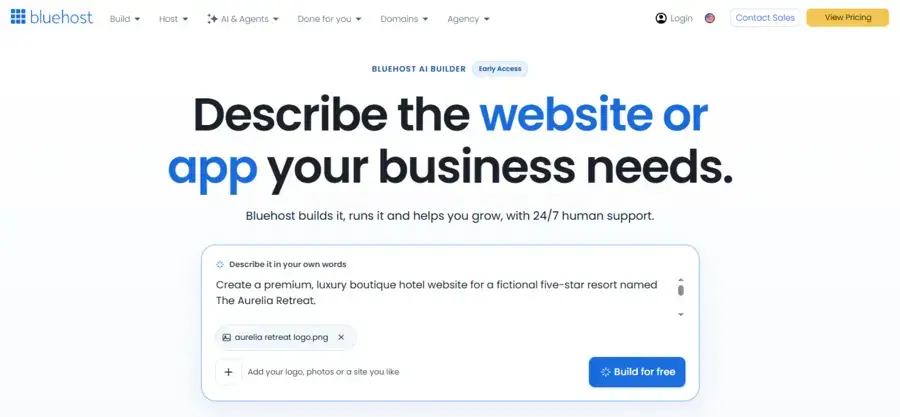
I started by opening Bluehost AI Builder and describing the website I wanted to create.
The platform uses a conversational, prompt-based approach. Instead of beginning with a traditional template selection process, you describe your project and let the AI generate the initial website.
I entered the Aurelia Retreat prompt and evaluated the generated result against the requirements.
What I looked at:
- How closely the generated design followed the prompt
- Whether all six requested pages were created
- The quality of the homepage layout and imagery
- Whether the luxury hotel branding was consistent
- How the AI handled the booking enquiry form
- How easily I could refine the website through additional prompts
For a closer look at its features, pricing, and overall experience, read our detailed Bluehost AI Builder review.
Creating The Website With Hostinger AI Builder
Next, I used Hostinger AI Builder to create the same project.
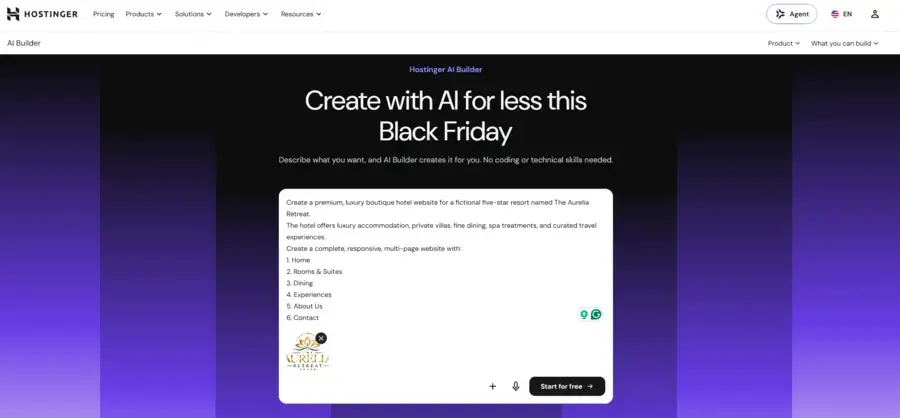
For the primary comparison, I used Agentic mode, which allows the AI to generate websites based on written instructions.
I used the same Aurelia Retreat prompt to keep the starting requirements consistent.
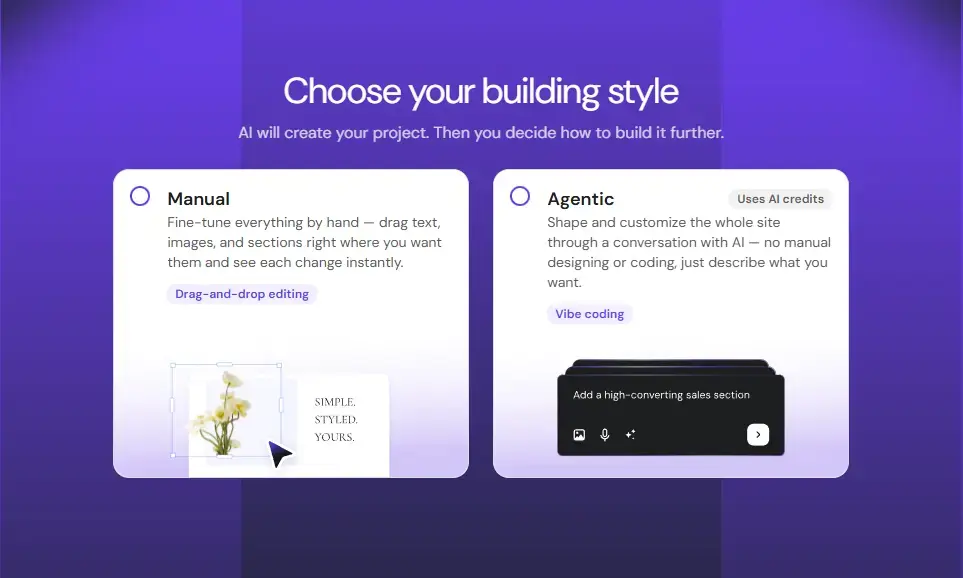
I then examined the generated website and explored the available editing options.
I also considered Hostinger’s Manual mode, which provides a visual drag-and-drop editing experience.
What I looked at:
- How accurately the AI interpreted the prompt
- Whether all six requested pages were generated
- The quality of the overall design and imagery
- How consistently the requested branding was applied
- Whether the booking enquiry form and other elements worked
- How much control I had over the generated website
- Whether Manual mode made further customization easier
For a closer look at its features, pricing, and overall experience, read our detailed Hostinger AI Website Builder review.
Design Comparison Of The Generated Websites
After generating the websites using the same prompt and brand logo, I compared the initial results to see how closely each platform followed the project requirements.
Both builders created a luxury-inspired website for The Aurelia Retreat, but their design approaches and results were noticeably different.
Bluehost AI Builder: A Complete Luxury Hotel Website
Bluehost AI Builder created a content-rich website with a warm, sophisticated design.
It used an ivory and beige color palette, elegant serif typography, and gold accents to establish a luxury hospitality feel.
The homepage included several sections requested in the prompt, including accommodation, dining, spa and wellness, guest testimonials, a booking enquiry form, and a newsletter section.
One thing I particularly noticed was its use of realistic hotel imagery.
The generated website included photographs of bedrooms, resort pools, dining experiences, and spa treatments, helping the different sections feel relevant to the hotel business.
The accommodation section featured three room options with images, descriptions, and pricing.
It also included a booking enquiry form with fields for guest details, check-in and check-out dates, number of guests, and room preferences.
Website Generated By Bluehost AI Builder
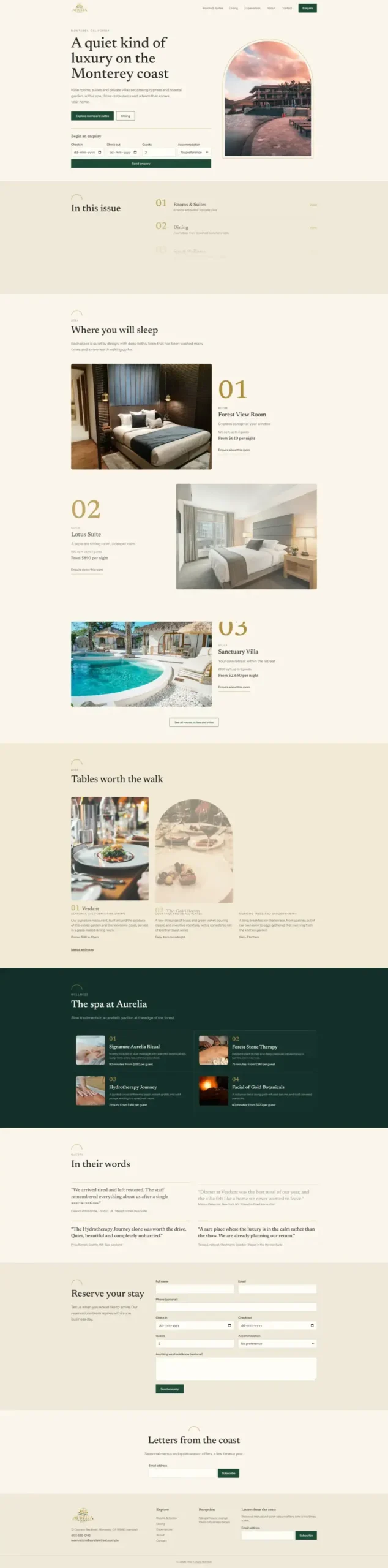
Overall, Bluehost delivered a detailed first draft with most of the requested website sections represented in the generated design.
Hostinger AI Builder: A Bold and Editorial Website Design
Hostinger AI Builder took a different approach.
It created a more editorial-style website with oversized typography, a deep forest-green hero background, muted gold accents, and generous whitespace.
The homepage featured a large branded hero section with the Aurelia Retreat identity, followed by an introduction, accommodation cards, a dining section, a wellness section, testimonials, a booking enquiry form, and a newsletter area.
However, there were some noticeable differences in the visual presentation.
While the hero section had a strong visual identity, the accommodation cards and dining section used abstract graphic-style visuals rather than realistic hotel photography.
The booking enquiry form included fields for guest details, check-in and check-out dates, number of guests, and room preferences.
The overall layout felt minimal and carefully structured, although some sections were less visually detailed than Bluehost’s result.
Website Generated By Hostinger AI Builder
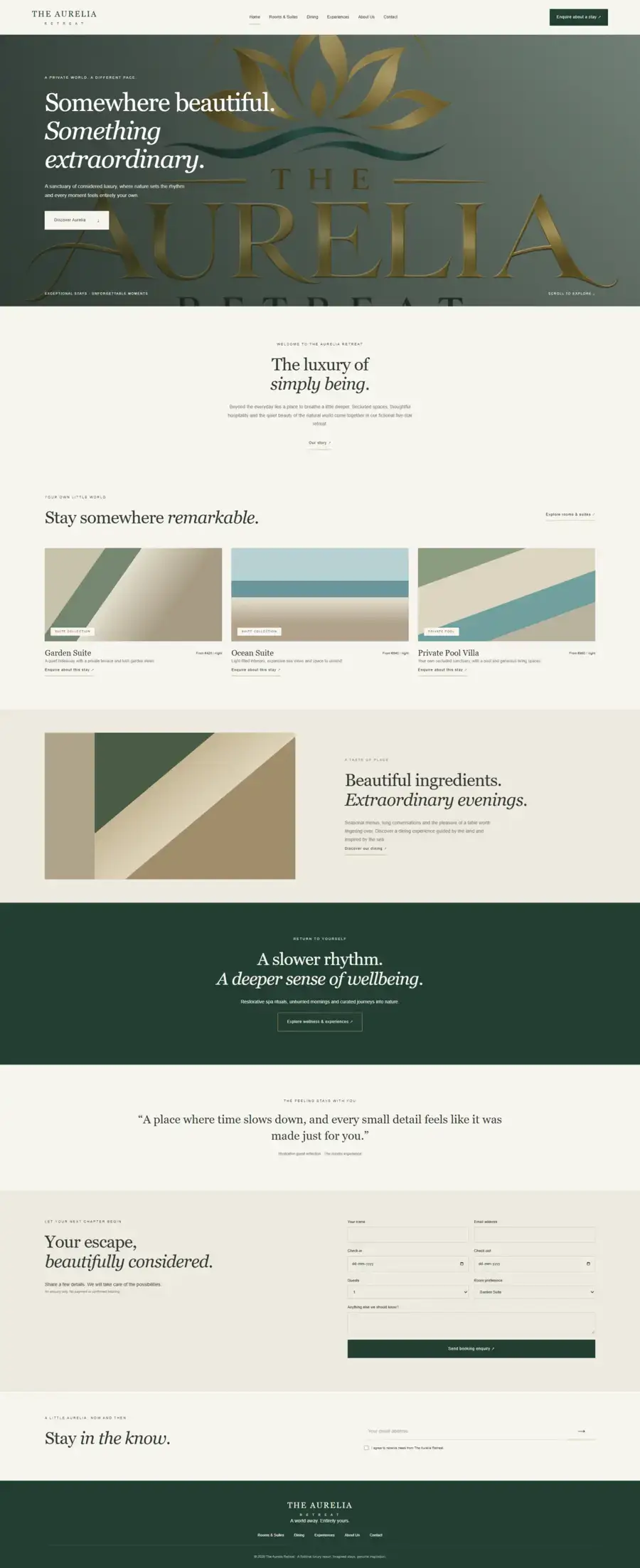
Overall, Hostinger delivered a distinctive design with a strong brand identity, but its initial output relied more heavily on typography, whitespace, and graphic elements.
Side-by-Side Comparison: Bluehost vs Hostinger
| What We Compared | Bluehost AI Builder | Hostinger AI Builder |
|---|---|---|
| Overall design | Warm, classic luxury style | Modern, editorial-style design |
| Color scheme | Ivory, beige, and gold | Forest green, ivory, and muted gold |
| Typography | Elegant serif headings | Oversized editorial typography |
| Hero section | Text with a resort photograph | Large typography and branded graphics |
| Accommodation | Three room options with realistic images | Three accommodation cards with abstract visuals |
| Dining section | Food photography and descriptions | Graphic-style visual with descriptive content |
| Spa and wellness | Dedicated spa section with treatment cards | Dedicated wellness section with a promotional message |
| Testimonials | Multiple guest testimonial blocks | One prominent testimonial quote |
| Booking enquiry | Detailed enquiry form | Detailed enquiry form |
| Newsletter | Included | Included |
Which Generated Website Looks Better?
Based on the initial generated websites, Bluehost delivered a more complete visual presentation for the luxury hotel project.
Its realistic imagery, accommodation details, dining photography, and dedicated spa section made the website feel closer to a finished hospitality website.
Hostinger, on the other hand, created a more distinctive editorial design. Its typography, large branded hero, and minimal layout gave the website a strong visual identity.
If your priority is getting a content-rich first draft with relevant-looking hospitality imagery, Bluehost has an advantage in this particular test.
If you prefer a minimal, typography-focused design, Hostinger’s initial result may appeal more to you.
However, the initial appearance is only one part of the experience.
Editing flexibility, mobile responsiveness, and working website features also matter when choosing an AI website builder.
Testing Website Functionality: Forms, Navigation and Interactive Elements
A website may look impressive, but its functionality is just as important as its design.
Visitors should be able to navigate between pages, interact with buttons, submit enquiries, and use the features provided on the website.
For The Aurelia Retreat project, I tested the main interactive elements generated by both Bluehost AI Builder and Hostinger AI Builder, with particular attention to the booking enquiry and newsletter forms.
Navigation and Buttons
I checked the navigation menus and calls to action to see whether visitors could access the relevant pages and interact with the website’s main elements.
I also looked at whether buttons, such as room enquiry and booking enquiry CTAs, directed visitors to the intended sections or actions.
The navigation menus and main buttons I tested worked as expected.
Booking Enquiry Forms
The booking enquiry form was one of the most important features of this project.
Both AI builders successfully created working enquiry forms with fields for guest details, check-in and check-out dates, number of guests, and room preferences.
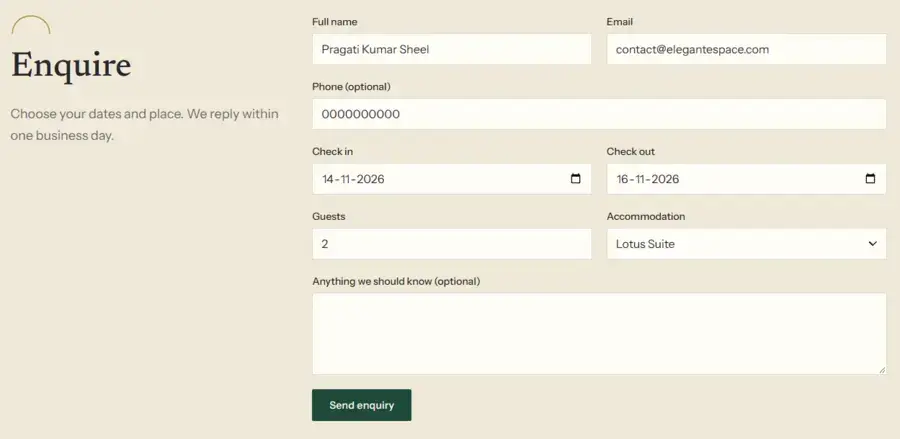
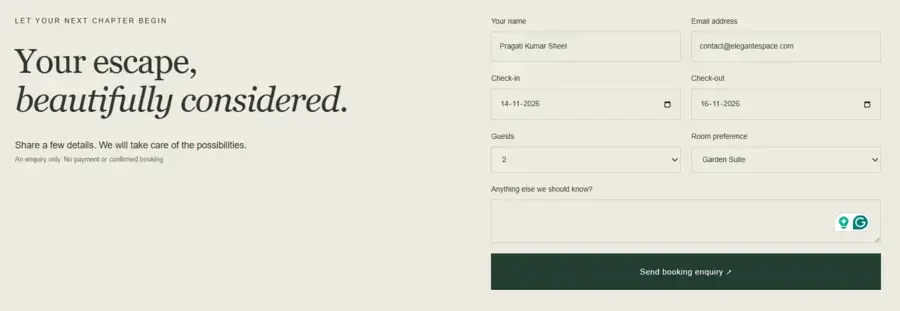
I tested the forms by submitting enquiry details.
In both cases, the submissions worked correctly, and the submitted information appeared in the respective admin or hotel dashboard for further action.
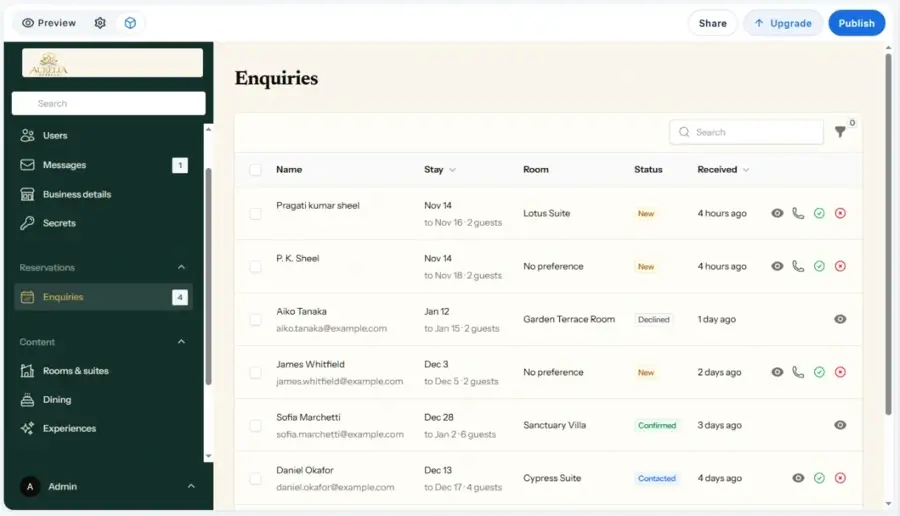
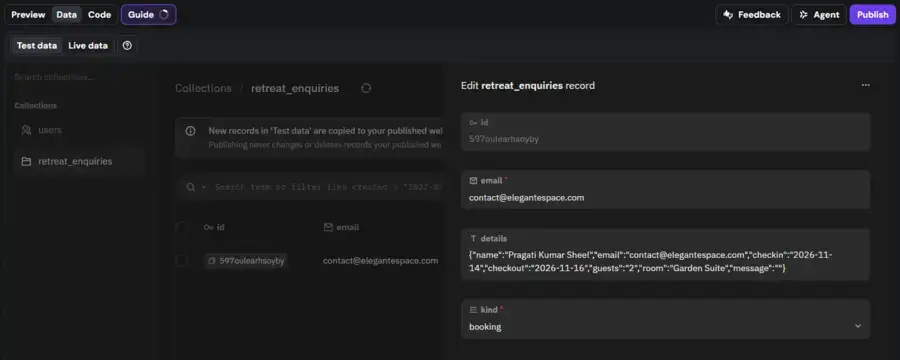
This means the hotel administrator could review incoming enquiries and follow up with customers to confirm availability, provide details, or proceed with the reservation process.
It’s worth clarifying that this is a booking enquiry workflow, not necessarily an automated hotel reservation system with live room availability and instant booking confirmation.
Newsletter Forms
I also tested the newsletter subscription forms on both websites.
Both forms accepted email submissions successfully, confirming that visitors could submit their email addresses through the generated newsletter sections.
Overall Functionality Results
The results were encouraging.
Both Bluehost AI Builder and Hostinger AI Builder generated functional booking enquiry and newsletter forms, rather than simply displaying static form designs.
The booking enquiries were submitted to the respective dashboards, where administrators could access the information and take further action.
This is an important advantage for businesses that want to start collecting customer enquiries through an AI-generated website without building these basic forms from scratch.
Bluehost vs Hostinger Ease Of Editing Functionality
After initial testing of both websites, I started making a few changes to see how easily I could customize them.
I tried updating the website content, replacing images, and adjusting the overall design.
Both platforms handled my editing instructions well, and I was able to make the changes without any major difficulties.
Editing the Website With Bluehost AI Builder
Bluehost AI Builder makes website editing straightforward through its conversational interface.
I could simply describe the changes I wanted and let the AI handle them.
I tried making changes to the website’s content, images, colors, and layout. The AI understood my instructions and made the requested changes without requiring me to manually edit every element.
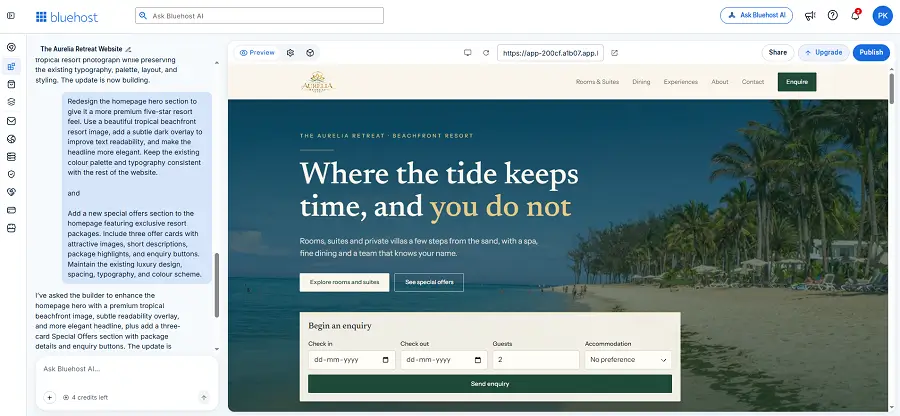
What I particularly liked was how simple the process felt.
I didn’t have to spend much time figuring out where different editing options were located. I could explain what I wanted in plain language and let the AI do the work.
Overall, I found Bluehost easier to use when making changes to the generated website.
Editing the Website With Hostinger AI Builder
Hostinger also handled my editing instructions well.
I could use Agentic mode to request changes through AI prompts and switch to Manual mode when I wanted to work directly with the visual editor.
I tried changing website content, images, colors, and layouts. The editing process worked as expected, and I could make the changes I wanted.
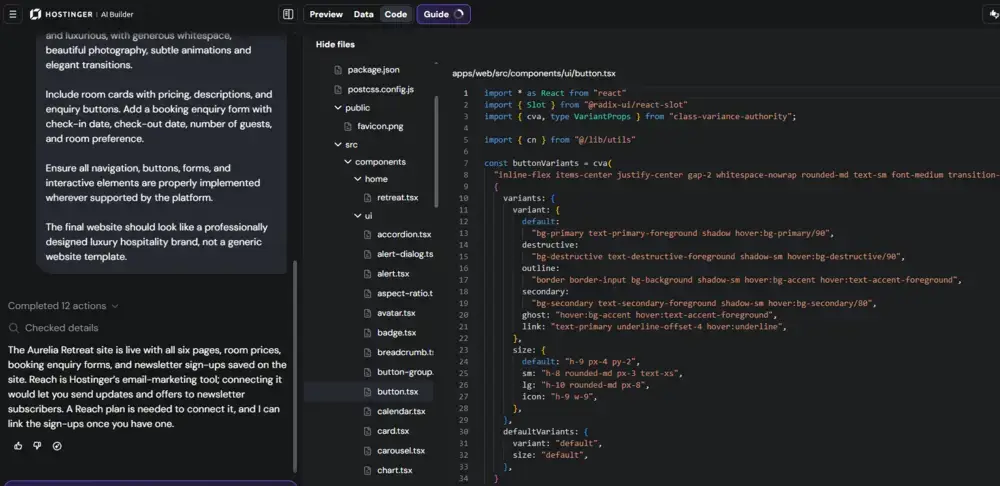
The availability of two editing approaches is useful because you aren’t limited to making every change through AI prompts.
You can also use the visual editor to customize the website directly.
However, compared with Bluehost, I found the overall editing experience slightly less straightforward.
Which Builder Was Easier to Customize?
Both platforms performed well when I asked them to modify the generated websites. I was able to make the changes I wanted without running into major difficulties.
However, I found Bluehost AI Builder easier to use overall, particularly when making changes through conversational prompts.
Hostinger offers more flexibility with its combination of Agentic and Manual modes, which may appeal to users who prefer having direct visual control over their websites.
For me, Bluehost provided the more straightforward editing experience, while Hostinger offered a little more choice in how I wanted to customize the website.
If you’re still exploring your options, check out our guide on how to choose the right website builder. It covers the key factors to consider when comparing platforms and finding the right fit for your needs.
Hosting, Domains and Website Publishing
After creating and customizing both websites, I wanted to see how easily I could get them online.
I tested the publishing process on both Bluehost AI Builder and Hostinger AI Builder.
For this comparison, I published both websites using the temporary subdomains provided by the platforms instead of connecting custom domains.
Publishing a Website With Bluehost AI Builder
Bluehost AI Builder provides a publishing option directly within its website editor.
When I opened the publishing settings, I could see the temporary Bluehost subdomain assigned to my project, along with options to buy a new domain or connect an existing one.
I used the temporary subdomain to publish the website for testing purposes.
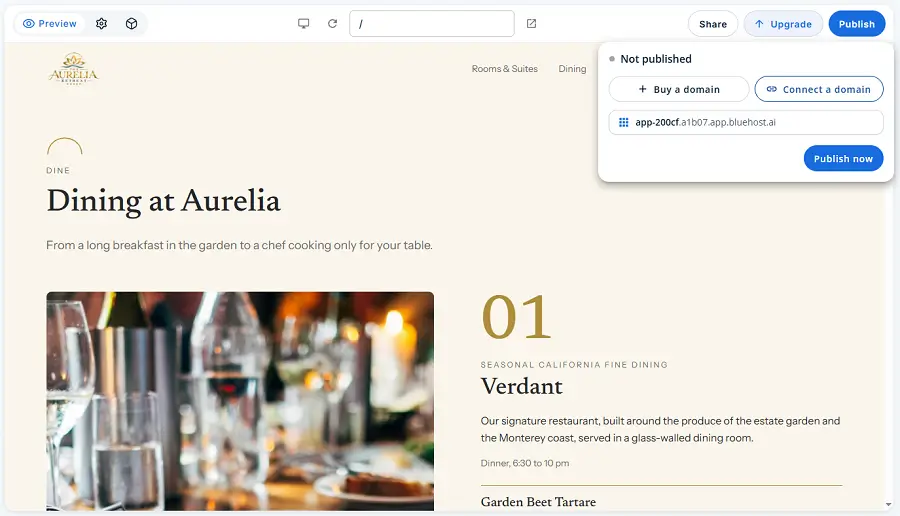
The process was straightforward, and I could access the published website without connecting a custom domain.
The free option is useful for trying out the builder.
But if you’re creating a website for your business, it’s worth choosing a paid plan to publish it with your own domain and make it accessible to your customers.
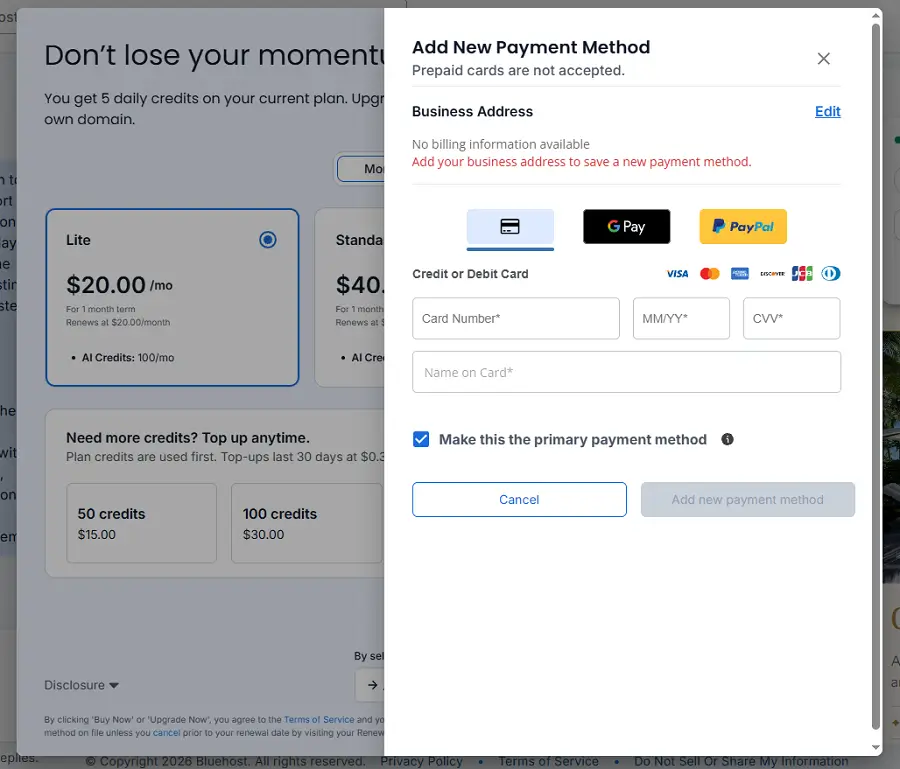
Bluehost also displays its available upgrade options within the platform, making it easy to explore the available plans.
Publishing a Website With Hostinger AI Builder
Publishing a Website With Hostinger AI Builder
Hostinger also made the publishing process straightforward.
After completing the website, I clicked the Publish option and published it using the temporary Hostinger subdomain.
Once publishing was complete, Hostinger displayed a confirmation message with the temporary website address and an option to connect a custom domain.
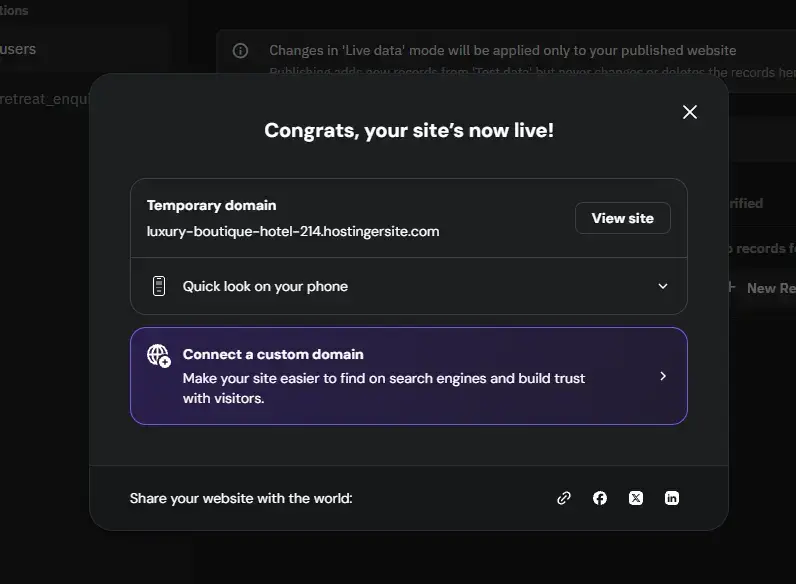
Like Bluehost, Hostinger requires an eligible paid plan to connect a custom domain.
Eligible plans also include a free domain for the first year, subject to the plan’s terms.
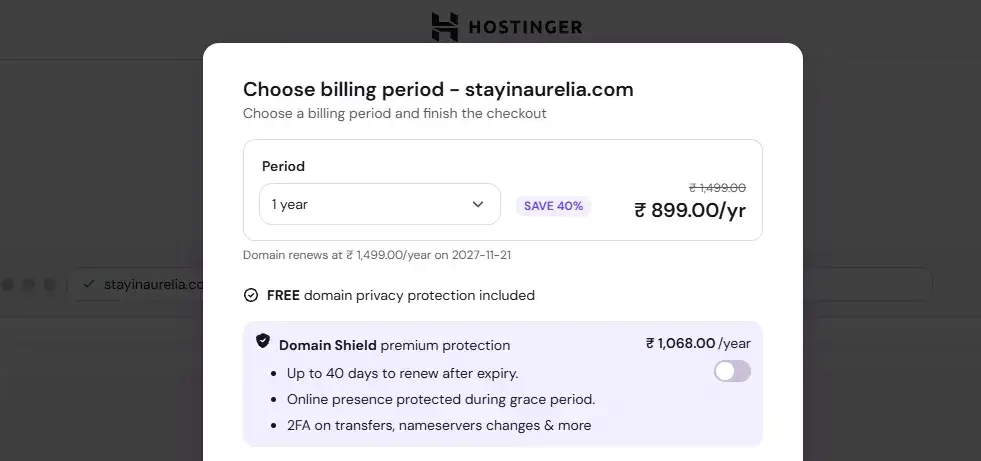
Custom Domain Setup and Pricing
Both platforms let you publish a website using a temporary subdomain, which is useful if you want to test your website before committing to a paid plan.
However, for a professional business website, using your own domain is generally a better choice.
It gives your website a dedicated address that reflects your brand rather than a platform-provided subdomain.
Here’s how the two platforms compare:
| Domain Feature | Bluehost AI Builder | Hostinger AI Builder |
|---|---|---|
| Temporary subdomain | Available | Available |
| Connect an existing domain | Paid plan required | Eligible paid plan required |
| Purchase a new domain | Available through publishing options | Available through Hostinger |
| Free domain | Check eligible plan benefits | Free for 1 year on eligible plans |
Bluehost offers paid AI Builder plans starting at $20 per month, while Hostinger’s eligible hosting plans start at promotional prices that vary by subscription term and region.
When comparing the actual cost, don’t look at the introductory price alone. Also consider renewal rates, subscription duration, and domain renewal charges.
Bluehost vs Hostinger: Hosting and Publishing Comparison
| Feature | Bluehost AI Builder | Hostinger AI Builder |
|---|---|---|
| Website publishing | Supported | Supported |
| Temporary subdomain | Available | Available |
| Custom domain | Requires a paid plan | Requires an eligible paid plan |
| Hosting management | Bluehost platform | Hostinger control panel |
| Website management | Through Bluehost | Through Hostinger |
Which Platform Makes Publishing Easier?
Both platforms made it easy to publish the websites during my test.
I was able to get both projects online using temporary subdomains without connecting custom domains.
The publishing experience was straightforward on both sides, so I wouldn’t consider this a major deciding factor between the two.
If you’re planning to launch a professional website, however, remember to factor in the cost of a paid plan, domain registration, and future renewals before making your decision.
Ease of Use and Customer Support
Both Bluehost AI Builder and Hostinger AI Builder are designed to make website creation accessible to beginners without requiring coding knowledge.
In my experience, I found Bluehost slightly easier to work with because of its straightforward conversational workflow.
Hostinger also offers a smooth experience, with the added flexibility of Agentic and Manual modes.
I also contacted both customer support teams and found them equally satisfactory.
I didn’t notice any significant difference in my support experience that would make one platform stand out over the other.
Pricing and Value for Money
Bluehost AI Builder and Hostinger AI Builder follow different pricing approaches, so the better value depends on what you need.
Bluehost offers dedicated AI Builder plans, while Hostinger includes its AI website builder with its web hosting plans.
This makes Hostinger worth considering if you also want hosting for your website, rather than paying for an AI builder separately.
AI credits are another important difference.
Bluehost provides a recurring daily credit allowance on its free plan, while Hostinger offers a one-time credit allowance based on the selected plan.
If you plan to generate and refine websites frequently, check how many credits are included and whether additional credits need to be purchased.
You should also consider renewal pricing.
Both platforms advertise introductory rates, which may increase when the initial subscription period ends. Check the renewal cost and subscription duration before choosing a plan.
My take: Hostinger may offer better value if you want website hosting and AI building tools bundled together.
Bluehost is worth considering if you prefer its dedicated AI building experience and straightforward conversational editing.
The right choice ultimately depends on your budget, expected AI usage, and website requirements.
Final Verdict: Which AI Website Builder Should You Choose?
After testing both platforms, Bluehost AI Builder is my overall winner in this comparison.
The biggest reason is its editing experience.
I found Bluehost easier to work with, particularly when making changes through conversational prompts.
Its generated website also felt more complete for our luxury hotel project, with realistic accommodation and dining visuals, multiple testimonials, and well-structured content sections.
Hostinger AI Builder is still a strong alternative. Its Agentic and Manual modes give users more flexibility in how they create and customize a website.
If you prefer switching between AI-assisted building and visual editing, Hostinger has an advantage here.
Choose Bluehost AI Builder
Choose Hostinger AI Builder
The Final Decision
For beginners and small businesses who want to get a professional-looking website online without dealing with complicated editing tools, I’d recommend Bluehost AI Builder.
However, if flexibility and the combination of AI building tools with web hosting matter more to you, Hostinger AI Builder is worth choosing.
Both platforms performed well in my tests, but based on the overall design and editing experience, Bluehost gets my recommendation.
If you’d rather build your website using WordPress, follow our step-by-step guide to creating a website.
Frequently Asked Questions
1. Is Bluehost AI Builder better than Hostinger AI Builder?
Based on my hands-on testing, Bluehost AI Builder is slightly better overall.
I found its conversational editing process easier to use, and its generated website felt more complete. However, Hostinger offers more flexibility with its Agentic and Manual editing modes.
2. Which AI website builder is easier for beginners?
I found Bluehost AI Builder easier for beginners because you can make website changes by describing what you want in natural language.
Hostinger is also beginner-friendly, but its two editing modes offer a little more to learn.
3. Can I connect my own domain to Bluehost AI Builder and Hostinger AI Builder?
Yes. Both platforms offer options to connect a custom domain.
However, you need an eligible paid plan to use your own domain. Both also allow you to publish using a temporary subdomain.
4. Does Hostinger AI Builder offer a free plan?
Hostinger’s AI website-building features are included with eligible hosting plans rather than being offered as a separate, permanently free website builder.
Check the current plans and promotional offers before purchasing.
5. Can I edit my website after AI generates it?
Yes. Both platforms let you edit the generated website.
Bluehost uses conversational prompts to make changes, while Hostinger offers AI-powered Agentic mode and Manual mode with a visual editor.
6. Do Bluehost AI Builder and Hostinger AI Builder include hosting?
Yes. Website hosting is included with their respective paid plans.
However, the plans, resources, features, and pricing differ, so compare the package details before choosing.
7. Which is better for creating a business website, Bluehost or Hostinger?
Both can create business websites with pages, images, content, and enquiry forms.
I’d recommend Bluehost if you prioritize a straightforward editing experience. Choose Hostinger if you prefer combining AI website generation with visual editing and hosting.
- Bluehost AI Builder vs Hostinger AI Builder at a Glance
- Bluehost AI Builder vs Hostinger AI Builder Pricing
- Bluehost AI Builder vs Hostinger AI Builder: Hands-on Testing
- Design Comparison of the Generated Websites
- Testing Website Functionality
- Bluehost vs Hostinger: Ease of Editing
- Hosting, Domains and Website Publishing
- Ease of Use and Customer Support
- Pricing and Value for Money
- Final Verdict
- Frequently Asked Questions
Related Post
Hostinger AI Website Builder
Best for AI-powered website creation
Creates professional websites quickly using AI, with customizable designs, built-in hosting, and easy editing tools for beginners and small businesses.
Bluehost AI Builder
Best for conversational AI website building
Creates professional websites through simple AI prompts, with easy conversational editing tools, built-in hosting, and a beginner-friendly website creation experience.


Bluehost AI Builder vs Hostinger AI Website Builder
Share your experience to help other users make a better choice.